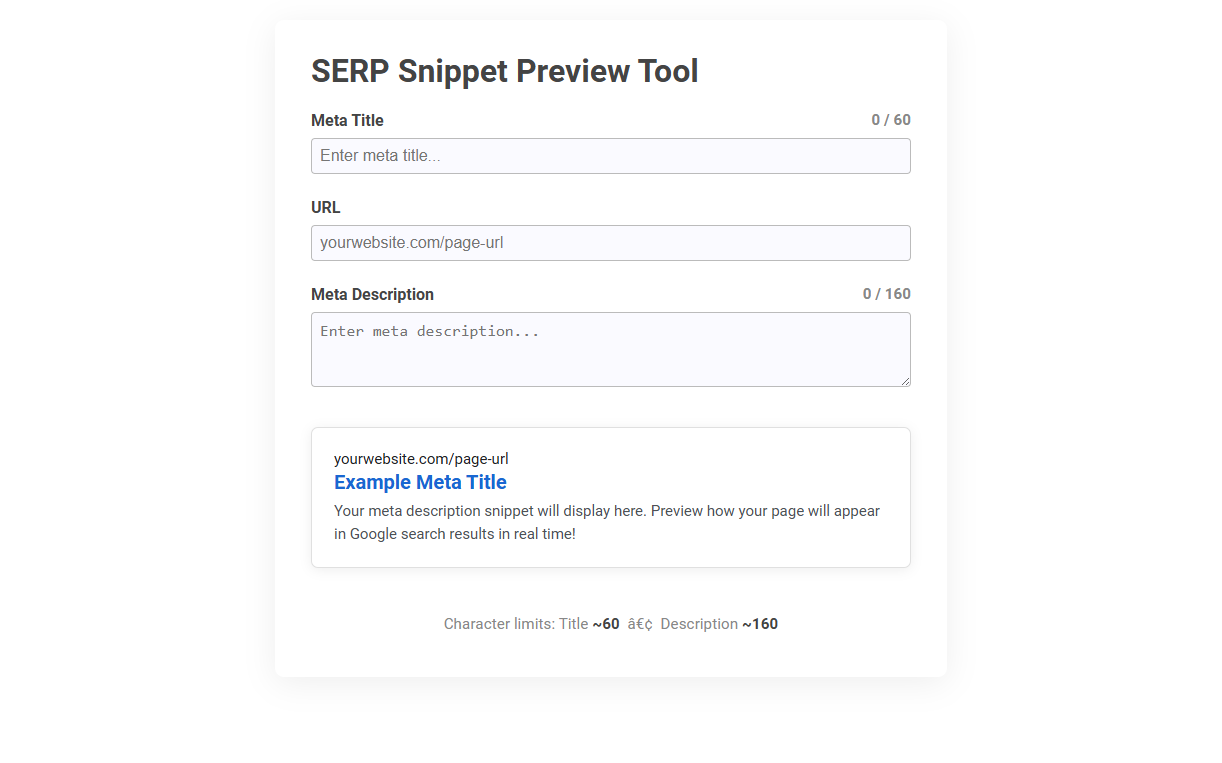
The SERP Snippet Preview Tool simulates how your web page's meta title and meta description will appear in Google search results. Its purpose is to help users optimize their titles and descriptions for better click-through rates by adhering to character limits and improving readability. To use it, simply enter your meta title, URL, and meta description to instantly preview and refine how your snippet will look to searchers.
How to use this tool?
Complete Guide to Using the SERP Snippet Preview Tool
-
Access the Tool:
Navigate to the SERP Snippet Preview Tool page. -
Enter Meta Title:
In the Meta Title field, type your desired meta title. This should be a concise, relevant description of your page's content. The character limit is typically around 60 characters, and you will see a character counter to help you stay within the limits. -
Enter URL:
Type the full URL of your page in the URL field. This will show you how your URL appears in search results. -
Write Meta Description:
In the Meta Description box, add a compelling summary that describes your page or content. You have about 160 characters before truncation, indicated by the character counter. -
Preview Your Snippet:
As you fill out the fields, a real-time preview will appear below. This preview mimics how your snippet will look in Google search results, including the title, URL, and meta description. -
Refine and Optimize:
Adjust your meta title and meta description as needed, watching how changes impact the snippet preview. Make sure your content is engaging, informative, and within character limits for best results in search rankings. -
Review Character Limits:
At the bottom, you'll see reminders for the current character limits: about 60 for the title and 160 for the description. -
Finalize:
Once your snippet looks optimal in the preview, copy the meta title and description to use on your webpage.
Tips for Best Results
- Keep meta titles descriptive and unique for each page.
- Include target keywords naturally in both meta title and description.
- Write clear, action-oriented descriptions that entice users to click.
- Double-check for typos or truncation in the preview area.
Introduction to SERP Snippet Preview Tools
A SERP snippet preview tool allows you to visualize how your webpage's title, URL, and meta description will appear on search engine results pages. This tool helps optimize your content for better click-through rates by ensuring your snippets are engaging and properly formatted. Using a SERP snippet preview tool, you can effectively enhance your website's visibility and attract more targeted traffic.
Key Features of Free SERP Snippet Preview Tools
Free SERP snippet preview tools offer real-time visualization of how web page titles, URLs, and meta descriptions appear on Google search results, ensuring optimal character length and keyword placement. These tools provide instant feedback on snippet appearance across desktop and mobile devices, enhancing SEO effectiveness by preventing truncation and improving click-through rates. Users benefit from customizable editing interfaces, accurate SERP simulation, and compatibility with multiple search engines for comprehensive optimization.
Step-by-Step Guide: Using the SERP Snippet Preview Tool
Step-by-Step Guide: Using the SERP Snippet Preview Tool enables users to visualize how their webpage title, URL, and meta description appear on search engine results pages. Begin by entering the target keyword and relevant metadata into the tool's input fields to generate an accurate snippet preview. Adjust the content to optimize length and clarity, ensuring maximum click-through rates and improved search visibility.
How to Enter and Optimize Meta Titles
Enter your meta title into the SERP snippet preview tool to visualize how it appears in search engine results. Optimize your title by keeping it under 60 characters and including primary keywords for better ranking. Use the tool to ensure your meta title is clear, compelling, and correctly formatted to attract clicks.
Crafting Effective Meta Descriptions for Better CTR
A SERP snippet preview tool helps craft effective meta descriptions by showing how your text will appear in search engine results, ensuring clarity and compelling language. Optimized meta descriptions increase click-through rates (CTR) by accurately summarizing content and incorporating targeted keywords. Utilizing this tool aligns your snippet with search intent, enhancing visibility and attracting relevant traffic.
Visualizing Your URL in Search Results
A SERP snippet preview tool helps visualize your URL as it appears in search results, ensuring optimal title and meta description display. It highlights how search engines present your content, allowing you to enhance click-through rates effectively. Use this tool to tailor your snippet for maximum visibility and engagement.
Real-Time Character Limits and Truncation Warnings
The SERP Snippet Preview Tool offers real-time character limits tailored for titles and meta descriptions, ensuring your content fits perfectly within search engine display standards. It highlights truncation warnings instantly, preventing important information from being cut off in search results. With this tool, you can optimize your snippets effectively to boost visibility and click-through rates.
Best Practices for SERP Snippet Optimization
A SERP snippet preview tool helps you visualize how your webpage appears in search results, ensuring your title and meta description are concise and keyword-rich. Best practices for SERP snippet optimization include using primary keywords near the beginning, maintaining character limits (50-60 for titles, 150-160 for descriptions), and crafting compelling, relevant content that encourages clicks. Optimizing your snippets enhances visibility and click-through rates, directly impacting your search engine performance.
Common Mistakes to Avoid in Meta Snippets
Avoiding common mistakes in your meta snippets is crucial for better SERP visibility. Ensure your snippet is concise, includes targeted keywords, and accurately represents page content to prevent misleading users. Using a SERP snippet preview tool helps you optimize length and format, improving click-through rates.
SERP snippet preview tool Tool Preview