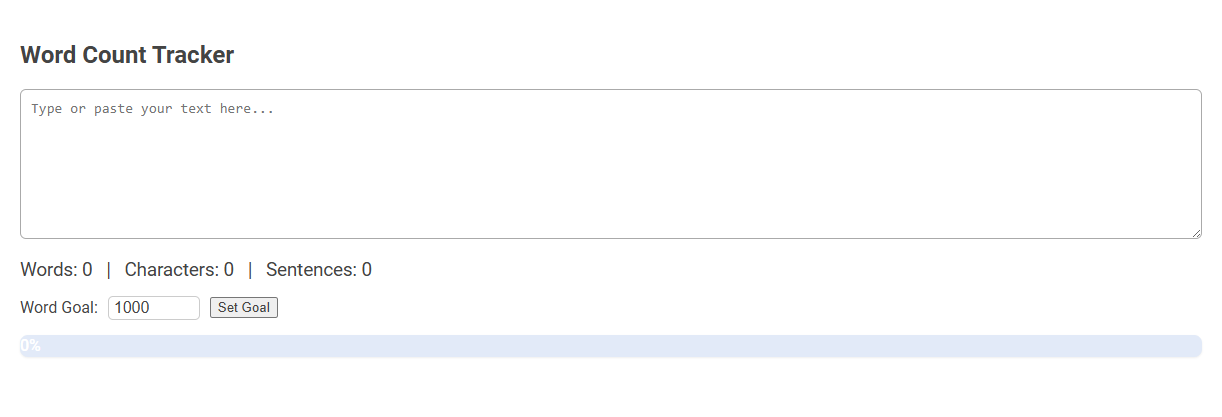
The Word Count Tracker tool is a digital utility designed to count words, characters, and sentences in real-time as you type or paste your text. It helps users set and track word goals, making it ideal for writers, students, and professionals who need to meet specific length requirements or monitor writing progress. Users simply input their text, set a word goal, and monitor their progress through live updates and a visual progress bar.
How to use this tool?
Complete Guide: How to Use the Word Count Tracker Tool
-
Access the Tool:
Navigate to the Word Count Tracker tool interface as shown above.
-
Input Your Text:
- Click inside the large textarea labeled "Type or paste your text here..."
- Start typing, or paste your pre-written text into the box.
-
View Instant Word, Character, and Sentence Counts:
As you type or paste text, the counts for Words, Characters, and Sentences will automatically update directly below the text box.
-
Set a Word Goal (Optional):
- Locate the "Word Goal" field below the counts.
- Enter your desired word count goal (e.g., 500, 1000).
- Click the "Set Goal" button.
- The progress bar beneath will display your current progress as a percentage toward your set goal.
-
Track Your Progress:
The progress bar will automatically update to show how close you are to reaching your word count goal as you continue to write or edit your text.
-
Editing and Updates:
You can edit your text at any time. The word, character, and sentence counts, as well as your progress bar, will update instantly.
Tips:
- Use this tool for essays, stories, reports, or any text where tracking word count is important.
- Modify your word goal at any time by entering a new number and clicking "Set Goal."
- The tool does not save your text, so make sure to copy your work elsewhere before closing the page.
Effortless Writing: Introducing the Free Online Word Count Tracker
Effortless Writing: Introducing the Free Online Word Count Tracker streamlines your content creation with instant, accurate word counts. This tool supports multiple languages and formats, ensuring seamless integration into your writing process. Maximize productivity and clarity with a user-friendly interface designed to enhance your writing flow.
Key Features of the Word Count Tracker Tool
The Word Count Tracker tool offers real-time tracking of word and character counts, ensuring accurate progress monitoring for writers and editors. It supports multiple document formats and provides detailed reports on writing speed and goal completion. Integrated export options and customizable alerts enhance productivity by keeping users focused on their targets.
Step-by-Step Guide: How to Use the Word Count Tool Effectively
A Word Count Tracker helps monitor the number of words in your document to meet specific length requirements. Start by pasting or typing your text into the tool, then view the real-time word count displayed for accurate tracking. Use features like character count and readability scores to optimize your writing for clarity and precision.
Real-Time Word, Character, and Sentence Counting
Track your writing progress accurately with a real-time word count tracker that monitors words, characters, and sentences instantly. This tool enhances your productivity by providing immediate feedback on your text length and structure. Optimize your content creation process with precise and efficient counting features designed for your needs.
Setting and Adjusting Your Custom Word Count Goal
Setting and adjusting your custom word count goal in a Word Count Tracker allows precise control over daily writing targets. This feature enables flexible goal modification based on project demands or personal writing pace. Tracking progress against tailored objectives enhances motivation and productivity in achieving writing milestones.
Visual Progress Tracking for Writers
A Word Count Tracker offers precise visual progress tracking that helps writers monitor daily and cumulative word goals. You can easily identify patterns and stay motivated by viewing colorful graphs and charts that represent your writing achievements. This tool enhances productivity by providing clear, immediate feedback on your writing journey.
Editing Made Simple with Instant Updates
Word Count Tracker streamlines editing by providing instant updates on your document's length, ensuring precise control over content length. This tool eliminates guesswork, allowing writers and editors to focus on refining their text efficiently. Real-time tracking enhances productivity by highlighting changes as they happen, making editing simple and accurate.
Versatile Uses: From Essays to Reports
Word count trackers offer versatile uses across various writing formats, including essays, reports, and more. These tools help you monitor and manage text length efficiently, ensuring adherence to specific requirements. Tracking word count enhances clarity and precision, crucial for academic, professional, and creative writing.
Important Tips for Maximizing the Tool
Word count trackers help monitor the length and consistency of your documents for better readability and SEO performance. To maximize the tool, set clear goals for each writing session and review your word count frequently to stay on track. Customize settings to match your project requirements, ensuring precision and efficiency in your writing process.
Word count tracker Tool Preview