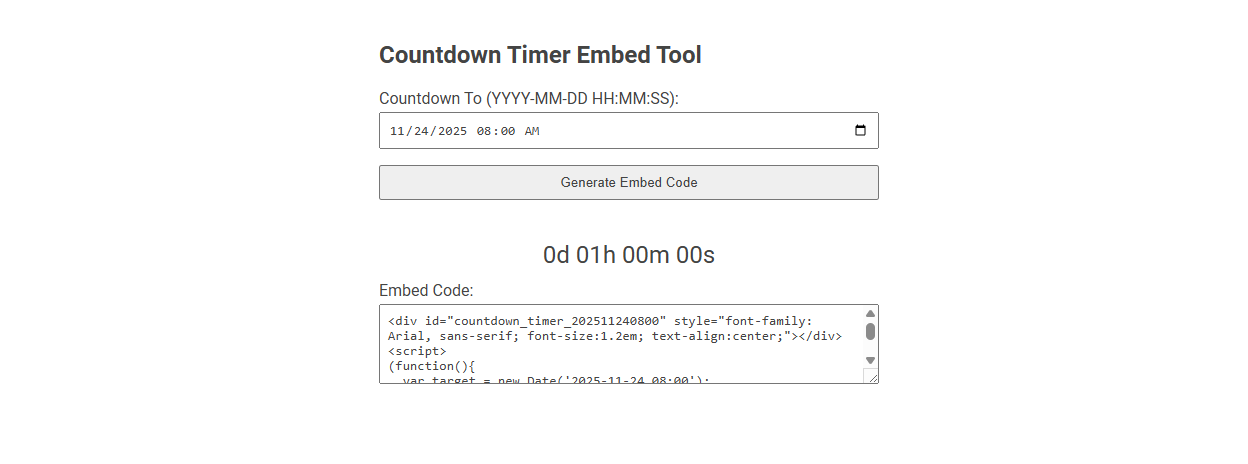
The Countdown Timer Embed Tool is a web-based utility that enables you to create and customize countdown timers for any specific date and time, providing an embeddable code snippet for integration into websites or blogs. Used to drive urgency for events, launches, or deadlines, it visually counts down the remaining time in a clear format. Simply set your target date and time, generate the code, and embed it wherever you need a live countdown display.
How to use this tool?
Complete Guide: How to Use the Countdown Timer Embed Tool
-
Access the Tool:
Go to the page containing the Countdown Timer Embed Tool as shown in the image above. -
Set the Countdown Target:
Find the input field labeled "Countdown To (YYYY-MM-DD HH:MM:SS)".
Select or enter your target date and time. Use the date picker or manually type in your desired countdown end point. (Ensure your format matches the required format.) -
Generate Embed Code:
After entering your date and time, click the "Generate Embed Code" button below the input field. -
View the Live Countdown Preview:
A live countdown will appear beneath the button, counting down to the target you set. This is a preview of what your users will see. -
Copy the Embed Code:
Below the countdown preview, you'll find a text area labeled "Embed Code".
Click inside the box and copy all the code provided. (You can right-click and select "Copy" or press Ctrl+C.) -
Embed the Countdown Timer on Your Website:
Paste the embed code into the HTML of your website where you want the countdown timer to appear.
Save and publish your changes. The countdown timer will now display and automatically update as time passes.
Tips
- Double-check your date and time format before generating the code.
- You may preview and adjust the countdown as many times as you need.
- The styling of the timer can be customized by editing the code if needed.
Introduction: Why Use a Countdown Timer in Marketing Campaigns
A countdown timer embed tool creates urgency and boosts conversions by visually showcasing limited-time offers. Your marketing campaigns gain higher engagement and increased click-through rates through this clear sense of scarcity. Incorporating countdown timers drives immediate customer action and maximizes promotional impact.
Benefits of Embedded Countdown Timers for Conversions
Embedded countdown timers create urgency and drive higher conversion rates by visually signaling limited-time offers. They enhance user engagement by displaying real-time deadlines, which motivates quicker decision-making. Businesses using countdown timers report increased click-through rates and improved sales performance.
Top Free Online Countdown Timer Tools for Marketers
Top free online countdown timer tools for marketers include TickCounter, CountingDownTo, and Timerdoro, offering easy embedding options for websites and emails. These tools enhance urgency and boost conversion rates by clearly displaying time-limited offers or events. Marketers benefit from customizable designs, real-time updates, and seamless integration with popular platforms.
Step-by-Step Guide to Accessing the Countdown Timer Embed Tool
Access the Countdown Timer Embed Tool by logging into your account dashboard and navigating to the Widgets section. Select the Countdown Timer option, customize the settings such as date, time, and style, then generate the embed code. Copy the code and paste it into your website's HTML to display the timer seamlessly.
Setting and Customizing Your Countdown Target Date
Setting and customizing your countdown target date is simple with the Countdown Timer embed tool. You select the exact date and time for your event, ensuring precise countdown accuracy. Your customization options include time zone adjustments and recurring countdowns for repeated events.
Generating and Previewing the Countdown Embed Code
The Countdown Timer Embed Tool allows users to generate customizable countdown embed code tailored to specific events or deadlines. It provides a real-time preview feature, enabling users to visualize how the countdown will appear on their website before embedding. This tool streamlines the integration process by delivering accurate, responsive embed codes compatible with multiple web platforms.
How to Embed a Countdown Timer in Your Website or Landing Page
Embedding a countdown timer in your website or landing page involves copying the provided HTML or JavaScript code from the countdown timer embed tool and pasting it into your site's source code where you want the timer to appear. Customize the timer settings such as end date, style, and size within the tool before generating the embed code to match your site's design and functionality. Embedding a countdown timer enhances user engagement by creating urgency for events, sales, or launches directly on your webpage.
Design Customization Tips for Your Countdown Timer
Design customization for your countdown timer enhances user engagement and conversion rates. Choose contrasting colors for the timer digits and background to ensure readability and attract attention. Incorporate your brand's font and style for a cohesive look that aligns with your overall design.
Creative Marketing Ideas Using Countdown Embeds
Countdown timer embed tools enhance urgency in marketing campaigns by visually highlighting limited-time offers and boosting conversion rates. Creative marketing ideas include integrating countdowns on landing pages, email campaigns, and social media posts to drive engagement and prompt immediate action. Brands leveraging countdown embeds see increased click-through rates and improved sales during promotions and product launches.
Countdown timer embed tool Tool Preview