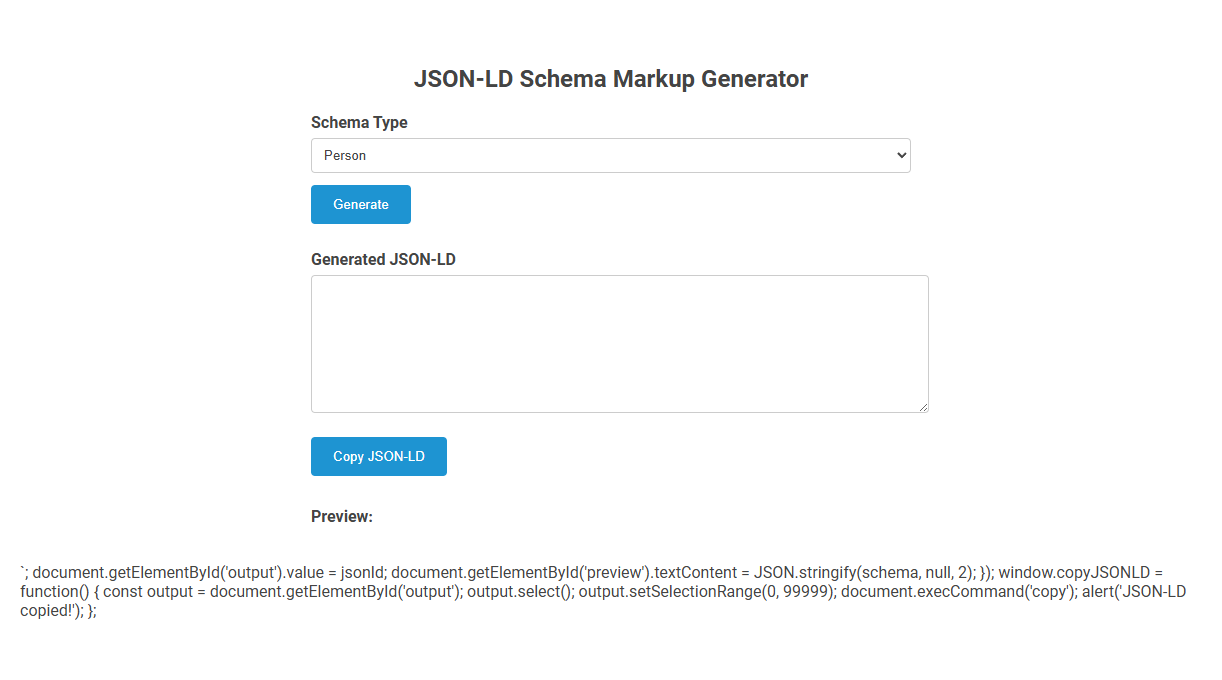
The JSON-LD Schema Markup Generator tool creates structured data in JSON-LD format for different schema types, making it easier to add SEO-friendly markup to websites. This tool is used to quickly generate and copy schema code for entities like Person, improving search engine understanding and rich results. Designed for simplicity, users select a schema type, generate the code, and copy it for integration into their web pages.
How to use this tool?
Complete Guide: How to Use the JSON-LD Schema Markup Generator Tool
- Access the Tool: Open the webpage containing the 'JSON-LD Schema Markup Generator'.
-
Select the Schema Type:
- Locate the dropdown menu labeled "Schema Type".
- Click the dropdown and choose your desired schema (e.g., Person, Organization, etc.).
-
Generate the JSON-LD Markup:
- After selecting your schema type, click the blue Generate button.
- The tool will automatically create a basic JSON-LD markup relevant to your selection.
-
Review the Generated JSON-LD:
- The markup appears in the large textbox labeled "Generated JSON-LD".
- You can edit the JSON-LD code directly in this box to add more details or customize as needed.
-
Preview the JSON-LD:
- A live preview appears below under the "Preview:" section.
- This helps you visually confirm the output before using it on your site.
-
Copy the JSON-LD Markup:
- Click the Copy JSON-LD button to copy the markup to your clipboard.
- An alert will confirm successful copying.
-
Implement on Your Website:
- Paste the copied JSON-LD markup into the <head> section of your webpage inside a
<script type="application/ld+json">tag. - Save and publish your page to update the structured data.
- Paste the copied JSON-LD markup into the <head> section of your webpage inside a
-
Validate Your Markup:
- Use tools like Google Rich Results Test to ensure your markup is error-free and working correctly.
Tips
- Always fill in all required fields of the schema for optimal rich results.
- Update the markup if site content changes.
- Consult Schema.org for more property options.
Introduction to Free JSON-LD Schema Markup Generator for Marketers
A Free JSON-LD Schema Markup Generator simplifies creating structured data to improve your website's SEO and search engine visibility. This tool enables marketers to effortlessly generate accurate JSON-LD code that enhances search results with rich snippets. Using this generator empowers your marketing strategy by making schema implementation fast and error-free.
Key Benefits of Implementing JSON-LD Schema for Marketing
A JSON-LD schema markup generator simplifies the creation of structured data, enhancing search engine understanding and improving rich result visibility. Implementing JSON-LD schema boosts click-through rates by making marketing content more attractive and accessible in search results. This structured approach increases organic traffic, drives qualified leads, and strengthens overall SEO performance for marketing campaigns.
Step-by-Step: Accessing the Schema Markup Generator Tool
Accessing the JSON-LD schema markup generator tool begins by navigating to a trusted online platform that offers schema creation services. You enter key information about your webpage, such as the title, description, and URL, into the tool's user-friendly interface. The generator then produces optimized JSON-LD code tailored to enhance your site's search engine visibility.
Choosing the Right Schema Type for Your Business
Choosing the right schema type in a JSON-LD schema markup generator enhances your business's search engine visibility by accurately representing your industry and services. Selecting specific schema types, such as LocalBusiness, Organization, or Product, ensures that search engines display relevant rich snippets tailored to your business. Proper schema markup implementation drives higher click-through rates and improves overall online presence.
Instantly Generating Accurate JSON-LD Markup Online
Generate precise JSON-LD schema markup instantly with our online tool, designed for accuracy and compliance with the latest schema.org standards. This generator simplifies embedding structured data on websites, enhancing SEO and rich result eligibility. Optimize your web presence effortlessly by creating validated JSON-LD markup in seconds.
Customizing and Editing Your Generated JSON-LD Code
A JSON-LD schema markup generator allows precise customization and editing of your generated JSON-LD code to match specific website content and SEO requirements. Users can easily modify attributes, add or remove data fields, and update schema types to ensure accurate structured data implementation. This flexibility enhances search engine understanding and improves rich snippet eligibility.
Real-Time Preview: Ensuring Correct Schema Output
A JSON-LD schema markup generator with Real-Time Preview ensures your structured data is accurately formatted before implementation. It instantly validates and displays the correct schema output, reducing errors and improving SEO performance. You can confidently optimize your website's content with immediate feedback and precise schema validation.
Copy and Implement: Adding JSON-LD to Your Website
Copy and Implement: Adding JSON-LD to Your Website involves generating accurate schema markup using a JSON-LD schema markup generator. Simply copy the generated JSON-LD code and paste it into the
section of your website's HTML to enhance search engine understanding. Implementing JSON-LD schema improves SEO by providing structured data that boosts rich snippet visibility in search results.Validating Your Schema with Google Rich Results Test
Validate your JSON-LD schema markup using Google Rich Results Test to ensure it meets Google's requirements for enhanced search results. This tool detects errors and warnings, helping you improve your structured data's accuracy and effectiveness. By validating your schema, you increase the chances of your content appearing with rich snippets in search results.
JSON-LD schema markup generator Tool Preview