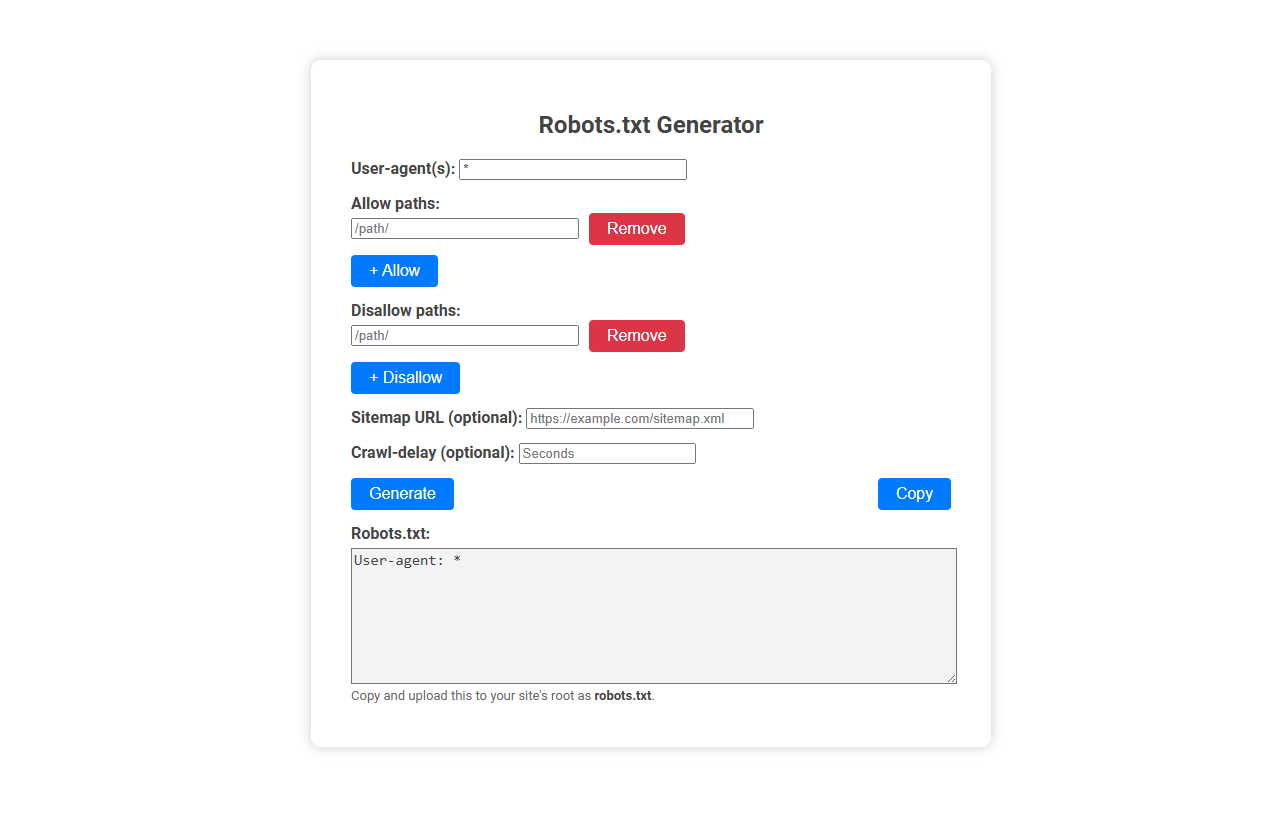
The Robots.txt generator tool helps users easily create a robots.txt file, which instructs search engine crawlers on how to access and index parts of a website. This tool is essential for website owners who want to control crawler activity, protect sensitive content, or optimize SEO. Users simply input user agents, allowed/disallowed paths, optional sitemap, and crawl delay, then generate and copy the ready-to-use robots.txt file for their site.
How to use this tool?
Complete Guide: How to Use the Robots.txt Generator Tool
-
Enter User-agent(s):
In the User-agent(s) field, specify which search engine bots the rules will apply to. Use*for all bots, or specify (e.g.Googlebot). -
Add Allowed Paths:
Enter any website path you wish to allow bots to crawl in the Allow paths field (e.g.,/public/). Click the "+ Allow" button to add it. Repeat for each path. -
Add Disallowed Paths:
Enter each path you want to block from bots in the Disallow paths field (e.g.,/private/). Click the "+ Disallow" button to add it. Repeat as needed. -
Remove Paths (if needed):
To remove a path you've added, click the red "Remove" button next to the relevant path. -
Set Sitemap URL (optional):
Add your website's sitemap link in the Sitemap URL field if you want to help search engines discover your pages faster (e.g.,https://example.com/sitemap.xml). -
Set Crawl-delay (optional):
In Crawl-delay, you can specify the delay (in seconds) between each request by bots, to manage your server's load. -
Generate the robots.txt File:
Click the blue Generate button to create your robots.txt code. The generated file will appear in the Robots.txt box below. -
Copy the Output:
Once satisfied, click the Copy button to copy your robots.txt content to your clipboard. -
Upload to Your Site:
Paste the copied content into a file named robots.txt and upload it to your site's root directory (https://example.com/robots.txt).
Tips:
- Use User-agent: * to set rules for all bots, or specify certain bots if needed.
- Paths are case-sensitive; double-check directory and file names.
- Test your robots.txt using search engine tools for verification.
Introduction: Why Robots.txt Is Crucial for Website Crawlability
Robots.txt is a vital file that directs search engine crawlers on which pages to index or avoid, directly impacting your website's visibility and crawlability. Using a Robots.txt generator simplifies creating precise instructions, ensuring search engines efficiently navigate your site while protecting sensitive content. Proper management of this file helps optimize SEO performance and prevents server overload from unnecessary crawling.
What Is a Robots.txt File?
A Robots.txt file is a text file used by websites to instruct search engine crawlers on which pages or sections to index or avoid. It helps control web crawler access, enhancing site privacy and optimizing search engine performance. A Robots.txt generator simplifies creating this file by automatically generating accurate directives based on user input.
Common Robots.txt Mistakes That Hurt SEO
Robots.txt generators streamline the creation of files that control search engine crawling, but common mistakes like disallowing important pages or blocking CSS and JavaScript can severely hurt SEO. Misconfigured directives prevent indexing of valuable content, reducing website visibility and ranking. Ensuring precise rules in robots.txt maximizes crawl efficiency and enhances search engine performance.
Features of a Free Online Robots.txt Generator Tool
A free online Robots.txt generator tool offers user-friendly customization to create precise directives that control web crawler access for optimized SEO. It features standard protocol compliance, instant validation, and automatic syntax error detection to ensure effective and error-free robots.txt files. Users benefit from downloadable files, easy integration, and frequently updated databases supporting major search engines like Google, Bing, and Yahoo.
Step-by-Step Robots.txt File Creation Process
A Robots.txt generator simplifies the step-by-step robots.txt file creation process by guiding you through defining which parts of your website search engines can crawl. Begin by specifying allowed and disallowed paths tailored to your site's structure and SEO strategy. Your customized robots.txt file helps control search engine access, improving site indexing and protecting sensitive content.
Configuring User-agents and Custom Bot Rules
A Robots.txt generator helps you configure user-agents by specifying which web crawlers can access your site. Custom bot rules allow precise control over indexing, enabling or restricting pages for individual bots like Googlebot or Bingbot. Your website's SEO benefits from tailored directives that manage crawler behavior efficiently.
Optimizing Allow and Disallow Paths for SEO
A Robots.txt generator simplifies the creation of precise Allow and Disallow directives to control search engine crawling efficiently. Optimizing these paths ensures critical content is indexed while preventing duplicate or low-value pages from affecting SEO performance. Proper configuration enhances site visibility and improves overall search ranking by guiding crawlers to prioritized resources.
Enhancing Indexing with Sitemap and Crawl-Delay Settings
A Robots.txt generator improves website indexing by allowing precise control over search engine crawlers through customizable Sitemap and Crawl-Delay settings. Including a Sitemap URL in Robots.txt helps search engines discover and index important pages efficiently. Crawl-Delay settings regulate the crawler's access speed, preventing server overload while maintaining optimal indexing performance.
How to Upload and Test Your Robots.txt File
To upload your robots.txt file, place it in the root directory of your website using an FTP client or your hosting control panel. Testing your robots.txt file ensures search engines correctly interpret its rules; use Google Search Console's Robots Testing Tool for accuracy. Verify that your file blocks or allows the intended URLs to optimize site crawling and indexing.
Robots.txt generator Tool Preview