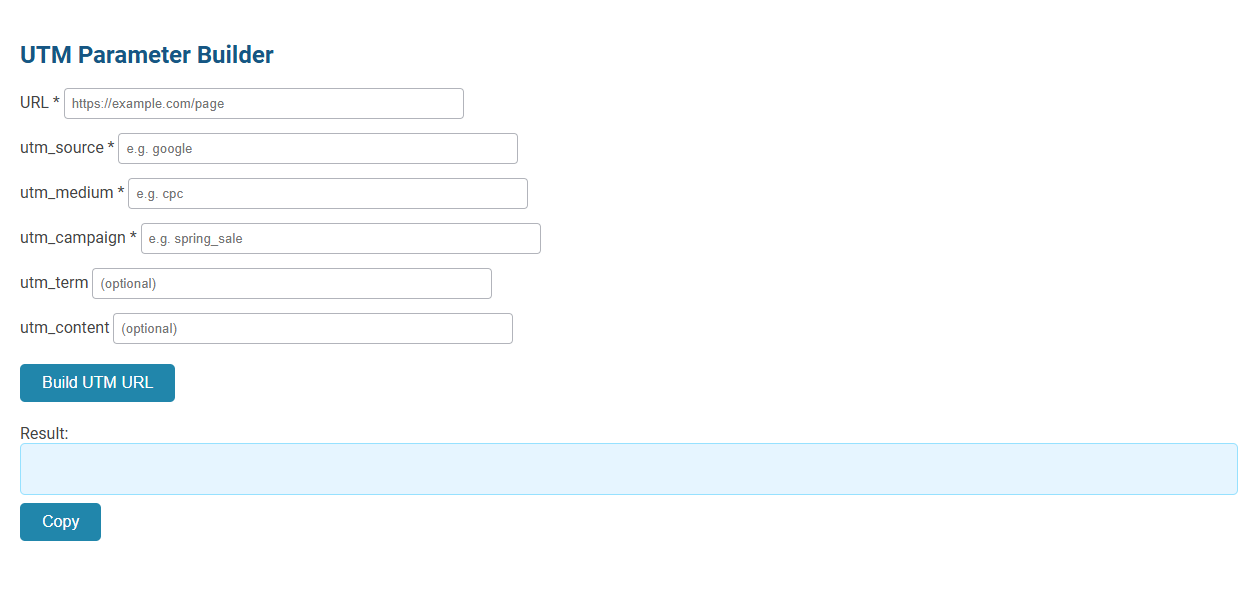
The UTM Parameter Builder tool enables users to create custom URLs by adding UTM parameters for precise tracking of marketing campaigns in analytics platforms like Google Analytics. Marketers use this tool to specify source, medium, campaign, term, and content, allowing accurate monitoring of traffic sources and campaign performance. Simply input your URL and parameters, then generate and copy the result to use in digital ads, emails, or social posts for enhanced tracking insights.
How to use this tool?
Complete Guide: How to Use the UTM Parameter Builder Tool
-
Enter Your Final URL:
In the URL field, type or paste the full link to your landing page (e.g.,https://example.com/page). -
Fill Out Required UTM Parameters:
- utm_source: Enter the source of your traffic (e.g.,
google,newsletter). - utm_medium: Enter the marketing medium (e.g.,
cpc,email). - utm_campaign: Enter your campaign name (e.g.,
spring_sale).
- utm_source: Enter the source of your traffic (e.g.,
-
Optional Parameters:
- utm_term: (Optional) Enter keywords or terms to identify paid search campaigns.
- utm_content: (Optional) Add this to differentiate multiple ads or links pointing to the same URL.
-
Generate the UTM URL:
Click the "Build UTM URL" button to create your custom URL with UTM parameters. -
View the Result:
The generated link will appear in the Result box. -
Copy Your UTM Link:
Click the "Copy" button to copy the new UTM link to your clipboard. -
Use Your UTM URL:
Paste your tracked URL wherever you are sharing your link--ads, emails, social media, etc. Analytics tools will now attribute traffic and performance using your specified UTM parameters.
Tips
- Always use consistent naming conventions for easy tracking and reporting.
- All required fields must be filled before generating the link.
- Use this builder tool for every unique campaign or platform you want to track separately.
Introduction: Enhance SEO Campaigns with UTM Parameter Tools
Enhance your SEO campaigns with a UTM parameter builder that tracks and analyzes traffic sources precisely. This tool helps you identify the effectiveness of marketing channels by appending custom tags to URLs. Using UTM parameters allows you to optimize your strategy based on detailed campaign performance data.
What Are UTM Parameters and Why They Matter for SEO
UTM parameters are tags added to URLs that help track the effectiveness of marketing campaigns by providing detailed insights into traffic sources and user behavior. These parameters are crucial for SEO as they allow you to analyze which channels drive the most valuable traffic and optimize your strategies accordingly. Understanding UTM parameters empowers your ability to measure campaign performance and improve search engine rankings through data-driven decisions.
Benefits of Using a Free Online UTM Builder
A free online UTM parameter builder simplifies tracking campaign performance by generating accurate, standardized URLs for Google Analytics. It saves time with easy-to-use interfaces and templates, reducing manual errors in tagging. Marketers gain precise insights into traffic sources, improving data-driven decision-making and campaign optimization.
Step-by-Step Guide: Accessing the UTM Parameter Builder
Access the UTM Parameter Builder by navigating to your preferred analytics or marketing tool that supports UTM customization. Begin by entering your campaign source, medium, and name to create precise tracking links. This step-by-step guide ensures you capture essential data for optimizing your marketing campaigns effectively.
Essential UTM Fields: Source, Medium, and Campaign Explained
A UTM parameter builder streamlines tracking by creating customized URLs with essential UTM fields: Source identifies the platform driving traffic, Medium specifies the marketing channel such as email or social media, and Campaign denotes the specific promotion or campaign name. These parameters enable accurate monitoring of user engagement and campaign performance in analytics tools like Google Analytics. Proper use of Source, Medium, and Campaign fields ensures precise attribution and improved marketing strategy optimization.
Leveraging Optional UTM Parameters for Granular Tracking
Leveraging optional UTM parameters like utm_content and utm_term enables marketers to achieve granular tracking of campaign elements and user interactions. These parameters provide detailed insights into specific ad creatives, keywords, or placement variations, enhancing the precision of performance analysis. Utilizing a UTM parameter builder streamlines the creation of these detailed tracking URLs, improving campaign optimization and ROI measurement.
How to Generate, Copy, and Implement Your UTM-Tagged URLs
Generate UTM-tagged URLs by using a UTM parameter builder to input campaign source, medium, and name, ensuring accurate tracking in analytics platforms. Copy the generated URL directly from the builder interface to maintain the encoded parameters without errors. Implement the UTM-tagged URL in marketing channels such as emails, social media posts, or advertisements to monitor campaign performance effectively.
Best Practices for UTM Naming Conventions and Consistency
Using a consistent UTM naming convention ensures accurate tracking and analysis of your marketing campaigns. Your UTM parameters should be clear, descriptive, and follow a standardized format to avoid discrepancies in data reporting. Implementing best practices like using lowercase letters, avoiding spaces, and maintaining uniform terms across all links strengthens the reliability of your analytics.
Measuring SEO Performance with UTM-Tracked Links
UTM parameter builders enable precise tracking of SEO performance by appending custom tags to URLs, which feed detailed referral data into analytics platforms like Google Analytics. Measuring SEO effectiveness with UTM-tracked links helps identify the most impactful keywords, content, and campaigns driving organic traffic and conversions. Marketers can optimize strategies by analyzing user behavior and engagement metrics derived from these tagged URLs.
UTM parameter builder Tool Preview