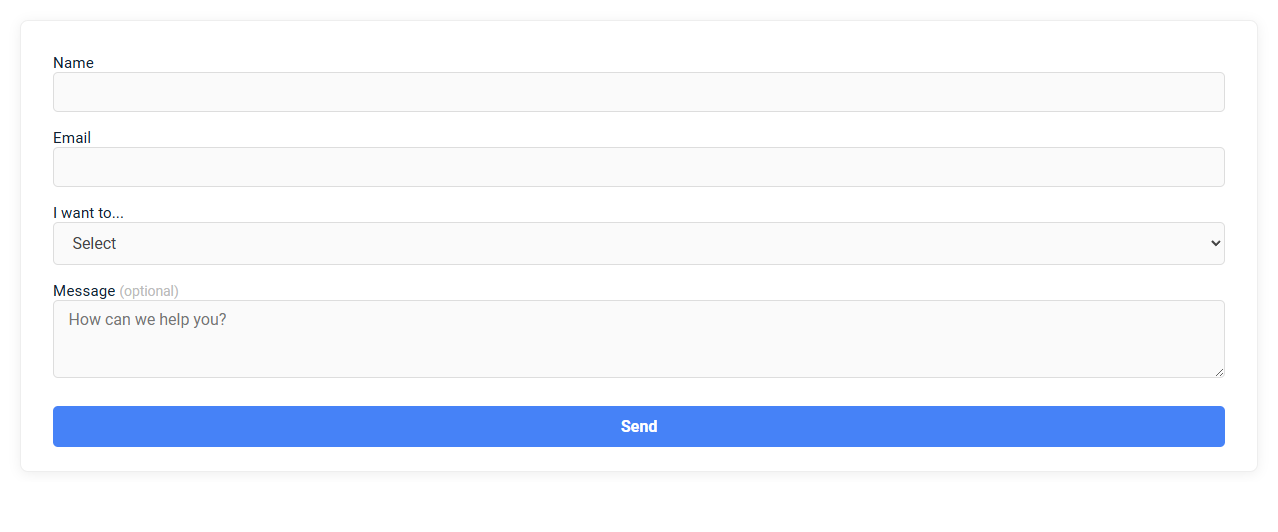
This is a minimalist join/support form tool designed for quick user onboarding or support requests, requiring only essential information such as name, email, purpose, and an optional message. Its clean interface reduces friction and enhances user experience by focusing on simplicity and efficiency. Users simply input their details, specify their intent, and submit the form for immediate processing or assistance.
How to use this tool?
Minimalist Join/Support Form Tool: Complete Guide
-
Access the Form:
Open the page containing the minimalist join/support form tool. -
Enter Your Name:
Locate the Name field (first box). Click inside and type your full name. -
Provide Your Email Address:
Find the Email field (second box). Enter a valid email address so you can receive responses. -
Select Your Intent:
Below "I want to...", click the dropdown menu.
Choose the option that best fits your reason for filling out the form (such as joining, support, etc.). -
Write a Message (Optional):
In the Message (optional) area, describe your question or request. You may leave this blank if not needed. -
Send Your Submission:
Review your details for accuracy.
Click the large blue Send button at the bottom to submit the form. -
Confirmation:
After submission, you may see a success message, get redirected, or receive an email confirmation (based on setup).
Tips for Best Use
- Double-check your email for typos to ensure a response.
- The message field helps clarify your intent--use it for detailed requests.
- If you don't receive confirmation, check your email's spam/junk folder.
Introduction: Simplifying Minimalist Supporter Form Creation
Minimalist join/support forms streamline user engagement by reducing complexity and enhancing usability. Focusing on essential fields, these forms ensure faster completion and higher conversion rates. This approach prioritizes clarity and efficiency, meeting modern user expectations for seamless interaction.
Key Features of the Free Online Minimalist Form Tool
Experience the Free Online Minimalist Join/Support Form Tool designed for seamless user interaction and quick data collection. Key features include an intuitive interface, customizable fields, and instant submission confirmation, ensuring your onboarding process is efficient and hassle-free. This tool guarantees secure data handling and mobile responsiveness, making it accessible anytime, anywhere.
Step-by-Step Guide to Access and Use the Tool
The Minimalist Join/Support Form streamlines user experience with a straightforward design for quick submissions. Access the tool by navigating to the official website, selecting the "Join/Support" tab, and entering your details step-by-step. Follow each prompt carefully to complete your form and maximize successful support or membership registration.
Securely Entering Your Name and Contact Information
Minimalist join/support form ensures secure entry of your name and contact information by using encrypted data fields and SSL protocols. This design eliminates unnecessary prompts, focusing solely on essential information to reduce exposure to data breaches. Your privacy is maintained through stringent security measures that protect your personal details during submission.
Selecting Intent: Customizing Your Support Request
The Minimalist Join/Support Form streamlines user interaction by emphasizing clear intent selection, which customizes support requests for faster resolution. Users choose from predefined intents such as account setup, technical issues, or billing inquiries, enabling targeted assistance. This focused approach reduces response time and improves overall support efficiency.
Optional Messaging: Enhancing Communication Clarity
Minimalist join/support forms with optional messaging streamline user interaction by reducing complexity and enhancing communication clarity. Offering users the choice to include messages minimizes cognitive load and improves the quality of support requests. This approach increases engagement and ensures messages contain relevant, concise information for efficient processing.
Submitting Your Minimalist Form Effortlessly
Submitting your minimalist join/support form is streamlined for maximum efficiency, requiring only essential information to complete the process quickly. The form's clear design eliminates distractions, allowing you to provide accurate details without hassle. Experience effortless submission with a focus on simplicity and speed.
Confirmation and Next Steps After Submission
The minimalist join/support form offers a streamlined experience ensuring quick confirmation upon submission. You receive an immediate acknowledgment to verify your information was successfully sent. Clear next steps guide you through follow-up actions to complete your process efficiently.
Expert Tips for Maximizing Form Effectiveness
Minimalist join/support forms enhance user experience by reducing clutter and focusing on essential fields only. Expert tips include using clear labels, implementing intuitive layouts, and ensuring mobile responsiveness to boost completion rates. Your design should prioritize simplicity while maintaining necessary functionality to maximize form effectiveness.
Minimalist join/support form Tool Preview