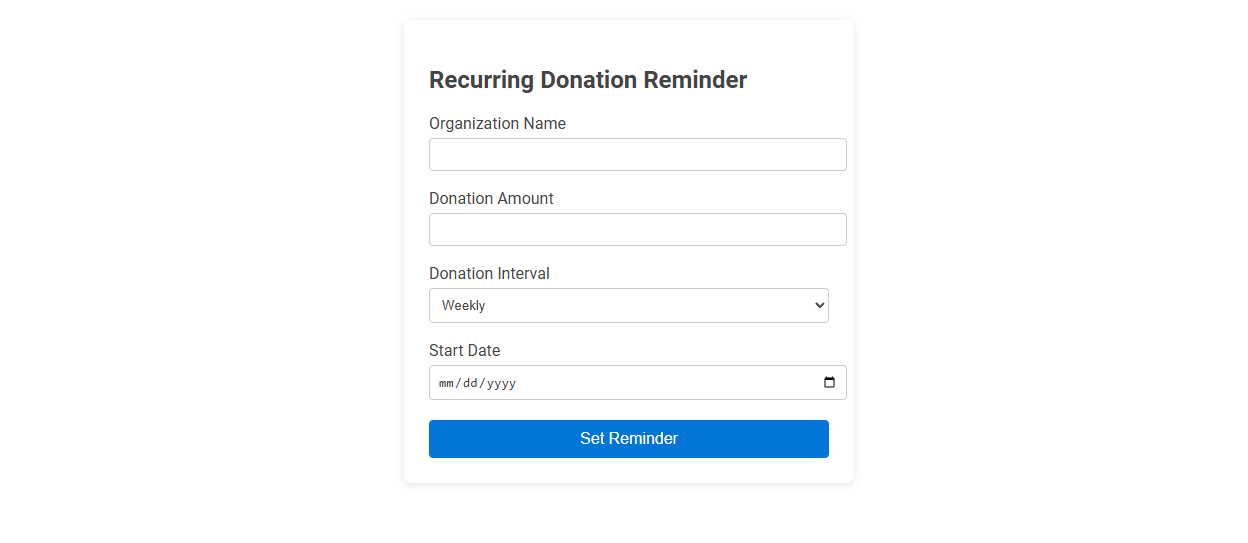
This Simple Recurring Donation Reminder tool helps users schedule reminders for recurring charitable donations by specifying the organization, donation amount, interval, and start date. The tool ensures donors never miss a contribution, supporting consistent giving and budgeting. To use it, fill in the required details and set your reminder with a single click.
How to use this tool?
Complete Guide: Using the Simple Recurring Donation Reminder Tool
-
Access the Tool
Begin by navigating to the Recurring Donation Reminder tool page. -
Enter Organization Name
In the "Organization Name" field, type the name of the organization you wish to support with your recurring donation. -
Specify Donation Amount
Enter the amount (in your local currency) that you intend to donate each cycle into the "Donation Amount" field. -
Select Donation Interval
Click on the dropdown menu in the "Donation Interval" section and choose your preferred frequency (e.g., Weekly, Monthly, Yearly) for the reminder. -
Pick a Start Date
Use the calendar selector in the "Start Date" field to pick the date when you want your reminders to begin. -
Set Reminder
Once all fields are filled, click the "Set Reminder" button to save your recurring donation reminder.
Tips
- Ensure your email notifications or preferred reminder method is set up to receive reminders from the tool.
- Double-check the details before setting the reminder to avoid errors.
- You can repeat the process for multiple organizations or donation intervals by filling out the form again.
The Benefits of Free Online Recurring Donation Reminder Tools
Free online recurring donation reminder tools streamline donor engagement by automating timely notifications, increasing donation consistency and boosting fundraising revenue. These tools reduce administrative workload with customizable scheduling and integration features, allowing nonprofits to focus more on mission-driven activities. Enhanced donor retention rates result from personalized reminders that foster long-term supporter relationships and sustained financial contributions.
How to Access the Recurring Donation Reminder Tool
Access the Simple Recurring Donation Reminder Tool through your nonprofit's online dashboard under the "Donations" tab. You can customize reminder schedules and automate notifications to enhance donor retention. Ensure your user permissions allow editing recurring donation settings to fully utilize the tool's features.
Entering Your Supported Organization's Name
Entering your supported organization's name accurately ensures timely and consistent recurring donation reminders. This simple tool streamlines the process by automatically linking reminders to the correct charity, enhancing donation management. Precise organization name input minimizes errors and maximizes support impact for your chosen cause.
Setting Your Recurring Donation Amount
Setting your recurring donation amount is easy and flexible with our simple recurring donation reminder tool. Choose a fixed amount that fits your budget and update it anytime to match your giving goals. This tool ensures consistent support for your favorite causes without hassle.
Choosing the Right Donation Interval
Selecting the right donation interval in a simple recurring donation reminder tool enhances donor engagement and maximizes contribution consistency. Weekly, monthly, and quarterly options cater to different donor capacities and preferences, ensuring sustained support without donor fatigue. Optimizing the interval based on donor behavior and campaign goals increases overall fundraising effectiveness.
Selecting Your Donation Reminder Start Date
Choosing your donation reminder start date ensures timely notifications that align with your giving schedule. Selecting an optimal start date maximizes donor engagement by prompting contributions before recurring payment deadlines. You can customize the reminder to suit individual preferences, increasing the likelihood of consistent support.
How to Set and Confirm Your Recurring Reminder
Setting a recurring donation reminder involves selecting the donation frequency, amount, and preferred notification method within the tool's interface. Confirm your recurring reminder by reviewing the summary of your choices and activating the schedule through a confirmation button or email verification. This process ensures timely support for your cause and consistent engagement with the donation platform.
Managing Multiple Donation Reminders Easily
Managing multiple donation reminders is effortless with this simple recurring donation reminder tool designed for seamless tracking. Your recurring donations stay organized through automated scheduling and customizable notification settings. Stay informed and never miss a contribution with clear reminders tailored to your giving preferences.
Tips for Maximizing Donation Consistency with Reminders
Maximize donation consistency by scheduling reminders at optimal intervals aligned with your donors' giving patterns. Personalize messages using donor data to increase engagement and response rates. Use clear calls-to-action and provide multiple payment options to simplify the donation process.
Simple recurring donation reminder tool Tool Preview