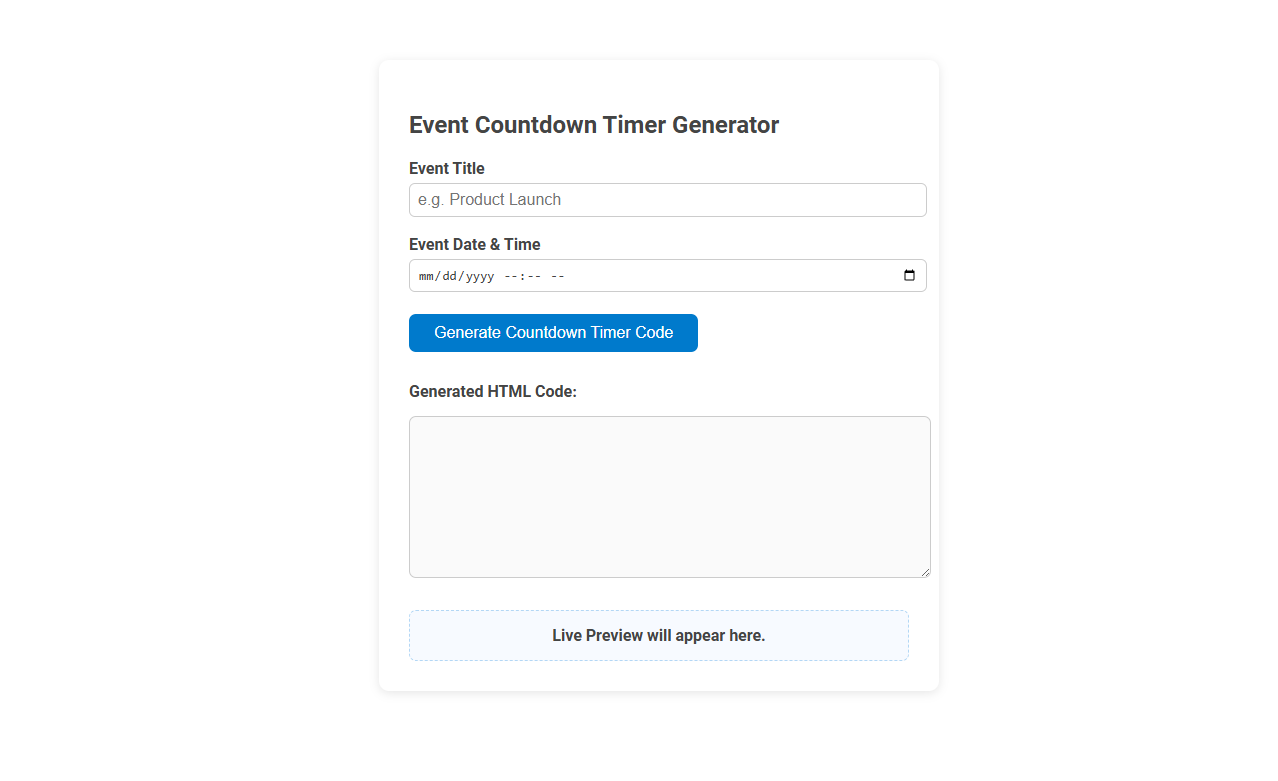
The Event Countdown Timer Generator tool allows users to create a customized countdown timer for any specific event by simply entering the event title and date & time. This tool is ideal for building anticipation and visually reminding audiences about upcoming launches, webinars, or important deadlines. Users can instantly generate and copy HTML code to embed the live countdown on their websites or digital platforms for real-time event tracking.
How to use this tool?
Complete Guide to Using the Event Countdown Timer Generator Tool
-
Enter Event Title:
- Click on the text box under "Event Title".
- Type in your event name, e.g., Product Launch.
-
Select Event Date & Time:
- Click the date picker under "Event Date & Time".
- Choose the desired date from the calendar.
- Enter the specific time for your event (hours and minutes).
-
Generate Countdown Timer Code:
- Click on the blue Generate Countdown Timer Code button.
- The tool will automatically create the countdown timer HTML code for your event.
-
Copy the Generated HTML Code:
- Your custom HTML code will appear in the "Generated HTML Code" box.
- Click inside this box, select the code, and copy it (Ctrl+C or right-click and select Copy).
-
Preview the Countdown Timer:
- A live preview of your timer will appear in the box labeled Live Preview will appear here.
- Check to ensure the countdown timer looks and functions as expected.
-
Embed the Timer in Your Website:
- Paste the copied HTML code into your website's HTML where you want the countdown timer to appear.
-
Update or Edit:
- To change the event details, update the information in the tool and click the button again to generate new code.
Tips:
- Always verify the date and time before generating the code.
- If embedding in a content management system, use the HTML/source mode.
Introduction to Free Online Event Countdown Timer Tools
Discover free online event countdown timer tools designed to help you create customizable timers for birthdays, weddings, product launches, and more. These tools offer easy-to-use interfaces, allowing your audience to track important dates in real time with visually engaging displays. Enhance event anticipation and engagement by incorporating a tailored countdown timer on your website or social media platforms.
Key Features of the Countdown Timer Generator
The Event Countdown Timer Generator offers customizable templates to create visually appealing countdowns tailored to various events. It supports real-time synchronization across multiple time zones, ensuring accurate tracking for global audiences. Users benefit from easy integration options with websites and email campaigns to enhance event promotion and engagement.
Step-by-Step Guide: Creating Your Event Countdown Timer
Create your event countdown timer by selecting your event date and time in the timer generator interface. Customize the design by choosing colors, fonts, and layout to match your event theme. Embed the generated countdown code on your website or share it on social media to engage your audience effectively.
Customizing Event Titles and Descriptions
An Event Countdown Timer Generator allows you to personalize event titles and descriptions, making your countdowns more engaging and relevant. Customizing these elements helps highlight unique details and prompts greater audience anticipation. Tailor your event's message to maximize impact and boost viewer interest.
Choosing Event Date and Time Settings
Selecting the precise event date and time settings is crucial for an accurate event countdown timer generator. Users must input the correct time zone, date, and hour to ensure the timer synchronizes perfectly with the event start. Incorporating features like 24-hour or 12-hour format options enhances customization and user accuracy.
Generating and Copying HTML Countdown Code
Generate an event countdown timer by customizing the desired date and style using the online countdown timer generator. Easily copy the auto-generated HTML countdown code to embed directly into your website or email. This tool ensures seamless integration with responsive design for all devices.
Embedding the Countdown Timer on Your Website
Embedding the Event Countdown Timer on your website enhances user engagement by visually displaying the time remaining until your event starts. Use the provided HTML embed code from the countdown timer generator to seamlessly integrate it into your site's header, sidebar, or event landing page. Customizable features such as size, style, and time zones ensure the timer matches your website's design and audience location.
Live Preview: Ensuring Accuracy Before Publishing
The Event Countdown Timer Generator offers a Live Preview feature that ensures your timer's accuracy before publishing. You can visually verify countdown settings and customize the design in real-time to avoid any errors. This tool guarantees your event countdown performs perfectly when embedded on your site.
Editing and Updating Your Countdown Timer
Editing and updating your event countdown timer is simple with flexible customization options, allowing you to adjust dates, times, and styles instantly. The intuitive interface ensures the countdown reflects the most accurate event details in real-time. Reliable synchronization keeps your timer aligned with time zone changes and event modifications.
Event countdown timer generator Tool Preview