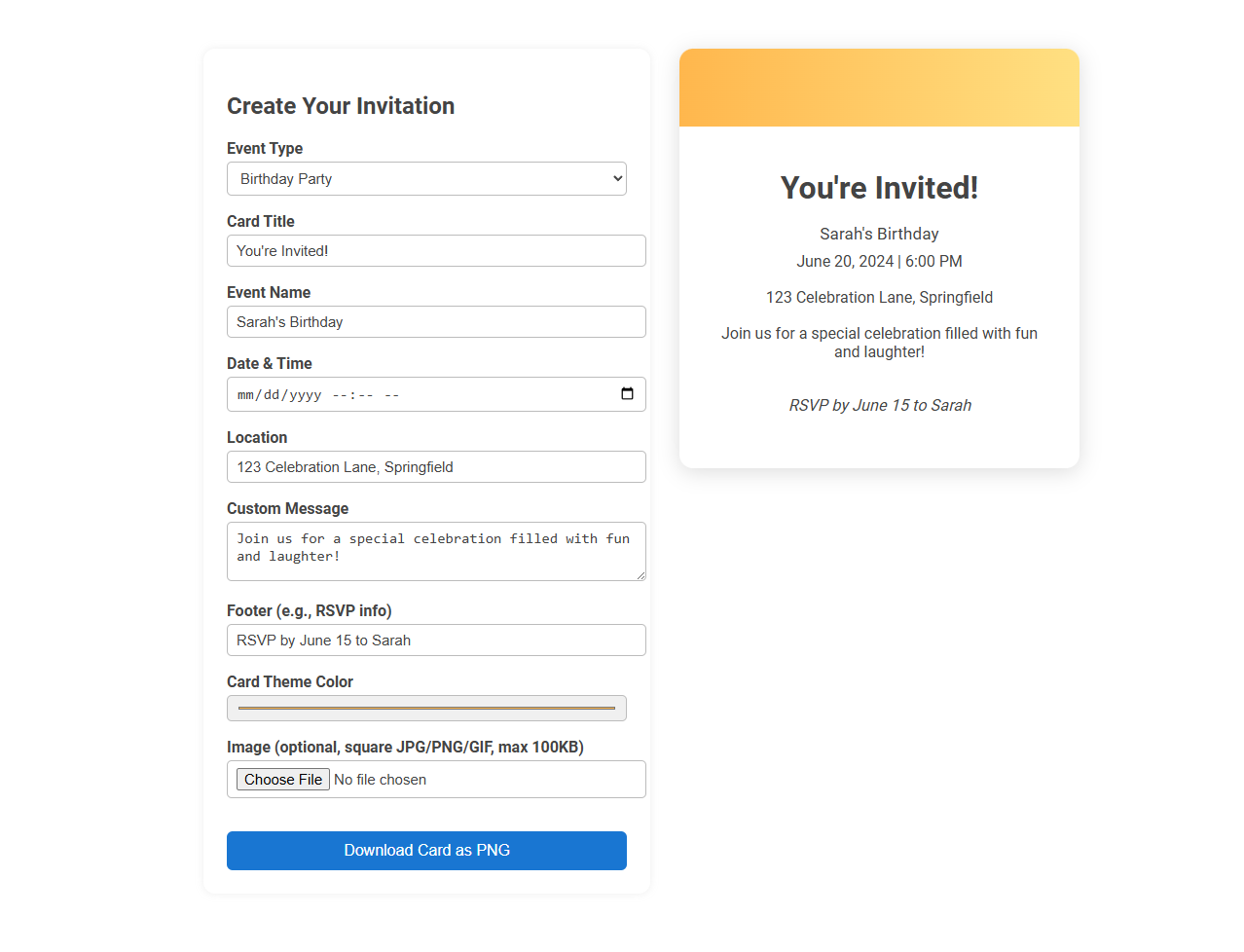
This customizable event invitation card generator tool enables users to quickly create personalized digital invitation cards by inputting event details such as title, date, location, and a custom message. It streamlines the invitation process, allowing for card theme color selection and optional image uploads, making event planning more efficient and visually appealing. Users can instantly preview and download their invitation as a PNG file for easy distribution.
How to use this tool?
Complete Guide to Using the Customizable Event Invitation Card Generator Tool
-
Access the Tool
Open the event invitation generator in your web browser. -
Select Event Type
Use the "Event Type" dropdown to choose the type of event (e.g., Birthday Party, Wedding, Meeting, Baby Shower, etc.). -
Enter the Card Title
Fill in the "Card Title" field (e.g., "You're Invited!") to define the main heading of your invitation. -
Add Event Name
Enter the specific name of your event (e.g., "Sarah's Birthday") in the "Event Name" field. -
Set Date & Time
Input the date and time of the event using the provided field. You can select from the calendar or type the details directly. -
Specify Location
Fill in the address or venue of your event under "Location." -
Write a Custom Message
Add any special message or details about the event in the "Custom Message" box. -
Footer (Optional)
Include RSVP information or other details in the "Footer" (e.g., "RSVP by June 15 to Sarah"). -
Pick a Card Theme Color
Use the color picker to select your preferred card theme color for a customized look. -
Add an Image (Optional)
Click "Choose File" to upload a square image (JPG/PNG/GIF, max 100KB) to personalize your invitation further. -
Preview Your Card
See your invitation card update in real-time on the right side of the screen. -
Download the Invitation
Once satisfied, click the blue "Download Card as PNG" button to save your invitation as an image file.
Tips:
- Keep your invitation concise for best appearance.
- Use square images to avoid cropping issues.
- Double-check event details before downloading.
Introduction to Free Online Event Invitation Card Generators
Free online event invitation card generators offer an easy and customizable solution for creating personalized invitations without design experience. These platforms provide various templates, allowing users to tailor colors, fonts, and images to match event themes. Ideal for weddings, parties, and corporate gatherings, they save time and ensure professional-quality invitations at no cost.
Key Features of Customizable Invitation Card Tools
Customizable event invitation card generators offer key features such as drag-and-drop editing, a vast library of templates, and real-time preview options. Users can personalize text, fonts, colors, and images to match event themes effortlessly. Advanced tools include RSVP tracking, printable formats, and seamless social media sharing to enhance event management.
Step-by-Step Guide: How to Use the Tool
Create personalized event invitations effortlessly with the customizable event invitation card generator. Begin by selecting a template that matches your event theme, then upload images or logos to enhance design appeal. Customize text details such as date, time, and venue, preview your invitation, and download it in your preferred format for easy sharing.
Choosing the Right Event Template
Selecting the perfect event template ensures your invitation card reflects the event's tone and style. Choose layouts that highlight essential details while aligning with your theme to capture guests' attention effectively. Your customization options should enhance readability and visual appeal, creating a memorable invitation experience.
Personalizing Your Invitation Design
Customizable event invitation card generators empower users to personalize every element of their invitation design, including fonts, colors, images, and layouts. These platforms offer intuitive tools that enable seamless integration of personal photos and themed graphics to match the event's style. Personalized invitations enhance guest engagement by creating a unique and memorable first impression.
Adding Essential Event Details
Customizable event invitation card generators streamline the process of adding essential event details such as date, time, location, and RSVP information to create personalized invitations. These tools support integration with calendars and offer templates that ensure clarity and visual appeal for effective communication. Users benefit from real-time editing and preview options that enhance accuracy and engagement before sending invitations.
Customizing Colors, Fonts, and Themes
Create personalized event invitations with a customizable event invitation card generator that allows you to tailor colors, fonts, and themes to match your unique style. Choose from a wide selection of vibrant color palettes, diverse font styles, and themed templates to make your invitations stand out. This tool enhances event branding by providing full control over design elements, ensuring each invitation perfectly reflects your event's mood and purpose.
Integrating Images and Visual Elements
Create stunning custom event invitation cards by integrating high-quality images and visual elements that reflect your event's theme. Use customizable templates to easily upload photos, icons, and graphics, enhancing personalization and engagement. Your invitations become memorable keepsakes that capture attention and convey your event's unique style.
Saving, Downloading, and Sharing Your Invitations
Create personalized event invitations effortlessly with a customizable generator designed for seamless saving, downloading, and sharing. Save your unique designs securely, download high-quality files compatible with various devices, and share invitations directly via social media or email. Your event planning becomes more efficient and stylish with quick access to beautifully crafted invitations.
Customizable event invitation card generator Tool Preview