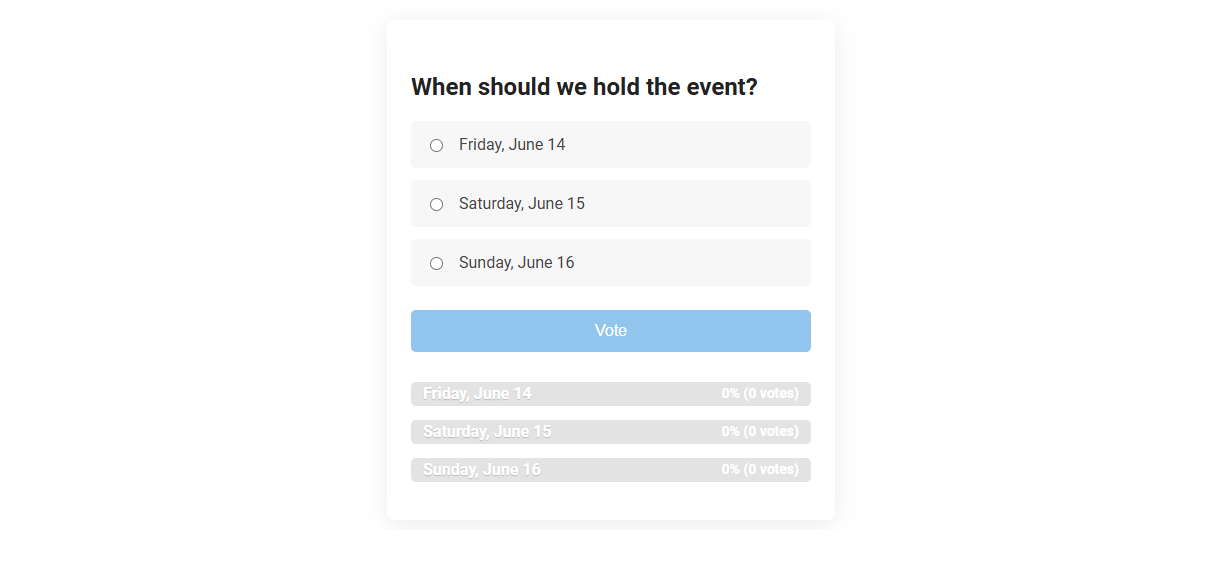
The event poll/voting widget tool enables groups to easily select the most suitable date for an event through a collective voting process. This tool streamlines decision-making by allowing participants to cast their votes on predefined options, ensuring transparency and efficiency. Its primary usage is for event organizers to gather preferences and finalize event schedules based on group consensus.
How to use this tool?
Complete Guide: How to Use the Event Poll/Voting Widget Tool
-
Access the Widget:
Navigate to the page or location where the poll/voting widget is displayed. -
Read the Poll Question:
At the top of the widget, you'll see the question for the poll. In this example, it asks: "When should we hold the event?" -
Select Your Choice:
Below the question, review the available options (e.g., different dates). Click the radio button next to your preferred choice. -
Submit Your Vote:
After selecting your option, click the blue Vote button. -
View Poll Results:
Once you vote, the widget will display the current results, showing the percentage and number of votes each option has received. The bars and numbers will update in real-time as more people vote. -
Change Your Vote:
Depending on widget settings, some polls allow users to change their vote by selecting a new option and submitting again, while others allow only one vote per user. -
Closing and Reopening:
To close the poll, the administrator can disable voting when the set deadline has passed. Results may remain visible for reference. -
Tips:
- Refresh the page to see updated results if voting is ongoing.
- Vote only once unless multiple votes are allowed.
- If you can't select or see the options, make sure you are not using privacy extensions or ad blockers that could hide widget elements.
Summary Table
| Step | Action |
|---|---|
| 1 | Open the widget on your event's page. |
| 2 | Read the question and all available options. |
| 3 | Select your preferred date/option. |
| 4 | Click the Vote button to submit. |
| 5 | View live results below the voting section. |
Introduction: Enhancing Event Engagement with Interactive Polls
Interactive event poll and voting widgets boost attendee engagement by enabling real-time feedback and active participation. These tools gather instant audience insights, making events more dynamic and responsive to attendee preferences. Integrating polls into event platforms enhances communication, drives interaction, and increases overall event satisfaction.
Key Benefits of Free Poll and Voting Widgets for Events
Free poll and voting widgets for events boost audience engagement by enabling real-time feedback collection and interactive participation. These tools provide valuable insights into attendee preferences and opinions, helping you tailor event content effectively. Easy integration and cost-efficiency make free widgets an ideal choice for enhancing event interactivity without additional expenses.
Step-by-Step Guide: Accessing and Using the Event Poll Tool
The Event Poll/Voting widget enables seamless audience interaction by collecting real-time feedback during events. To access the Event Poll Tool, log in to your dashboard, navigate to the event management section, and select the "Polls" tab. Create and customize your poll with question types and options before launching it live to engage participants effectively.
Customizing Poll Questions for Maximum Engagement
Customizing poll questions to align with your audience's interests significantly boosts engagement rates in event poll/voting widgets. Use clear, concise language and relevant topics to capture attention and encourage participation. Tailoring questions based on event themes or attendee demographics ensures your poll resonates effectively.
Real-Time Voting: Viewing and Understanding Live Results
The Event Poll/Voting widget offers real-time voting that enables participants to view live results instantly. Interactive charts and dynamic data visualization enhance understanding of ongoing votes as they happen. This feature drives engagement by providing transparent and up-to-date feedback during events.
Managing Poll Settings: Vote Changes and Limitations
Managing poll settings allows you to control vote changes and set participation limits effectively. You can enable or restrict users from changing their votes to maintain poll integrity and prevent skewed results. Setting vote limitations ensures fair engagement and accurate representation of participant opinions.
Tips for Troubleshooting Widget Issues
Event poll/voting widgets may experience issues such as slow loading, unresponsive buttons, or inaccurate vote counts. Clear browser cache, update the widget to the latest version, and ensure stable internet connectivity to resolve common problems. Check compatibility with the hosting platform and review error logs for deeper diagnostics.
Security and Privacy Considerations for Poll Participants
Event poll/voting widgets ensure your data is protected through end-to-end encryption and anonymized responses. Secure authentication methods prevent unauthorized access, maintaining the integrity of each vote. Privacy policies guarantee that participant information is not shared or stored beyond the event's scope.
Best Practices for Closing and Sharing Poll Results
Effective closing of event poll/voting widgets involves clearly communicating the end time and automatically locking responses to ensure data integrity. Sharing poll results immediately after closing boosts participant engagement by providing transparent insights and fostering discussions. Utilize visual summaries like graphs or charts to enhance understanding and encourage sharing across social media platforms for broader reach.
Event poll/voting widget Tool Preview