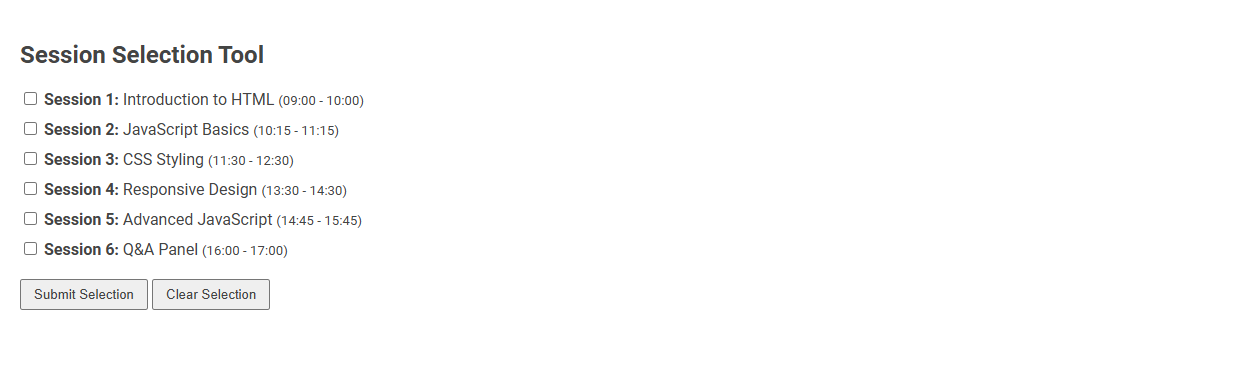
The Session Selection Tool is a digital interface that allows users to choose from a list of scheduled learning sessions or workshops. It streamlines the process of session registration, ensuring participants can efficiently manage and customize their event itinerary. Users simply select their preferred sessions by checking boxes and submitting their choices for confirmation.
How to use this tool?
Complete Guide: Using the Session Selection Tool
-
Review Session Options:
Each session is listed with a checkbox, title, and scheduled time slot. Read through each session to choose the ones you want to attend.
- Session 1: Introduction to HTML (09:00 - 10:00)
- Session 2: JavaScript Basics (10:15 - 11:15)
- Session 3: CSS Styling (11:30 - 12:30)
- Session 4: Responsive Design (13:30 - 14:30)
- Session 5: Advanced JavaScript (14:45 - 15:45)
- Session 6: Q&A Panel (16:00 - 17:00)
-
Select Your Sessions:
- Click on the checkbox next to any session(s) you wish to attend. You can select one or multiple sessions based on your interests and availability.
-
Submit Your Selection:
- Once you have made your selections, click the "Submit Selection" button to finalize your choices.
- Your selected sessions will be registered or saved as per the tool's configuration.
-
Clear Your Choices (If Needed):
- If you wish to reset your choices and start over, click the "Clear Selection" button. All checkboxes will be deselected, and you can make new selections.
Tips
- Make sure there are no timing conflicts if sessions overlap.
- If unsure which sessions to join, check session details or ask event organizers.
- Always confirm your selection if required by the event rules.
With these steps, you can efficiently select and register for your desired sessions using the Session Selection Tool.
Introduction to Effortless Event Session Selection
The Session Selection Tool simplifies your event planning by streamlining the process of choosing sessions tailored to your interests and goals. It offers an intuitive interface that helps prioritize options based on relevance, speaker expertise, and schedule compatibility. Empower your event experience with effortless session selection designed to maximize engagement and learning outcomes.
Benefits of Using a Free Online Session Selection Tool
A free online session selection tool streamlines the scheduling process by allowing users to easily browse and choose sessions that fit their interests and availability. It enhances user experience through intuitive interfaces and real-time updates, reducing scheduling conflicts and administrative errors. Access to such tools boosts event participation rates and improves overall organization efficiency.
How the Session Selection Tool Works
The Session Selection Tool analyzes your preferences and available options to recommend the most relevant sessions tailored to your interests. It filters sessions based on criteria such as topic, speaker expertise, and schedule compatibility. You receive a customized list that ensures efficient planning for maximum engagement and value.
Step-by-Step Guide: Reviewing Available Sessions
The Session Selection tool allows you to efficiently review available sessions by displaying comprehensive details such as date, time, and topic. This step-by-step guide ensures you can easily compare options and select the session best suited to your schedule and interests. Following this process streamlines your decision-making and maximizes the relevance of your learning experience.
Making Your Selections: Choosing Sessions Easily
The Session Selection Tool streamlines the process of making your selections by providing an intuitive interface that categorizes sessions by topic, date, and speaker. Users can quickly filter and compare options to find sessions that best fit their interests and schedule. This efficient approach ensures a personalized and organized event experience.
Submitting and Registering Your Session Choices
The Session Selection Tool streamlines submitting and registering your session choices for conferences or events. Use the tool to browse available sessions, select preferred topics, and finalize registration efficiently. Ensure your selections are submitted before deadlines to secure your spot in desired sessions.
Resetting or Changing Your Session Selections
The Session Selection Tool allows users to efficiently reset or change their session choices without disrupting their overall schedule. By accessing the tool's dashboard, users can easily deselect current sessions and select new ones based on availability and preferences. This functionality ensures flexibility and optimal customization for event attendees.
Avoiding Timing Conflicts and Overlapping Sessions
The Session Selection Tool helps you avoid timing conflicts and overlapping sessions by clearly displaying your schedule and alerting you to any overlaps. It ensures that your chosen sessions fit seamlessly within your available time slots, maximizing your event experience. This feature simplifies planning by preventing scheduling errors and optimizing your agenda.
Frequently Asked Questions about Session Selection Tools
A Session Selection Tool simplifies choosing the ideal sessions for your event by filtering options based on preferences, topics, and availability. Common questions include how to customize filters, the accuracy of session recommendations, and real-time updates during event registration. You can enhance your event experience by understanding these features and effectively navigating the tool.
Session selection tool Tool Preview