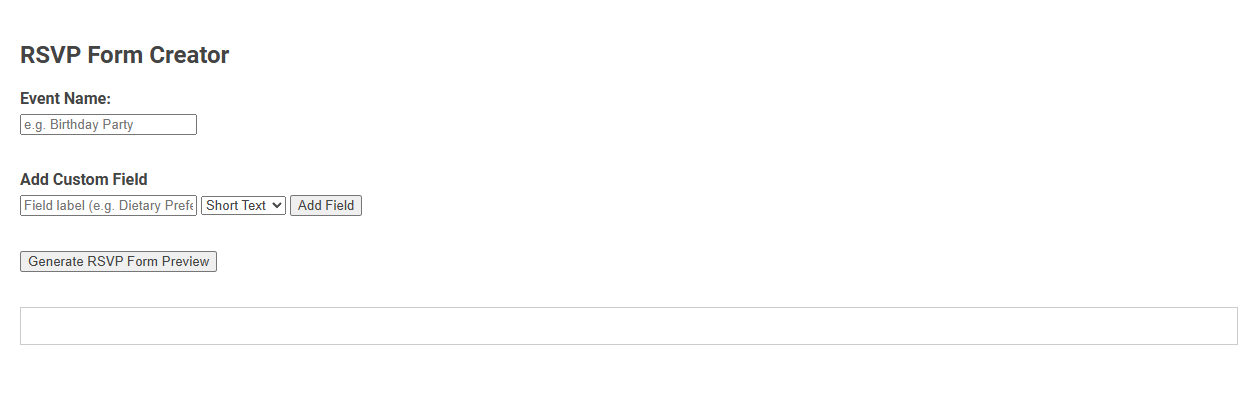
The RSVP Form Creator tool allows users to easily build customized RSVP forms for events by specifying the event name and adding custom fields to gather attendee information. This tool streamlines event management by enabling hosts to collect relevant responses tailored to specific needs, such as dietary preferences or special requests. Users can quickly generate and preview a personalized RSVP form to share with guests, optimizing event planning and communication.
How to use this tool?
Complete Guide to Using the RSVP Form Creator Tool
-
Enter Event Name:
- In the "Event Name" field, type the name of your event (e.g., Birthday Party, Wedding, Meeting).
-
Add Custom Fields:
- In the "Field label" text box, enter what you want to ask (e.g., Dietary Preferences, Number of Guests).
- Select the type of response you want from the dropdown:
- Short Text: For brief answers (e.g., names, small notes).
- Long Text: For longer responses (e.g., comments, messages).
- Other field types may be available depending on the tool.
- Click the "Add Field" button to include this field in your RSVP form.
- Repeat this step to add as many custom fields as you need.
-
Generate Preview:
- Click the "Generate RSVP Form Preview" button to create a draft version of your RSVP form.
- The preview will display in the area below the button. Review this for completeness and accuracy.
-
Review and Finalize:
- Make sure all necessary fields have been added.
- If you need to modify fields, make changes and click "Generate RSVP Form Preview" again.
Tips:
- Be clear and concise with field labels so guests know what information to provide.
- Test the form preview to ensure ease of use for your invitees.
Introduction to Effortless RSVP Form Creation
Create seamless event invitations with our RSVP form creator, designed for effortless customization and user-friendly experience. Utilize pre-built templates and drag-and-drop tools to quickly tailor forms that capture essential guest information. Enhance event planning efficiency by streamlining responses and managing attendee data in one intuitive platform.
Key Features of the Free RSVP Form Tool
Create personalized RSVP forms effortlessly with the Free RSVP Form Tool. Enjoy features like customizable templates, real-time response tracking, and automated email notifications to streamline your event planning. Your event management becomes more efficient with seamless guest list integration and mobile-friendly design.
Step-by-Step Guide to Building Your RSVP Form
Create your RSVP form efficiently with a step-by-step guide optimized for event planning. Start by selecting a user-friendly RSVP form creator platform that offers customizable templates tailored to guest information collection. Implement key fields such as name, contact details, attendance status, and meal preferences, then test the form for functionality and ease of use before sharing it with your invitees.
Customizing RSVP Fields for Accurate Responses
Customizing RSVP fields in your form ensures accurate guest responses tailored to your event's specific needs. You can include options like meal preferences, plus-one details, and special accommodations to gather precise information. This targeted approach improves event planning efficiency and enhances overall attendee satisfaction.
Previewing and Editing Your Event RSVP Form
Preview and edit your event RSVP form with ease using our intuitive form creator. Instantly view how your guests will interact with your RSVP fields and make real-time adjustments to customize questions, design, and response settings. Optimize guest engagement by ensuring your form is clear, concise, and tailored to your event's unique needs before sending invitations.
Optimizing RSVP Forms for Maximum Guest Engagement
Optimizing RSVP forms involves designing clear, concise questions that reduce friction and encourage prompt responses. Incorporate user-friendly features like mobile compatibility, customizable templates, and automated reminders to enhance guest interaction. Your event's success depends on crafting an engaging RSVP experience that boosts participation and streamlines planning.
Best Practices for Gathering Guest Information
Creating an effective RSVP form creator enhances event planning by streamlining guest information collection and improving response rates. Use clear, concise fields to capture essential data like names, dietary preferences, and contact details while maintaining user privacy and data security. Your form should be mobile-friendly, easy to navigate, and include personalized confirmation messages to boost engagement and accuracy.
Integrating Your RSVP Form with Event Invitations
Integrating your RSVP form with event invitations streamlines guest responses and enhances event management efficiency. Embedding customizable RSVP forms directly into emails or invitation links ensures seamless interaction and accurate attendance tracking. This approach optimizes guest experience and simplifies data collection for successful event planning.
Advantages of Online RSVP Management Tools
Online RSVP management tools streamline guest list tracking by automating responses and sending instant reminders. They enhance accuracy through real-time updates and reduce manual errors, saving time and effort during event planning. Using these tools, your event coordination becomes more efficient, allowing you to focus on creating memorable experiences.
RSVP form creator Tool Preview