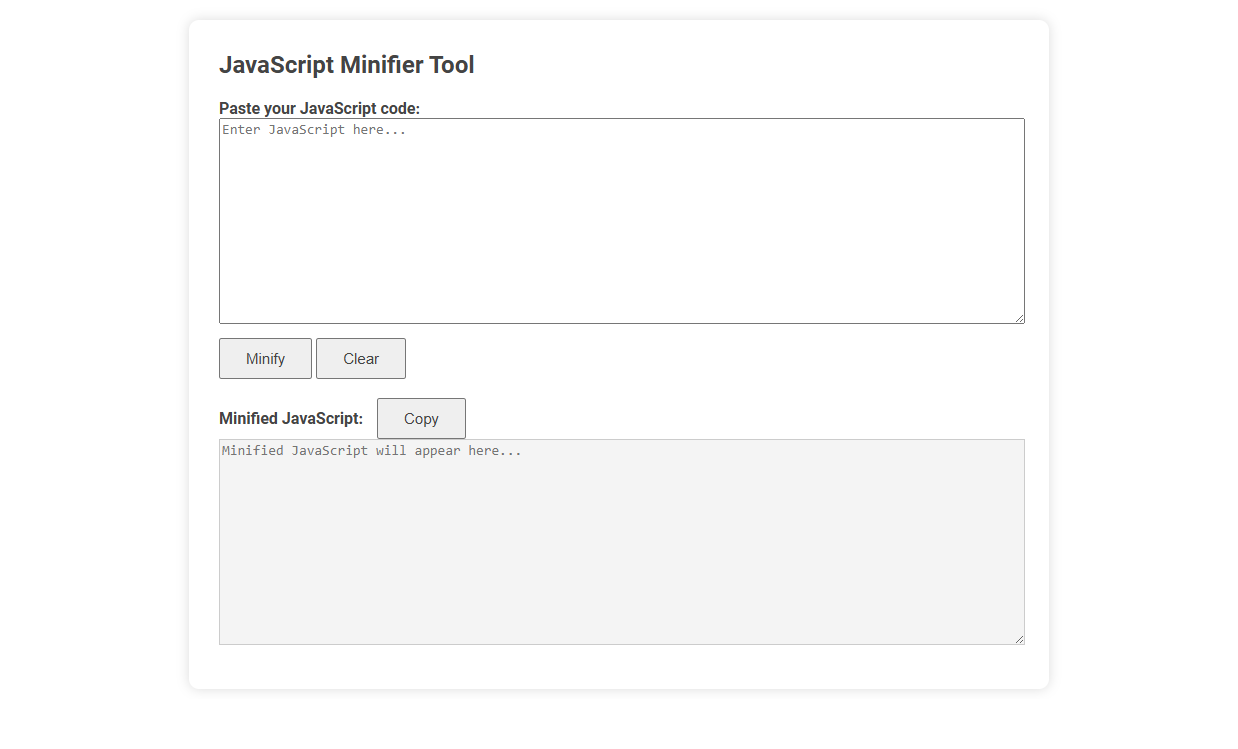
JavaScript Minifier Tool is a web utility that compresses JavaScript code by removing unnecessary spaces, comments, and formatting. Minification reduces file size for faster load times and improved website performance. To use, paste your JavaScript code into the input box, click "Minify," and copy the optimized result from the output area.
How to use this tool?
Complete Guide: How to Use the JavaScript Minifier Tool
-
Pasting Your Code
Locate the first large text box labeled "Paste your JavaScript code:". Enter or paste your JavaScript code into this box. This is where you input the code that you want to minify. -
Minifying the Code
Once your code is in the input box, click the "Minify" button located directly under the input area. The tool will process your code and generate a minimized (compressed) version of your script, removing unnecessary whitespace, comments, and line breaks. -
Viewing the Minified Output
After clicking "Minify", the minified code will appear in the second large box labeled "Minified JavaScript:". Review the output to ensure it meets your needs. -
Copying the Minified Code
To use your minified JavaScript elsewhere, click the "Copy" button next to the minified output. This copies the minified code to your clipboard so you can paste it wherever it's needed. -
Clearing the Form
If you wish to start over or remove the current contents, use the "Clear" button below the JavaScript input box. This will empty the input box for fresh code entry.
Tips:
- Make sure your input code is valid JavaScript before minifying to avoid errors.
- Use the minified code in production environments for faster page loading and reduced bandwidth usage.
- The original, unminified code is best for development and debugging purposes.
Introduction to Free JavaScript Minifier Tools for Blogger
Free JavaScript minifier tools optimize code by removing unnecessary characters without altering functionality, enhancing website loading speed crucial for bloggers. Popular tools like UglifyJS, Terser, and Google Closure Compiler offer efficient compression tailored for JavaScript files, improving blog performance and SEO rankings. Using these minifiers helps bloggers reduce file sizes, leading to faster page rendering and better user experience.
Key Benefits of JavaScript Minification in Blogger
JavaScript minification in Blogger significantly reduces file size, leading to faster page loading times and improved user experience. It eliminates unnecessary characters and spaces without affecting code functionality, optimizing website performance and SEO rankings. Implementing a JavaScript minifier helps decrease bandwidth usage and enhances mobile browsing efficiency for Blogger sites.
Step-by-Step: How to Use an Online JavaScript Minifier
Using an online JavaScript minifier involves uploading your script file or pasting the code into the provided text area. Select the compression level or optimization settings, then click the "Minify" button to process the file. Download or copy the minified JavaScript output to improve website load times and performance.
User Guide: Pasting Your Code for Minification
To minify your JavaScript code, copy and paste it directly into the input field of the JavaScript minifier tool. Ensure your code is complete and free from syntax errors before submission to guarantee accurate minification results. The tool compresses your code by removing whitespace, comments, and unnecessary characters without altering functionality.
Minifying JavaScript: Processing and Results
Minifying JavaScript involves removing whitespace, comments, and unnecessary characters to reduce file size without changing functionality. The process includes parsing the code, eliminating redundancies, and compressing variable names, resulting in faster load times and improved performance. Effective minification produces compact, efficient scripts that enhance web application speed and decrease bandwidth usage.
Copying and Using Minified JavaScript in Blogger
A JavaScript minifier reduces file size by removing whitespace, comments, and unnecessary characters, enhancing website loading speed. Copying the minified JavaScript code ensures your Blogger site runs more efficiently without altering functionality. To use minified scripts in Blogger, paste the optimized code into your HTML or widget section for faster performance and improved user experience.
Clearing the Form and Starting Fresh
Using a JavaScript minifier streamlines your code by removing unnecessary characters, making it efficient and compact. Clearing the form before starting fresh ensures that no residual data interferes with your new code input. You can quickly optimize your scripts while maintaining clarity and performance.
Tips for Effective JavaScript Minification
Effective JavaScript minification reduces file size by removing whitespace, comments, and unnecessary characters without altering functionality. Use tools like UglifyJS or Terser to automate this process and enable source maps for easier debugging. You should also analyze dependencies to avoid minifying already compressed libraries, ensuring optimal performance and faster load times.
Common Issues and Troubleshooting with Minifier Tools
JavaScript minifiers often encounter issues like syntax errors, variable name collisions, and broken code due to aggressive compression. Troubleshooting involves validating JavaScript syntax before minification, configuring tools to preserve critical variable names, and testing the output thoroughly in different environments. Using source maps and incremental minification helps identify and resolve errors efficiently.
JavaScript minifier Tool Preview