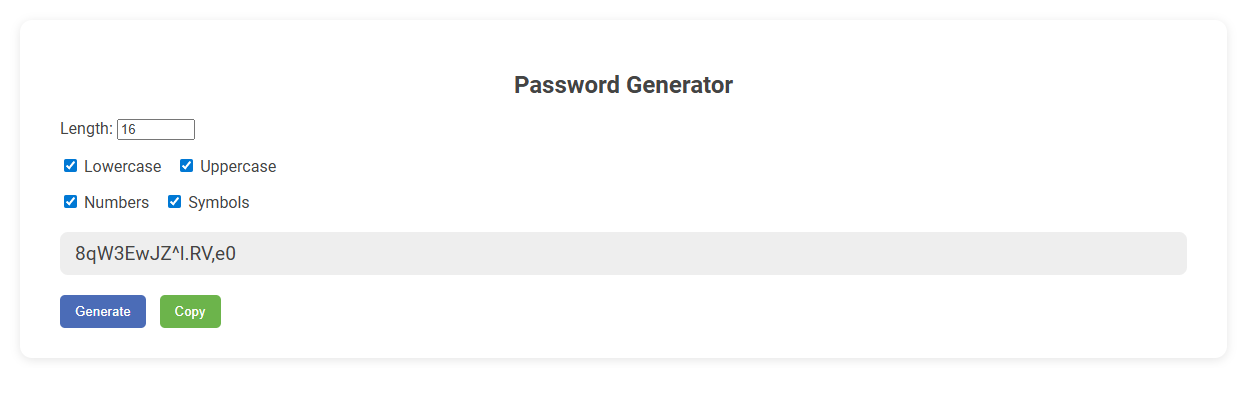
This Password Generator tool creates strong, random passwords based on customizable criteria like length, inclusion of uppercase and lowercase letters, numbers, and symbols. It is designed to enhance security by generating unpredictable passwords, reducing the risk of unauthorized account access. Users simply select their desired options, click "Generate," and can easily copy the secure password for immediate use.
How to use this tool?
Complete Guide: How to Use the Password Generator Tool
-
Set Password Length:
Locate the "Length" field and enter the desired number of characters for your password (e.g., 16). This determines how long your password will be. -
Select Character Types:
Choose which types of characters you want in your password by checking the boxes for:- Lowercase: Includes small letters (a-z)
- Uppercase: Includes capital letters (A-Z)
- Numbers: Includes numbers (0-9)
- Symbols: Includes special characters (e.g., @, #, $, %)
-
Generate Password:
Click the Generate button. The tool will instantly create a random password based on your chosen settings. The generated password will appear in the input box below. -
Copy Your Password:
To use the password elsewhere, click the Copy button. This will copy the generated password to your clipboard.
Tips for Strong Passwords
- Use a mix of uppercase, lowercase, numbers, and symbols for maximum security.
- The longer the password, the harder it is to crack. Consider using at least 12 characters.
- Avoid using easily guessable information like your name or birthdate.
Why Bloggers Need Secure Passwords for Their Accounts
Bloggers need secure passwords to protect their accounts from cyberattacks and unauthorized access, which can lead to data breaches and content theft. A strong password generator creates complex, unique passwords that reduce the risk of hacking attempts and safeguard sensitive information, including login credentials and personal data. Maintaining account security ensures the integrity of a blog's reputation, preserves reader trust, and prevents costly downtime.
Key Features of Free Online Password Generator Tools
Free online password generator tools offer customizable length and complexity settings to create strong, unique passwords. They include options for mixing uppercase letters, lowercase letters, numbers, and special characters to enhance security. Most tools provide instant password strength evaluation and easy copy-to-clipboard functionality for user convenience.
Step-by-Step Guide: Generating a Password for Blogger
Creating a strong password for Blogger involves using a reliable password generator that combines uppercase letters, lowercase letters, numbers, and special characters. Start by selecting the desired password length, typically 12 to 16 characters, to enhance security against brute-force attacks. Copy the generated password and store it securely in a password manager before updating your Blogger account settings to ensure safe and easy login access.
Optimizing Password Length for Blogger Security
Optimizing password length is crucial for enhancing Blogger security by creating stronger, harder-to-crack credentials. Use a password generator that produces a minimum of 12 characters combining letters, numbers, and symbols to maximize protection. Your online content remains safer when you apply these length-focused password strategies.
Choosing Strong Character Combinations for Passwords
Choosing strong character combinations for passwords involves using a mix of uppercase letters, lowercase letters, numbers, and special symbols to increase complexity. Your password generator should prioritize randomness and unpredictability to resist hacking attempts. Incorporating diverse character types significantly strengthens your password against brute-force and dictionary attacks.
How to Copy and Use Generated Passwords Safely
Copy generated passwords by clicking the designated copy button or highlighting and using keyboard shortcuts (Ctrl+C or Command+C). Paste passwords directly into secure password fields without saving them on clipboard-sensitive applications to minimize exposure. Use password managers to store and autofill passwords safely, avoiding manual entry and reducing the risk of interception.
Best Practices for Managing Blogger Passwords
Using a reliable password generator creates strong, unique passwords for Blogger accounts, enhancing security against hacking attempts. Store passwords securely in a reputable password manager to prevent unauthorized access and facilitate easy updates. Regularly update Blogger passwords and enable two-factor authentication to protect sensitive content and maintain account integrity.
Common Mistakes to Avoid in Password Creation
Common mistakes to avoid in password creation include using easily guessable information such as birthdays, simple patterns like "123456," and repeating the same password across multiple accounts. Weak passwords compromise security and increase vulnerability to hacking attempts. Strengthen your protection by creating unique, complex passwords with a mix of letters, numbers, and symbols.
Frequently Asked Questions About Online Password Generators
Frequently Asked Questions About Online Password Generators answer common concerns such as security, randomness, and usability. Users often inquire if generated passwords are truly random and resistant to hacking attempts. Trusted generators use advanced algorithms and encryption techniques to create complex, unique passwords that enhance online safety.
Password generator Tool Preview