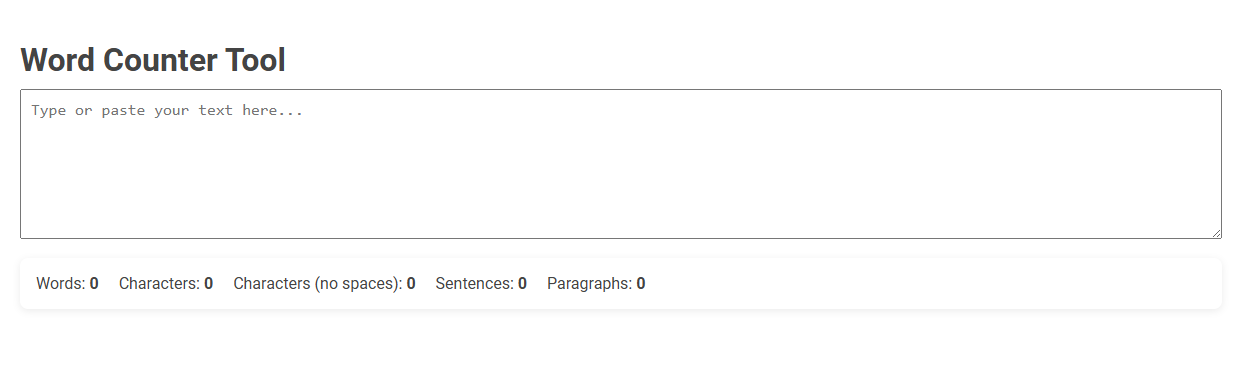
The Word Counter Tool is an online utility that automatically calculates the number of words, characters (with and without spaces), sentences, and paragraphs in a given text. It helps users efficiently monitor text length for academic, professional, and social media requirements. Simply type or paste your content into the box to receive instant and precise statistics.
How to use this tool?
Complete Guide to Using the Word Counter Tool
-
Access the Tool:
- Go to the Word Counter Tool page where you see the heading Word Counter Tool.
-
Enter Your Text:
- Click inside the large text box labeled "Type or paste your text here..."
- Either type your text directly or paste copied text from another source.
-
View Results Instantly:
- As soon as you enter your text, the tool will automatically display the following statistics below the text box:
- Words: The total number of words in your text.
- Characters: The total number of characters including spaces.
- Characters (no spaces): The number of characters excluding spaces.
- Sentences: The number of sentences detected in your text.
- Paragraphs: The number of paragraphs in your text.
-
Edit Your Text:
- You can add, remove, or edit the text in the box at any time.
- All statistics will update instantly as you make changes.
-
Usage Tips:
- Use this tool to meet word or character limits for assignments, stories, articles, or social media posts.
- Check the structure of your writing by keeping an eye on sentence and paragraph counts.
Note: There is no need to press any "submit" or "count" button; the results appear automatically as you type or paste your content.
Introduction to Free Word Counting Tools for Bloggers
Free word counting tools help bloggers measure the length of their content quickly and accurately. These tools provide valuable insights into word count, readability, and SEO optimization, ensuring your posts meet platform requirements. Using a reliable word counter enhances content creation efficiency and improves audience engagement.
Key Features of the Online Word Counter
The Online Word Counter offers real-time tracking of word, character, sentence, and paragraph counts, ensuring precise content analysis. It supports multiple languages and provides readability scores to enhance text clarity and engagement. Users benefit from easy-to-use copy-paste functionality alongside detailed keyword density reports for SEO optimization.
How the Word Counter Ensures Accurate Results
The Word Counter ensures accurate results by using advanced algorithms that recognize word boundaries and exclude non-word characters. It processes your text in real-time, automatically updating the count as you type. This precision enables you to meet exact word limits for writing, editing, and academic purposes.
Step-by-Step Guide to Using the Word Counter Tool
Step-by-step guide to using the Word Counter tool ensures precise tracking of text length and readability. Begin by pasting or typing your content into the provided text box to instantly view word and character counts. Analyze the results to edit your writing effectively, maintaining optimal length for essays, articles, or social media posts.
Benefits of Real-Time Word, Character, and Sentence Counting
Real-time word, character, and sentence counting enhances writing accuracy by providing instant feedback on text length, ensuring adherence to specific requirements. This tool improves productivity by allowing writers to monitor their progress and make adjustments without interrupting their flow. Increased precision in content creation supports better SEO optimization and clear communication.
Optimizing Blog Posts with the Word Counter
Optimizing blog posts with a word counter ensures your content meets ideal length standards for SEO and readability. Your posts can achieve better engagement by maintaining keyword density without overstuffing. Using a word counter helps you balance comprehensive information with concise messaging effectively.
Common Use Cases for Bloggers and Writers
Word counters help bloggers and writers track article length to meet SEO and publication standards. They ensure concise content by highlighting overused phrases and assist in maintaining consistent pacing across drafts. These tools also support goal-setting for daily word counts, enhancing productivity and deadline management.
Tips for Maximizing Word Counter Efficiency
Using a word counter effectively saves time by providing accurate and instant text analysis, essential for meeting content length requirements in writing assignments or SEO. Optimize efficiency by setting clear goals, regularly checking your word count during writing, and leveraging advanced features such as readability scores and keyword density. Choose word counters that support multiple formats and integrate seamlessly with your writing tools for a streamlined workflow.
Comparison with Other Online Word Counting Tools
This Word Counter tool delivers precise results faster than most online alternatives, supporting multiple languages and providing detailed analytics such as keyword density and readability scores. Unlike basic counters, it offers customizable settings tailored to your specific writing needs, ensuring a comprehensive text analysis. You benefit from an intuitive interface that streamlines counting tasks, making it ideal for writers, students, and professionals seeking accurate and efficient word count services.
Word counter Tool Preview