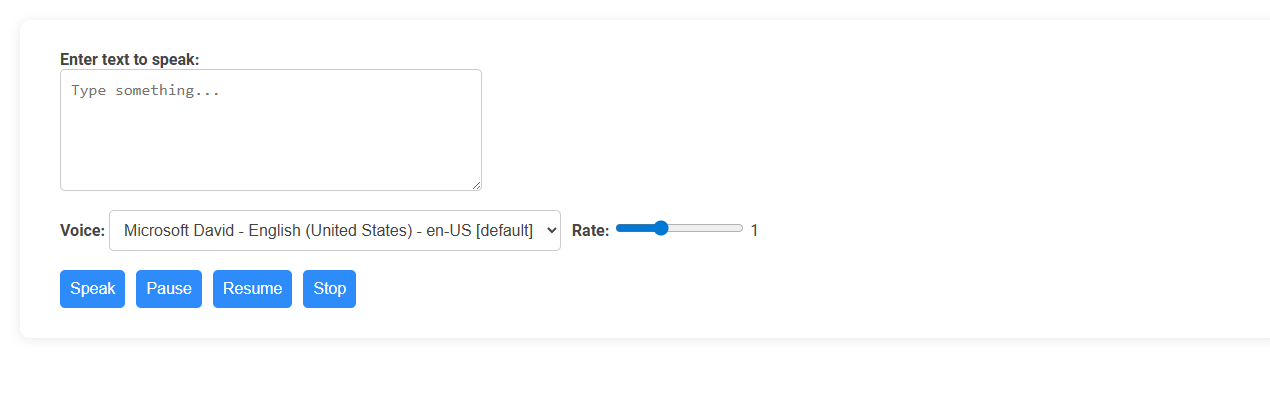
This Text to Speech tool converts written text into spoken words using selectable digital voices and adjustable speech rate. Ideal for users with visual impairments, language learners, or those seeking hands-free interaction, it enhances accessibility and content delivery. Usage involves entering text, choosing a voice, setting the rate, and using buttons to play, pause, resume, or stop the speech output.
How to use this tool?
Complete Guide: How to Use the Text to Speech Tool
-
Enter Text:
In the box labeled "Enter text to speak," type or paste the text you want the tool to read aloud. -
Select Voice:
Use the drop-down menu labeled "Voice" to choose from available voices and languages. For example, you may see options like "Microsoft David - English (United States)." -
Adjust Rate:
Use the "Rate" slider to make the speech faster or slower. Slide to the right for faster speech and to the left for slower speech. -
Synthesize Speech:
Click the blue Speak button to have the text read aloud by the selected voice. -
Pause Speech:
Click the Pause button to temporarily stop the speech. -
Resume Speech:
Click Resume to continue the speech from where it was paused. -
Stop Speech:
Click the Stop button to end the speech immediately.
Tips:
- Check your text for errors before clicking "Speak" for a clear reading.
- Experiment with different voices and rates to find the style you prefer.
- You may need to allow microphone and speaker permissions in your browser settings for proper operation.
What Is a Text to Speech Tool?
A text to speech tool is a software application that converts written text into natural-sounding spoken words using advanced speech synthesis technology. It supports multiple languages and voice options to enhance accessibility and user engagement across various platforms. These tools are widely used in education, customer service, and content creation to improve communication and reach diverse audiences.
Key Benefits for Bloggers Using Text to Speech
Text to speech tools enhance your blogging efficiency by converting written content into engaging audio, making it accessible to a wider audience, including visually impaired users. These tools improve content reach and audience retention by offering diverse consumption options, such as podcasts and voice-enabled articles. Incorporating text to speech technology also saves time in content creation and facilitates multitasking, empowering bloggers to maintain consistent publishing schedules.
Top Features of Free Online Text to Speech Tools
Free online text to speech tools offer top features like natural-sounding voice options, multi-language support, and customizable speech speed. These tools provide easy-to-use interfaces with the ability to convert text into audio instantly, making content accessible for various users. Integration with multiple file formats and the option for offline use enhance convenience and usability.
Supported Languages and Voice Options
Text to speech tools support a wide range of languages, including English, Spanish, Mandarin, French, German, and many more, enabling seamless communication across global audiences. Voice options vary from natural human-like voices to customizable pitch, speed, and tone settings, enhancing user experience and accessibility. Advanced tools incorporate regional accents and gender variations to cater to diverse user preferences and applications.
Step-by-Step Guide: How to Convert Text to Speech Online
Discover how to convert text to speech online with this step-by-step guide. Choose a reliable text-to-speech tool, upload or paste your text, and select your preferred voice and language settings. Your audio file will be generated quickly, allowing you to download or share it instantly.
Advanced Customization: Adjusting Voice and Speech Rate
Advanced text to speech tools offer extensive customization options, allowing precise adjustments to voice type, pitch, and speech rate. You can tailor these settings to create a natural and engaging audio experience that suits your needs. Enhanced control over vocal attributes improves clarity and personalization in your content delivery.
Tips for Optimal Use of Text to Speech Tools
Maximize your text to speech tool by selecting natural-sounding voices that match your content's tone. Adjust speech speed and pronunciation settings for clarity and listener engagement. Use high-quality source text free from errors to enhance output accuracy and effectiveness.
Accessibility Advantages for Bloggers and Readers
Text to speech tools enhance accessibility by allowing bloggers to reach readers with visual impairments or reading difficulties. Your content becomes more inclusive and engaging through audio formats that support multitasking and literacy improvement. These tools also increase audience retention by catering to diverse learning preferences and environments.
Comparing the Best Free Text to Speech Tools
Comparing the best free text to speech tools reveals notable differences in voice quality, language support, and customization options. Google Text-to-Speech offers natural voice synthesis with multilingual capabilities, while Microsoft Azure's TTS provides extensive voice variety and integration features. Amazon Polly excels in real-time streaming and supports numerous languages, making it a top choice for diverse applications.
Text to speech tool Tool Preview