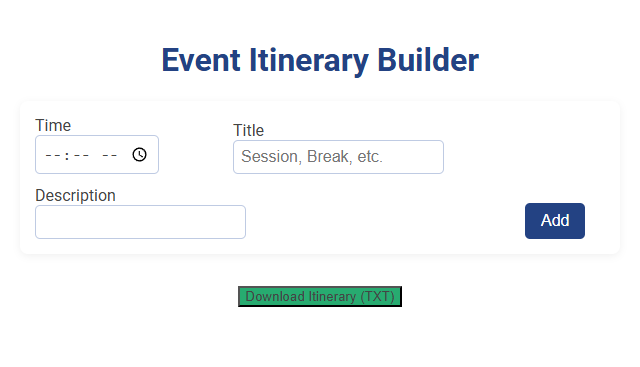
The Event Itinerary Builder tool enables users to organize event schedules by entering time, session titles, and descriptions. This tool streamlines planning by allowing quick addition of agenda items and exporting the finalized itinerary as a downloadable text file. Users can efficiently create, edit, and share structured event plans for meetings, conferences, or seminars.
How to use this tool?
Complete Guide: How to Use the Event Itinerary Builder Tool
-
Access the Tool:
- Open the Event Itinerary Builder tool on your device's browser.
-
Enter Itinerary Details:
- Time: Click the time field. Type or select the start time of the agenda item using the provided time picker.
- Title: Enter a short title for the itinerary item (e.g., "Registration," "Keynote Session," "Break").
- Description: (Optional) Add a detailed description for this event item if needed.
-
Add the Item:
- Once all fields are filled, click the Add button. The item will be added to your itinerary list.
-
Repeat for All Agenda Items:
- Continue adding sessions, breaks, and other events by repeating steps 2 and 3 as needed.
-
Download the Itinerary:
- Once you've finished entering all event items, click Download Itinerary (TXT) to save your itinerary as a text file to your device.
Tips
- Double-check all times and descriptions before downloading the final file.
- If changes are needed, simply add, edit, or remove itinerary items, then re-download the updated itinerary.
Introduction to Free Online Event Itinerary Builders
Free online event itinerary builders streamline the planning process by allowing users to create detailed schedules with customizable templates and real-time updates. These tools support event organizers in managing sessions, speakers, and venue details efficiently without any software installation. Popular platforms such as Canva, Eventbrite, and Sched offer intuitive interfaces and collaborative features to enhance event coordination and attendee experience.
Key Features of Event Itinerary Builder Tools
An Event Itinerary Builder streamlines your event planning by offering customizable scheduling, real-time updates, and seamless integration with calendars. Key features include drag-and-drop interface, automated reminders, and collaborative tools for efficient team coordination. These capabilities ensure your event runs smoothly from start to finish.
Step-by-Step Guide: Building Your Event Itinerary Online
Creating your event itinerary online starts with selecting a user-friendly event itinerary builder designed to streamline scheduling and task management. Input key details such as event dates, sessions, speakers, and venues to organize your agenda efficiently. Utilize customizable templates and real-time updates to ensure your itinerary remains accurate and accessible for all participants.
Customizing Sessions, Breaks, and Event Blocks
Event itinerary builders allow you to customize sessions, breaks, and event blocks to create a seamless schedule tailored to your needs. Adjust session durations, organize break times strategically, and divide your event into manageable blocks for optimal flow. This customization ensures a personalized experience that maximizes engagement and efficiency.
Streamlining Agenda Input with User-Friendly Interfaces
An event itinerary builder streamlines agenda input through intuitive, user-friendly interfaces designed to simplify scheduling tasks. These platforms integrate drag-and-drop features and real-time editing, enabling quick adjustments to event timelines. Your experience is enhanced by clear visual layouts that reduce errors and save planning time.
Downloading and Sharing Your Event Itinerary Effortlessly
Download your event itinerary effortlessly in multiple formats such as PDF and Excel for seamless access across devices. Share your itinerary instantly via email or social media platforms to keep all participants informed and engaged. You can customize sharing settings to control who views or edits the event details, ensuring smooth coordination.
Tips for Crafting a Professional Event Schedule
Create a professional event itinerary by prioritizing clear time allocations and essential activities to ensure smooth transitions. Incorporate buffer times to accommodate unexpected delays and enhance attendee experience. Utilize digital tools for real-time updates and easy distribution to all participants.
Common Use Cases for Online Itinerary Builders
Online itinerary builders streamline trip planning by organizing flights, accommodations, and activities into a single, easy-to-access schedule. Common use cases include business travel coordination, multi-destination vacations, and group event planning to ensure seamless logistics. Your personalized itinerary enhances travel efficiency and reduces stress by keeping all essential details in one place.
Enhancing Event Coordination with Real-Time Edits
Event itinerary builders enhance event coordination by allowing real-time edits, ensuring seamless updates across all schedules and participants. This dynamic functionality reduces miscommunication and improves responsiveness during event execution. Optimized for multi-user collaboration, these tools streamline agenda management and boost overall event efficiency.
Event itinerary builder Tool Preview