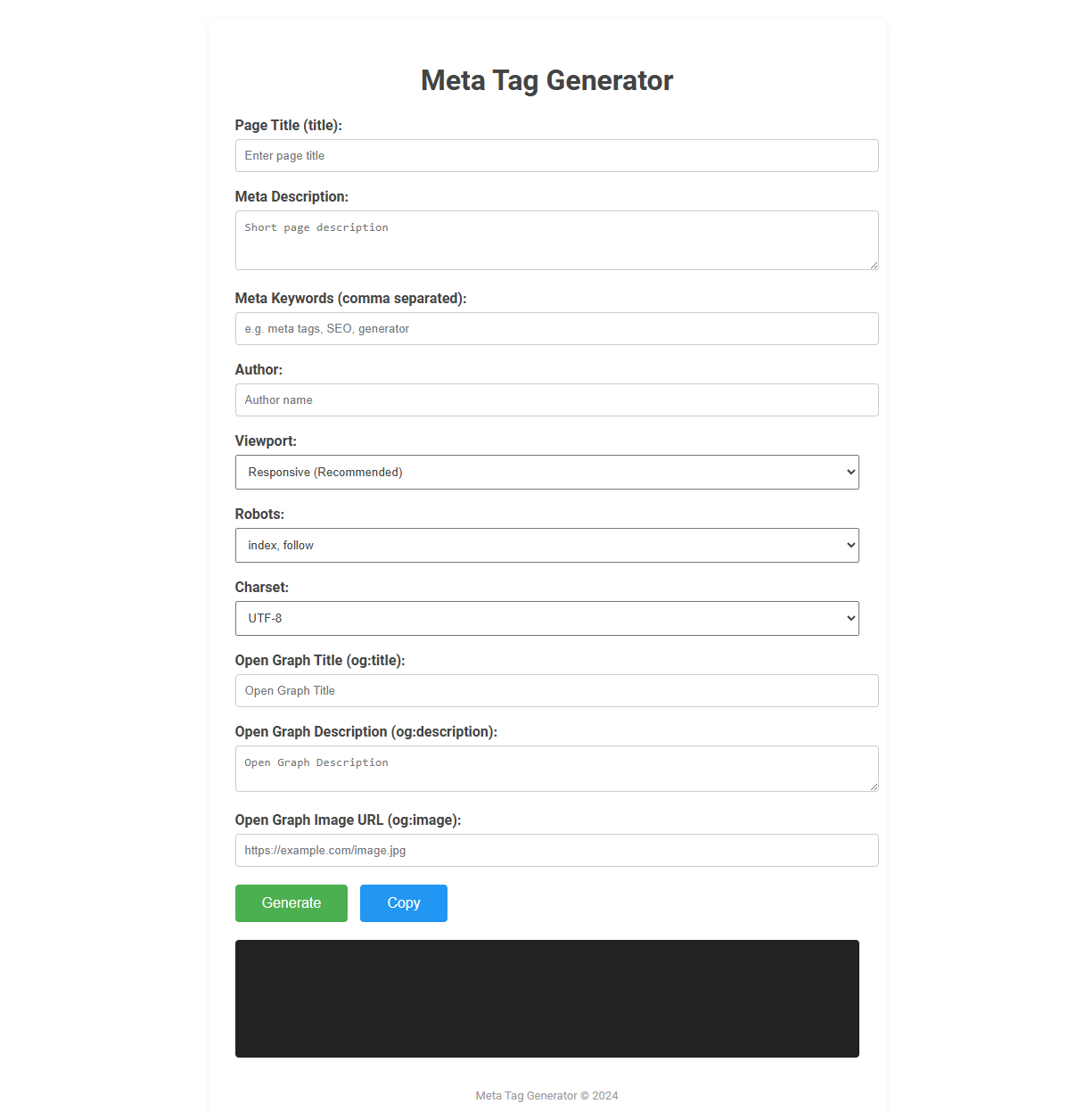
The Meta Tag Generator tool is a web-based utility designed to help users create optimized meta tags for HTML pages, enhancing search engine optimization (SEO) and social media sharing. It enables users to input parameters like title, description, keywords, author, viewport, robots directives, charset, and Open Graph properties, then instantly generates the corresponding meta tag code. This tool is essential for web developers and digital marketers seeking to improve site visibility, indexing and presentation on search and social platforms.
How to use this tool?
Complete Guide: How to Use the Meta Tag Generator Tool
-
Access the Tool:
- Open the Meta Tag Generator tool in your browser.
-
Fill Out the Form Fields:
- Page Title (title): Enter the title for your webpage. This shows in the browser tab and search engine results.
- Meta Description: Write a brief description of your page. Keep it concise and relevant for better SEO.
- Meta Keywords (comma separated): Input keywords related to your page, separated by commas. Although not widely used by search engines now, it can help with organization.
- Author: Provide the name of the page or content author.
- Viewport: Select the recommended responsive option. This makes your page render well on all device sizes.
- Robots: Choose how search engines should index your page. Commonly "index, follow" is selected to allow search engines to index the page and follow links.
- Charset: UTF-8 is standard and ensures proper text encoding.
- Open Graph Title (og:title): Enter the title that will display when your page is shared on social media.
- Open Graph Description (og:description): Provide a summary for social sharing (it may differ from meta description).
- Open Graph Image URL (og:image): Insert the direct URL to the image to show when someone shares your page on platforms like Facebook or Twitter.
-
Generate Meta Tags:
- After completing the form, click the Generate button. The tool will create a set of HTML meta tags based on your input.
-
Copy the Generated Tags:
- Click the Copy button to copy the generated code to your clipboard.
-
Paste into Your HTML:
- Open your website's HTML file.
- Paste the copied meta tags within the
<head>section of your webpage.
-
Save and Upload:
- Save your changes and upload the updated HTML file to your server.
-
Validate and Test:
- Use browser tools or online validators to make sure your meta tags are working correctly.
- Share your link on social media to verify Open Graph data displays as intended.
This workflow ensures your webpage is optimized for both search engines and social sharing platforms, improving visibility and engagement.
Introduction: Boost Website Rankings Using a Free Meta Tag Generator
Boost website rankings effortlessly with a free Meta tag generator that creates optimized meta titles and descriptions tailored to your content. This tool enhances search engine visibility by generating precise, keyword-rich tags that improve click-through rates. Utilizing a Meta tag generator streamlines SEO efforts, making it easier to attract targeted organic traffic and increase online presence.
Why Meta Tags Matter for SEO Success
Meta tag generators create precise HTML tags that improve website visibility in search engine results. Effective meta tags influence click-through rates by providing relevant keywords and clear descriptions. Optimized meta tags enhance SEO success through better indexing and increased organic traffic.
Key Features of an Effective Online Meta Tag Generator
An effective online Meta tag generator provides accurate keyword suggestions tailored to your website's content, enhancing SEO performance. It offers customizable fields for title, description, and keywords, ensuring your meta tags are both unique and relevant. Real-time previews and compatibility checks help you optimize tags that improve click-through rates and search engine rankings.
Step-by-Step Process: How to Use the Free Meta Tag Generator Tool
Using the free Meta Tag Generator tool involves a simple step-by-step process to enhance your website's SEO. First, input your page title, description, and keywords into the designated fields to create relevant meta tags. Copy the generated code and paste it into your website's HTML to optimize your site's search engine visibility.
Essential Meta Tags for Better Search Engine Visibility
Essential meta tags like title, description, and keywords significantly improve your website's search engine visibility by accurately summarizing content for crawlers. Properly optimized meta tags enhance click-through rates by providing clear and relevant information directly in search results. Using a meta tag generator helps you create precise tags that boost your site's SEO effectiveness efficiently.
Enhancing Social Media Sharing with Open Graph Tags
Meta tag generators simplify creating Open Graph tags that optimize how your content appears on social media platforms, improving visibility and engagement. These tags control titles, descriptions, and images shared on networks like Facebook and LinkedIn, ensuring your posts attract clicks and shares. Using a meta tag generator helps you tailor metadata precisely for enhanced social media performance.
Optimizing for Mobile: Responsive and Viewport Meta Tags
Meta tag generators streamline the creation of responsive and viewport meta tags crucial for mobile optimization. Implementing viewport tags ensures web pages render correctly across diverse screen sizes, enhancing user experience on smartphones and tablets. Responsive meta tags adapt layouts dynamically, improving page load speed and accessibility on mobile devices.
Pro Tips for Crafting High-Impact Meta Descriptions and Titles
Use a Meta Tag Generator to create concise, keyword-rich titles and descriptions that improve search engine visibility and click-through rates. Pro tips include integrating primary keywords naturally within 50-60 characters for titles and 150-160 characters for descriptions to maximize impact. Craft compelling, action-oriented language that accurately reflects page content to enhance user engagement and SEO performance.
Validating and Testing Your Meta Tags for Optimal Performance
Validating and testing your meta tags ensures they meet SEO standards and improve search engine rankings. Use tools like Google Search Console and Meta Tag Analyzer to check tag accuracy and relevance. Consistent testing helps optimize click-through rates and enhances overall website performance.
Meta tag generator Tool Preview