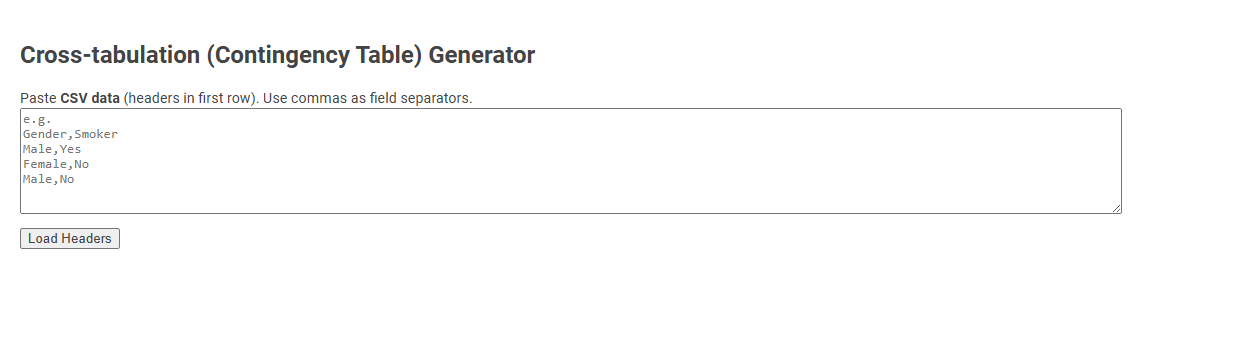
The Cross-tabulation (Contingency Table) Generator tool allows users to input CSV data and automatically generate contingency tables to summarize the relationship between two categorical variables. This is essential for analyzing patterns, associations, or dependencies within datasets, aiding statistical analysis and decision-making. Simply paste CSV data with headers and use the interface to quickly visualize the cross-tabulated results.
How to use this tool?
Complete Guide: How to Use the Cross-tabulation (Contingency Table) Generator Tool
-
Prepare Your Data:
- Your data must be in CSV format (headers in the first row).
- Use commas
,as field separators. - Example format:
Gender,Smoker

 Male,Yes

 Female,No

 Male,No
-
Paste Your Data:
- Click inside the large textbox area on the page.
- Paste your CSV data, including headers.
-
Load Headers:
- Click the Load Headers button.
- The tool will identify the column headers from your first row (e.g., "Gender", "Smoker").
-
Select Variables for Cross-tabulation:
- You may be prompted to select which columns to use for the rows and columns of your cross-tabulation table.
- Choose your row variable (e.g., Gender) and column variable (e.g., Smoker).
-
Generate the Contingency Table:
- Click the button to generate or view your table (button label may vary, e.g., "Generate Table" or similar).
- The results will display as a cross-tabulation, showing the frequency counts of all combinations of the row and column variables.
-
Interpret the Table:
- Review the counts in the generated table to examine relationships between variables (e.g., how many males are smokers).
- Some tools may provide percentages or statistical summaries (optional).
Tips:
- Ensure your data doesn't have extra spaces or missing headers.
- If you encounter errors, check that all rows have the correct number of fields (match headers).
- This tool is used for simple exploratory data analysis--use statistical software for advanced options.
Introduction to Free Online Cross-Tabulation Tools
Free online cross-tabulation generators simplify data analysis by allowing users to create contingency tables without complex software. These tools enable quick comparison of categorical variables, enhancing decision-making through clear visualization of relationships. Ideal for researchers and marketers, they support data-driven insights with user-friendly interfaces and real-time results.
Key Features of Contingency Table Generators
Cross-tabulation generators allow you to quickly create contingency tables that display the relationship between categorical variables. Key features include customizable row and column variables, automated calculation of joint and marginal frequencies, and options for displaying percentages or chi-square statistics. These tools enhance your data analysis by providing clear, visual insights into variable associations.
Preparing Your CSV Data for Analysis
Preparing your CSV data for a cross-tabulation generator requires ensuring clean, well-structured datasets with clearly labeled columns and consistent categorical values. Organize your data so each row represents a unique observation, and each column corresponds to variables you wish to analyze, avoiding missing or ambiguous entries. Properly formatted CSV files with standardized headers enhance the accuracy and efficiency of generating meaningful contingency tables.
Step-by-Step Guide to Using the Online Tool
A Cross-tabulation (contingency table) generator simplifies analyzing relationships between categorical variables by organizing data into a matrix format. To use the online tool, first upload your dataset or input data manually, then select the variables for rows and columns to create the table. Finally, customize options such as filtering or weighting before generating and exporting the contingency table for further analysis.
Loading and Identifying Data Headers
Cross-tabulation (contingency table) generators require accurate loading of datasets to analyze categorical variable relationships effectively. Identifying data headers correctly ensures precise mapping of row and column variables, enhancing the clarity of frequency distributions. Proper header recognition streamlines the generation of meaningful cross-tab reports for statistical analysis.
Selecting Row and Column Variables
Selecting row and column variables in a cross-tabulation (contingency table) generator is crucial for analyzing relationships between categorical data. The row variable typically represents the primary category for comparison, while the column variable displays the secondary category to evaluate joint distributions. Proper variable selection ensures accurate interpretation of frequency counts and patterns within the dataset.
Generating and Viewing Cross-Tabulation Results
A Cross-tabulation (contingency table) generator simplifies analyzing relationships between categorical variables by producing clear frequency distributions. It enables quick generation and viewing of cross-tabulation results, highlighting patterns and associations within data sets. Interactive features allow users to customize table layouts, filter variables, and export results for detailed statistical analysis.
Interpreting Frequency and Percentage Outputs
A Cross-tabulation (contingency table) generator helps you analyze relationships between categorical variables by displaying frequency counts and percentage distributions. Understanding the output involves interpreting raw frequencies to identify data patterns, while percentage values clarify each category's relative contribution. This dual insight aids in making data-driven decisions and spotting significant associations in your dataset.
Common Data Preparation Tips and Troubleshooting
A Cross-tabulation (contingency table) generator requires clean, well-structured categorical data for accurate analysis. Common data preparation tips include ensuring consistent category labels, handling missing values by imputation or exclusion, and encoding variables properly to maintain data integrity. Troubleshooting often involves checking for data entry errors, verifying category alignment, and confirming appropriate variable selection to prevent misleading results.
Cross-tabulation (contingency table) generator Tool Preview