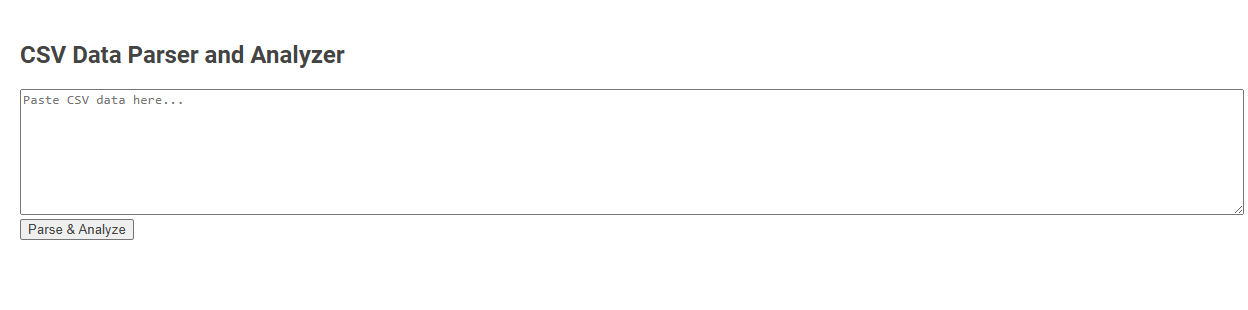
CSV Data Parser and Analyzer is a tool for importing, parsing, and analyzing raw CSV content directly within a web interface. This tool enables users to quickly process tabular data for errors, structure, or summary statistics without external software. It is primarily used by pasting CSV data into the input area and clicking "Parse & Analyze" to receive immediate insights.
How to use this tool?
Complete Guide to Using the CSV Data Parser and Analyzer Tool
-
Prepare Your CSV Data
Ensure your data is in proper CSV (Comma-Separated Values) format, with columns separated by commas and each row on a new line. Example:
Name,Age,Country
John Doe,30,USA
Jane Smith,25,Canada
-
Open the Tool
Make sure the CSV Data Parser and Analyzer interface is visible, as shown in the image. -
Paste Your Data
Click inside the large textarea labeled Paste CSV data here....
Use Ctrl+V (Windows) or Cmd+V (Mac) to paste your prepared CSV content. -
Start Parsing and Analyzing
Click the button located below the textarea.
The tool will process your CSV input. -
View Results
After clicking the button, analysis and parsing results will appear on the page.
Typical outputs may include:- Table view of your data
- Summary statistics (e.g., counts, averages)
- Error messages if the CSV format is incorrect
-
Troubleshooting
- If you receive an error, check your data for missing headers, inconsistent columns, or formatting issues.
- Make sure no extra commas or line breaks are present that may break the CSV format.
- Paste only valid CSV data into the textarea.
-
Tips
- Use a simple text editor to prepare your CSV before pasting.
- If data is large, be patient while the tool processes your input.
Summary
Paste your CSV, click Parse & Analyze, and review the results. Edit and retry as needed for best results.
Key Features of the Free Online CSV Data Parser and Analyzer
The Free Online CSV Data Parser and Analyzer offers seamless file upload and instant parsing of large CSV datasets, ensuring efficient data handling. It provides advanced filtering, sorting, and visualization tools that help uncover insights and trends quickly. You can export analyzed results in multiple formats to streamline your data management and reporting tasks.
How to Format and Prepare CSV Data for Upload
To format and prepare your CSV data for upload, ensure each column has a clear, descriptive header and that all data entries are consistently formatted without extra spaces or special characters. Validate date formats, remove empty rows, and confirm that delimiters such as commas or semicolons are used uniformly throughout the file. Properly prepared CSV files minimize errors during parsing and enable more accurate data analysis.
Step-by-Step Guide: Accessing the CSV Parsing Tool
Accessing the CSV parsing tool begins with uploading your CSV file through the designated interface. You will then select parsing options such as delimiter type and encoding to tailor the data extraction accurately. The tool processes the file, enabling detailed analysis and visualization of structured CSV data for valuable insights.
How to Import or Paste CSV Data Efficiently
Efficiently importing or pasting CSV data involves choosing the right parser that supports seamless integration with your workflow. Use tools that allow direct pasting of CSV content without requiring file uploads, minimizing time spent on data preparation. Your process becomes faster when the parser automatically detects delimiters and handles large datasets smoothly.
Initiating the Parsing and Automated Analysis Process
Initiating the parsing and automated analysis process for CSV data involves loading the file into a specialized parser that interprets rows and columns according to predefined schema rules. The parser validates data integrity and formats during ingestion, enabling seamless error detection and correction. Automated analysis algorithms then extract key metrics, identify patterns, and generate actionable insights from the structured dataset.
Understanding Table Views and Data Output Summaries
A CSV data parser and analyzer transforms raw data into structured formats, enabling clear table views for easy interpretation. Understanding table views allows you to quickly identify patterns, anomalies, and key metrics within your dataset. Data output summaries provide concise statistical insights, enhancing decision-making through accurate and actionable information.
Common CSV Formatting Errors and Troubleshooting Solutions
Common CSV formatting errors include inconsistent delimiter usage, improper quotation marks, and missing headers. These issues often cause parsing failures or data misalignment in CSV data parsers and analyzers. Implementing validation routines and error-handling mechanisms significantly improves accuracy and troubleshooting efficiency.
Best Practices for Handling Large or Complex CSV Files
Effective CSV data parsing and analysis of large or complex files requires efficient memory management and streaming techniques to process data without loading entire files into RAM. Implementing chunk-wise reading combined with robust error handling ensures accurate parsing of diverse data types and inconsistent formatting. Utilizing parallel processing frameworks and indexing strategies significantly accelerates data querying and transformation tasks.
Tips to Maximize Analysis Accuracy with the Tool
To maximize analysis accuracy with a CSV data parser and analyzer, ensure proper data cleansing by removing duplicates and correcting formatting errors before processing. Utilize built-in validation features to detect anomalies and maintain consistent data types across columns for reliable results. Regularly update parsing rules to accommodate diverse CSV structures and leverage advanced filtering options to focus on relevant data subsets.
CSV data parser and analyzer Tool Preview