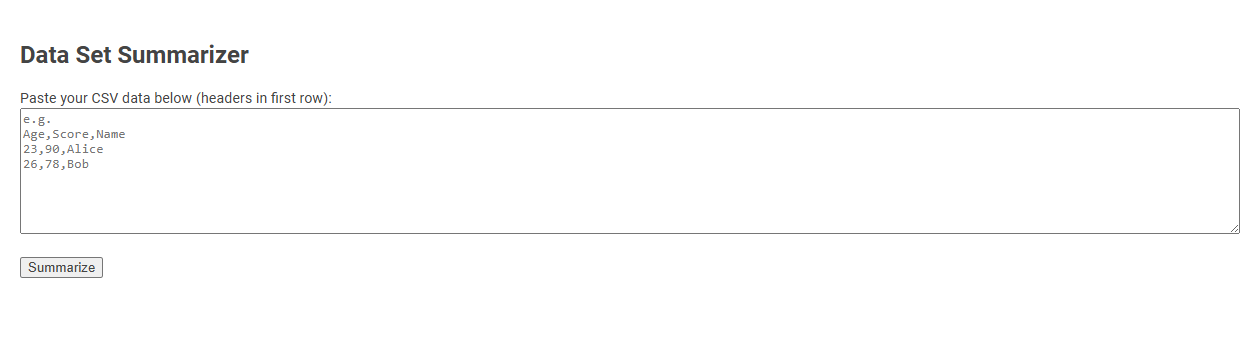
The Data Set Summarizer tool allows users to input CSV data and quickly receive a summarized analysis of their dataset. Designed for simplicity and efficiency, it helps users understand the structure and statistical properties of tabular data without the need for advanced data analysis skills. Usage involves pasting CSV data with headers into the provided field and clicking "Summarize" to generate a report.
How to use this tool?
Complete Guide: How to Use the Data Set Summarizer Tool
-
Prepare Your Data
- Create a CSV (comma-separated values) data set where the first row contains column headers (e.g.,
Age,Score,Name). - Each following row should contain corresponding data for each header, separated by commas (e.g.,
23,90,Alice).
- Create a CSV (comma-separated values) data set where the first row contains column headers (e.g.,
-
Access the Tool
- Visit the web page containing the Data Set Summarizer tool.
- You will see a large text area labeled "Paste your CSV data below (headers in first row):".
-
Enter Your Data
- Copy your prepared CSV data (including the header row).
- Paste the copied data into the provided text area. Example:
Age,Score,Name
23,90,Alice
26,78,Bob
-
Run the Summarizer
- Click the "Summarize" button located below the text area.
-
View Results
- The tool will process your CSV data and display a summary. Typical summaries may include:
- Statistical summaries (mean, min, max, etc.) for numeric columns.
- Basic information about text columns (e.g., most common values).
- Review the summary to gain quick insights from your data!
-
Tips for Best Results
- Ensure every row has the same number of columns as the header row.
- Avoid using commas within field values unless properly quoted as per CSV standards.
- Remove any blank lines before pasting to prevent errors.
Introduction to Free Online Dataset Summarization Tools
Free online dataset summarization tools provide efficient ways to distill large datasets into concise, meaningful overviews. These tools leverage statistical analysis and natural language processing to highlight key patterns, trends, and anomalies without requiring advanced technical skills. Users can quickly gain insights from complex data through interactive visualizations and automated summary reports.
Key Features of the Data Set Summarizer Tool
The Data Set Summarizer Tool offers rapid extraction of vital statistics, enabling quick insights into your data's structure and quality. It highlights key features such as data type detection, missing value analysis, and distribution summaries for each variable. You gain a comprehensive overview that supports informed decision-making and efficient data preprocessing.
Step-by-Step Guide: How to Prepare Your CSV Data
Preparing your CSV data begins with cleaning by removing duplicates and correcting errors to ensure accuracy. Next, organize your data into consistent formats and structure columns with clear, descriptive headers. Finally, validate your dataset by checking for missing values and standardizing entries to optimize it for summarization tools.
Accessing the Dataset Summarizer Tool Online
Access the Dataset Summarizer Tool online by visiting the official platform designed for quick data analysis. This tool allows you to upload your dataset and receive concise summaries highlighting key metrics and insights. Utilize the online interface to streamline your data exploration and enhance decision-making efficiently.
Instructions for Uploading or Pasting CSV Data
The Data Set Summarizer accepts CSV files up to 10MB, supporting both direct uploads and copy-paste input methods for seamless data integration. Ensure the CSV includes a header row with clear column names to facilitate accurate summarization and metadata extraction. Upload the file via the interface or paste your CSV content into the designated text area, then click "Summarize" to generate insights and statistical overviews.
Executing Dataset Summarization with a Single Click
Executing dataset summarization with a single click transforms complex data analysis into an effortless task. The Data Set Summarizer quickly generates comprehensive insights, highlighting key patterns and statistics without manual intervention. Your workflow becomes more efficient as critical data summaries are delivered instantly to support informed decision-making.
Exploring Statistical and Text Column Summaries
Data set summarizers provide detailed insights by exploring both statistical and text column summaries to reveal key patterns and distributions. Your analysis benefits from metrics such as mean, median, and standard deviation for numerical data, alongside frequency counts and unique value summaries for textual columns. These summaries enhance data understanding, enabling efficient preprocessing and informed decision-making.
Best Practices for Accurate Data Analysis Results
A data set summarizer enhances your ability to identify key patterns and outliers by providing clear, concise overviews of complex information. Best practices for accurate data analysis results include thorough data cleaning, consistent variable categorization, and leveraging robust summary statistics such as mean, median, and standard deviation. Ensuring data accuracy and relevance throughout the summarization process leads to more reliable and actionable insights.
Advantages of Using Free Online Data Summarization Tools
Free online data summarization tools offer quick extraction of key insights from large datasets, saving time and enhancing decision-making efficiency. They eliminate the need for advanced programming skills, making data analysis accessible to non-experts. These tools often support multiple data formats and provide customizable summary options, increasing flexibility for various business and research applications.
Data set summarizer Tool Preview