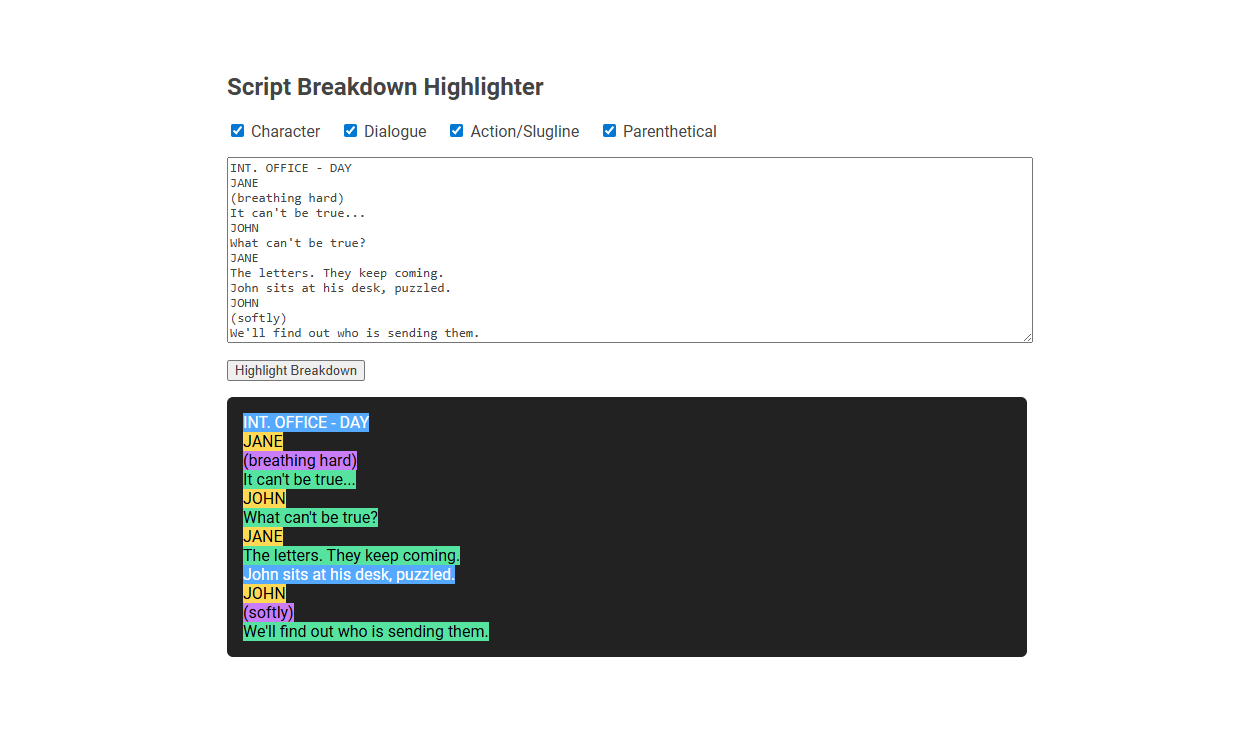
The Script Breakdown Highlighter tool is a digital utility designed to analyze and visually highlight different elements in a screenplay, such as characters, dialogue, actions/sluglines, and parentheticals. It streamlines the script breakdown process by using color distinctions for each element type, allowing screenwriters and production teams to quickly identify and organize script components for planning and scheduling. Users simply input script text, select which elements to highlight, and generate a color-coded visual breakdown for efficient script management.
How to use this tool?
Complete Guide: Script Breakdown Highlighter Tool
-
Choose Elements to Highlight:
-
At the top, select which script components you want highlighted by checking any combination of these boxes:
- Character
- Dialogue
- Action/Slugline
- Parenthetical
-
At the top, select which script components you want highlighted by checking any combination of these boxes:
-
Paste or Write Your Script:
- Enter your script text into the large textbox area provided. Paste your script or write it directly in standard script format (with clear distinctions between sluglines, character names, dialogue, actions, and parentheticals).
-
Highlight Breakdown:
- Click the "Highlight Breakdown" button below the textbox. The tool will process your script and visually highlight each selected script element.
-
Understanding Highlights:
-
Each script element type will be color-coded in the result panel below the script entry area:
- Action/Slugline (Blue)
- Character (Yellow)
- Dialogue (Green)
- Parenthetical (Purple)
-
Each script element type will be color-coded in the result panel below the script entry area:
-
Reviewing & Editing:
- Check the highlighted breakdown in the dark display panel below. If anything appears incorrect, edit the script in the textbox and click "Highlight Breakdown" again to refresh the highlights.
-
Tips for Best Results:
- Use standard script formatting for best accuracy: uppercase sluglines, character names, dialogue immediately below, action in regular case, and parentheticals in parentheses.
- Toggle checkboxes to show or hide highlights for specific elements, helping you focus on the structure you need.
Summary
The Script Breakdown Highlighter Tool helps writers, directors, and script analysts visually separate and identify components of a screenplay for easier reading, analysis, and preparation. Simply paste your script, select what to highlight, and review the visual breakdown.
Script Breakdown Highlighter: Transforming Videography Workflows
Script Breakdown Highlighter revolutionizes videography workflows by efficiently identifying and organizing key script elements for seamless production planning. You gain enhanced clarity and speed, enabling precise shot management and resource allocation. This tool transforms your project execution with streamlined, data-driven insights tailored to filmmaking needs.
Key Features of the Free Online Script Breakdown Tool
Script Breakdown Highlighter offers an intuitive platform to simplify your script analysis with automatic scene, character, and prop tagging. Its user-friendly interface supports multiple file formats, ensuring seamless upload and quick extraction of key elements. The tool enhances workflow efficiency by allowing real-time highlighting and customizable notes directly within your script.
How Script Breakdown Accelerates Production Planning
Script breakdown accelerates production planning by quickly identifying key elements such as scenes, characters, props, and locations, enabling precise resource allocation. Your team gains clarity on scheduling, budgeting, and crew assignments, reducing delays and unexpected costs. This streamlined process ensures a smoother workflow from pre-production to shooting.
Step-by-Step Guide: Using the Script Breakdown Highlighter
The Script Breakdown Highlighter simplifies identifying key elements in your script by color-coding characters, props, and locations for quick reference. Start by uploading your script, then assign specific colors to various categories to visually organize your scenes. This step-by-step method enhances your workflow, making production planning more efficient and accurate.
Custom Element Selection for Tailored Highlighting
Script breakdown highlighter leverages Custom Element Selection to enable tailored highlighting of specific script components such as characters, props, and locations. This feature allows users to precisely select and highlight elements relevant to their analysis, improving organizational clarity and workflow efficiency. Enhanced customization supports detailed script annotation, making it an essential tool for production and storytelling teams.
Visualizing Scripts: Benefits of Color-Coded Elements
Script breakdown highlighters enhance your ability to visualize scripts by assigning distinct colors to characters, props, and settings. This color-coded system improves organization, making it easier to track and analyze essential elements at a glance. Using visual cues accelerates decision-making and streamlines the production planning process.
Optimizing Team Collaboration with the Script Highlighter
Script breakdown highlighter enhances team collaboration by clearly marking scenes, characters, and key elements within the script for easy reference. This tool streamlines communication among writers, directors, and production staff, reducing misinterpretations and saving valuable time. Optimizing script organization accelerates pre-production workflows and ensures alignment across creative teams.
Practical Applications for Videographers and Filmmakers
Script breakdown highlighters streamline the pre-production process by organizing scenes, characters, props, and locations with color-coded precision. You gain faster scheduling and budgeting insights, reducing time spent on manual notes. This tool enhances collaboration among videographers and filmmakers, ensuring a smooth shoot and efficient resource management.
Top Tips for Maximizing Script Analysis Efficiency
Script breakdown highlighters streamline the process of categorizing characters, props, and scenes for efficient script analysis. Prioritize color-coding based on scene importance and character presence to quickly identify key elements. Use your script breakdown highlighter to create organized, visually distinct notes that enhance your workflow and reduce preparation time.
Script breakdown highlighter Tool Preview