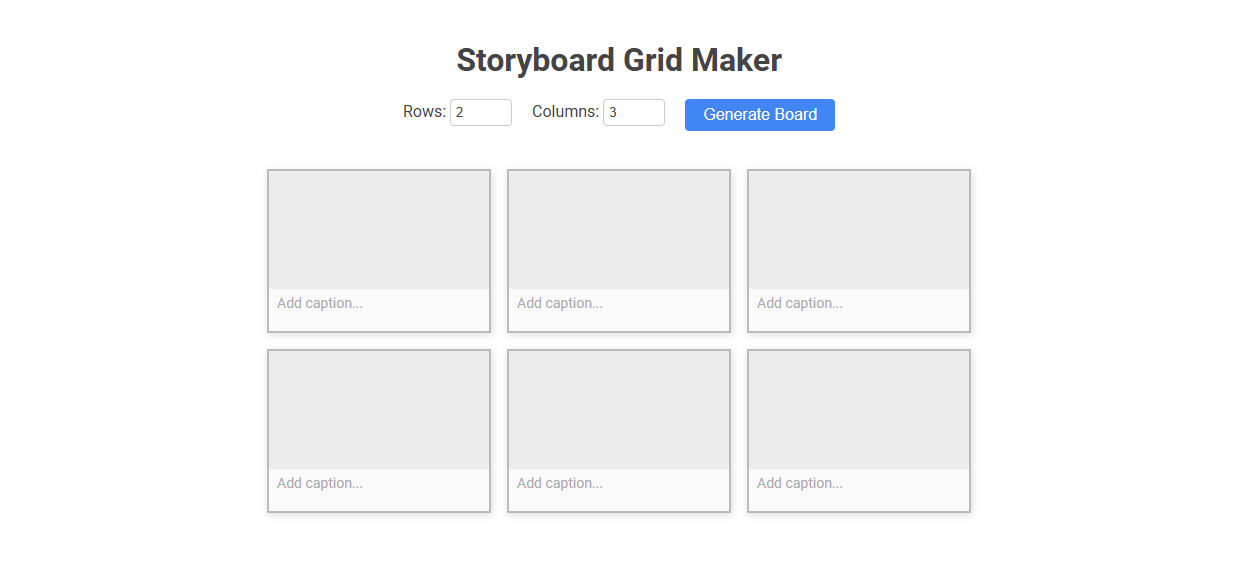
Storyboard Grid Maker is an interactive tool designed for creating organized storyboard layouts by specifying custom rows and columns. It streamlines planning for visual storytelling, film, or animation by letting users generate grids, insert images, and add captions to each frame. Ideal for directors, creative teams, or content planners, this tool makes arranging and visualizing story sequences efficient and intuitive.
How to use this tool?
Complete Guide to Using the Storyboard Grid Maker Tool
-
Access the Tool:
Open the Storyboard Grid Maker tool in your web browser. -
Set Grid Dimensions:
At the top of the page, you'll see input fields labeled "Rows" and "Columns." Enter the number of rows and columns you want your storyboard grid to have.- Example: Enter 2 for Rows and 3 for Columns for a 2x3 grid.
-
Generate Board:
Click the blue Generate Board button. The storyboard grid will appear below, organized according to your specified rows and columns. -
Add Storyboard Panels:
Each square in the grid represents a storyboard panel. Click on each panel area to upload or place your image or illustration if the tool allows it.- If image upload is not supported, use the panel for sketching or visualization.
-
Add Captions:
Under each panel, there's a field labeled "Add caption...". Click inside this field and type your caption, description, dialogue, or notes for each panel. -
Edit Your Board:
You can modify the number of rows and columns at any time and click Generate Board again to reset or adjust your grid.- Note: Changing the grid size may reset your existing panels and captions.
-
Save/Export Your Storyboard:
If the tool provides a save, download, or export button, use it to export or save your storyboard (often in image or PDF format).- If not, take a screenshot to save your storyboard manually.
Tips for Best Use
- Plan your storyboard sequence before creating your grid.
- Keep captions clear and concise for easy understanding.
- Adjust panel size and grid as needed for your story flow.
Introduction to Free Online Storyboard Grid Makers
Storyboard grid makers offer intuitive platforms for creating organized visual plans essential in filmmaking and content production. Free online storyboard grid makers provide customizable templates that streamline scene visualization without software installation. These tools enhance creative workflow by enabling easy arrangement of sketches, text, and shot details in a structured grid format.
Key Features of Online Storyboard Tools for Videographers
Storyboard grid makers offer videographers intuitive drag-and-drop interfaces that simplify scene organization and shot planning. High-resolution export options and customizable templates empower you to create professional visual narratives efficiently. Collaborative features enable seamless teamwork, ensuring storyboard updates are accessible in real-time across devices.
Step-by-Step Guide: Accessing the Storyboard Grid Platform
Accessing the Storyboard Grid Maker platform begins by visiting the official website and creating a user account for personalized project management. Navigate to the dashboard where users can select from various customizable storyboard grid templates tailored to different production needs. The platform supports seamless saving and exporting options, streamlining the storyboard creation process for filmmakers and animators.
Customizing Grid Dimensions for Your Video Project
Storyboard grid makers enable precise customization of grid dimensions to match specific video project requirements. Users can adjust rows, columns, and cell sizes to organize visual sequences effectively. Tailoring grid layouts enhances storyboard clarity and supports efficient project planning.
Creating and Organizing Storyboard Panels
Storyboard grid maker streamlines the process of creating and organizing storyboard panels with customizable layouts tailored to film, animation, and video projects. It enhances visual planning by allowing users to arrange panels in grids, adjust panel sizes, and add detailed annotations for each frame. This tool improves workflow efficiency by keeping all storyboard elements neatly aligned and easily accessible for collaborative storytelling.
Adding Captions, Notes, and Descriptions to Panels
Storyboard grid makers streamline the process of adding captions, notes, and descriptions directly to each panel, enhancing clarity and communication in visual storytelling. This feature allows creators to annotate scenes with precise details, dialogue, and instructions, ensuring that the narrative flow is easily understood by collaborators. Efficient captioning and note integration improve project organization and facilitate smoother production workflows.
Editing and Adjusting Your Storyboard Grid
Editing and adjusting your storyboard grid allows precise customization of frame size, layout, and spacing to match your project's unique visual flow. The intuitive interface enables you to easily rearrange panels, resize cells, and modify grid lines for optimal storytelling clarity. Your creative process benefits from real-time updates, ensuring the storyboard aligns perfectly with your narrative vision.
Saving, Exporting, or Sharing Your Storyboard
Storyboard grid makers allow you to save your progress effortlessly, ensuring your creative work is never lost. Export options include high-resolution PDFs or image files, making it easy to print or present your storyboard professionally. Sharing features enable instant collaboration by sending your storyboard directly through email or cloud platforms.
Best Practices for Effective Storyboarding Online
Storyboard grid makers streamline the process of organizing visual narratives by providing customizable templates for clear, concise scenes. Best practices for effective storyboarding online include maintaining consistent frame sizes, using precise annotations, and aligning story progression with your project goals. Utilizing these techniques ensures your storyboard communicates ideas efficiently and enhances collaborative feedback.
Storyboard grid maker Tool Preview