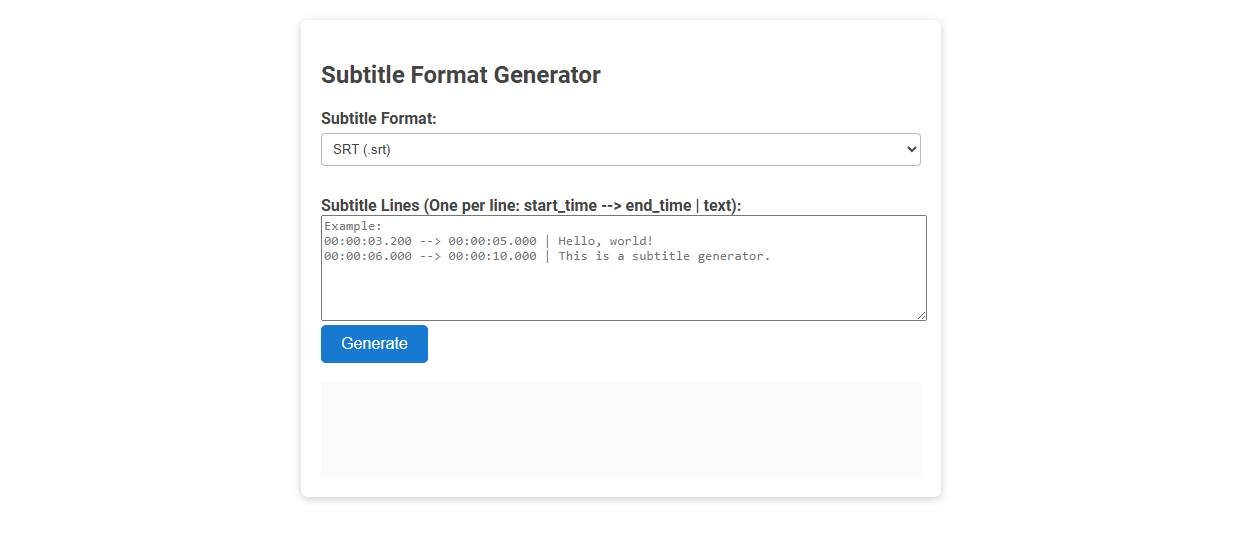
Subtitle Format Generator is a tool designed to convert user-provided subtitles into widely-used formats like SRT by specifying start time, end time, and subtitle text. It simplifies subtitle file creation for videos, ensuring compatibility with various video players and editing platforms. Users select the desired format, input their subtitle lines, and instantly generate ready-to-use subtitle files.
How to use this tool?
Complete Guide: How to Use the Subtitle Format Generator Tool
-
Choose Your Subtitle Format
- Locate the "Subtitle Format" dropdown menu.
- Click the dropdown and select the desired subtitle file format (e.g., SRT). -
Enter Subtitle Lines
- In the text area labeled "Subtitle Lines (One per line: start_time --> end_time | text):", enter each subtitle line in the specified format:
start_time --> end_time | subtitle text
- Example (as shown):
00:00:03.200 --> 00:00:05.000 | Hello, world!
00:00:06.000 --> 00:00:10.000 | This is a subtitle generator.
- Each line should have the time section and text separated by a pipe|.- start_time: When the subtitle appears (hh:mm:ss.mmm)
- end_time: When the subtitle disappears (hh:mm:ss.mmm)
- subtitle text: The text to be shown
-
Generate Subtitles
- After entering all subtitle lines, click the blue Generate button. -
Retrieve Output
- The generated subtitle file content will appear in the output box below the button.
- Copy this content and save it as a subtitle file matching the format you selected (e.g.,example.srt).
Tips
- Be sure your time format matches the required format:
hh:mm:ss.mmm - Double-check there are no overlapping time intervals for different subtitles.
- If your subtitle tool or video player needs a particular format (SRT, VTT, etc.), always select the matching option before generating.
Introduction: Why Videographers Need Subtitle Format Generators
Subtitle format generators simplify the process of creating accurate and compatible subtitles for various video platforms. You can enhance viewer engagement and accessibility by ensuring subtitles meet industry standards and sync perfectly with your content. These tools save time and reduce errors, making them essential for professional videographers.
Key Features of a Free Online Subtitle Format Generator
A free online subtitle format generator offers seamless conversion between popular subtitle formats such as SRT, VTT, and ASS. You can easily customize timing, font styles, and synchronization to ensure perfect alignment with your video content. This tool supports batch processing, enabling efficient handling of multiple subtitle files without compromising quality.
Supported Subtitle Formats for Video Projects
A Subtitle Format Generator supports various popular subtitle formats including SRT, VTT, SSA, and ASS, ensuring compatibility with your video projects. These formats enable precise timing and styling options to enhance viewer experience across platforms. You can easily create and customize subtitles that fit your project's specific needs.
Step-by-Step Guide: Creating Subtitles with the Online Tool
Creating subtitles is easy with our Subtitle Format Generator. You begin by uploading your video file, then input the dialogue for each timestamp using the online tool's intuitive interface. Your subtitles are ready to download in various formats, ensuring compatibility with all media players.
Customizing Subtitle Timing and Text for Accuracy
A Subtitle Format Generator enables precise customization of subtitle timing and text to enhance accuracy in video content. You can adjust start and end times frame-by-frame, ensuring perfect synchronization with audio. This tool supports various formats, allowing your subtitles to align seamlessly across multiple platforms for an optimal viewing experience.
Exporting and Downloading Various Subtitle File Types
Subtitle format generators streamline exporting and downloading subtitles by supporting multiple file types such as SRT, VTT, and ASS. These tools ensure compatibility with different media players and platforms, allowing precise timing and formatting retention. Users can quickly export subtitles in their preferred format for seamless integration into videos or streaming services.
Troubleshooting Common Subtitle Generation Issues
Subtitle format generators often encounter common issues such as timing mismatches, encoding errors, and font compatibility problems. Troubleshooting involves verifying synchronization with video frames, ensuring UTF-8 encoding for special characters, and selecting widely supported subtitle formats like SRT or VTT. Regular updates of subtitle software and validation through preview tools significantly reduce generation errors.
Best Practices for Subtitle Formatting in Videography
A Subtitle Format Generator streamlines creating clear, readable captions by adhering to best practices in videography. Ensure subtitles use concise language, proper timing, and legible font sizes to enhance viewer comprehension and engagement. Your videos will benefit from improved accessibility and a professional appearance by following these guidelines.
Integrating Subtitles into Popular Video Editing Software
Subtitle format generators streamline the integration of captions into popular video editing software like Adobe Premiere Pro, Final Cut Pro, and DaVinci Resolve. These tools support various subtitle formats such as SRT, VTT, and ASS, ensuring compatibility and seamless editing workflow. Enhance your video projects by using a subtitle format generator to maintain accurate timing and localization across multiple platforms.
Subtitle format generator Tool Preview