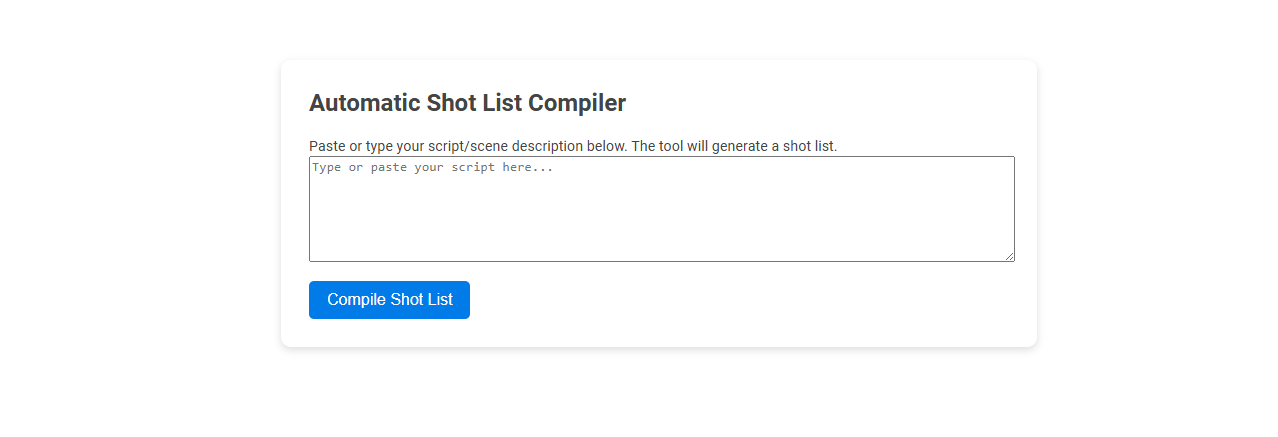
The Automatic Shot List Compiler is a tool that instantly generates a shot list from your script or scene description, streamlining pre-production planning for filmmakers. It eliminates manual breakdowns, saving time and reducing human error. Simply paste or type your script, and the tool organizes essential cinematic shots for efficient production workflows.
How to use this tool?
Complete Guide: How to Use the Automatic Shot List Compiler Tool
-
Access the Tool:
Open the Automatic Shot List Compiler tool interface in your web browser. -
Prepare Your Script/Scene:
Have your script or a scene description ready. This can be the text of a screenplay, scene treatment, or a simple breakdown of events. -
Paste or Type Your Script:
Click inside the large text box labeled "Type or paste your script here..." Paste your text or type it directly into the box. -
Compile the Shot List:
Once you've entered your script or scene description, click the blue button labeled "Compile Shot List." -
Review the Generated Shot List:
The tool will process your text and generate a shot list, typically detailing the types of shots, angles, and coverage suggested by your description. -
Edit or Export:
Review the shot list for accuracy and completeness. Depending on the tool's functionality, edit inline or copy the list to your preferred document editor for further adjustments. -
Repeat as Needed:
For additional scenes, repeat the steps above with new text entries.
Tips:
- Be as descriptive as possible in your script/scene to ensure comprehensive shot coverage.
- Check the output for any missing or unclear elements, and refine your input for more precise results.
- Use for pre-production planning, communication with crew, and as a base to build detailed shooting schedules.
Introduction to Free Online Shot List Compiler Tools
Automatic shot list compiler tools streamline video production by organizing scenes and camera angles efficiently. Free online shot list compiler tools offer user-friendly interfaces, customizable templates, and real-time collaboration features that enhance pre-production planning. These platforms improve workflow, save time, and increase accuracy for filmmakers and content creators.
Key Features of Automatic Shot List Compilation
An Automatic Shot List Compiler streamlines your production workflow by intelligently organizing scenes, shot types, and camera angles into a cohesive schedule. Key features include real-time scene detection, customizable shot categorization, and integration with editing software for seamless project management. This technology enhances efficiency, reduces manual errors, and ensures your film shoots stay on track and well-coordinated.
Step-by-Step Setup Guide: Getting Started
The Automatic Shot List Compiler streamlines your pre-production by organizing scenes and camera angles efficiently. Begin by uploading your script and selecting desired scene parameters to tailor the shot list. Follow each step in the intuitive setup guide to customize and optimize your project workflow seamlessly.
Inputting Your Script for Best Results
Inputting your script accurately is crucial for an Automatic Shot List Compiler to generate precise shot recommendations. Ensure your script is clear, well-structured, and includes detailed scene descriptions to optimize the tool's semantic analysis. Providing complete dialogue and action details enhances the compiler's ability to align shots closely with your creative vision.
How the Tool Analyzes and Suggests Shots
The Automatic Shot List Compiler analyzes your script using advanced AI to identify key scenes, characters, and actions, breaking down complex narratives into organized shot categories. It suggests optimal camera angles, lighting setups, and shot sequences tailored to your story's tone and pacing. This tool streamlines your pre-production process by offering data-driven recommendations that enhance visual storytelling efficiency.
Reviewing and Customizing the Generated Shot List
Reviewing and customizing the generated shot list ensures it aligns perfectly with your project's vision and requirements. You can easily adjust shot sequences, add specific notes, or remove unnecessary frames for a streamlined workflow. This flexibility enhances efficiency and guarantees that every shot supports the creative goals.
Exporting and Integrating Shot Lists into Workflow
Automatic shot list compilers streamline exporting shot lists in various formats compatible with major editing and production software. Your workflow benefits from seamless integration, allowing real-time updates and collaboration across teams. Efficient export options reduce manual errors and accelerate post-production timelines.
Best Practices for Accurate Shot List Generation
Automatic shot list compilers enhance film production efficiency by organizing scenes based on script metadata and shooting schedules. Employing high-quality script parsing, consistent scene tagging, and integration with production calendars ensures your shot lists are accurate and tailored to real-time changes. Regularly updating your database and validating shot details against director inputs improves reliability and streamlines the overall workflow.
Advantages for Videographers and Production Teams
An Automatic Shot List Compiler streamlines the pre-production process by generating organized, detailed shot lists quickly, saving you valuable time. It enhances collaboration among videographers and production teams by providing a clear, accessible blueprint that reduces miscommunication and errors on set. Using this technology improves efficiency and ensures that creative vision is accurately translated into every shot captured.
Automatic shot list compiler Tool Preview