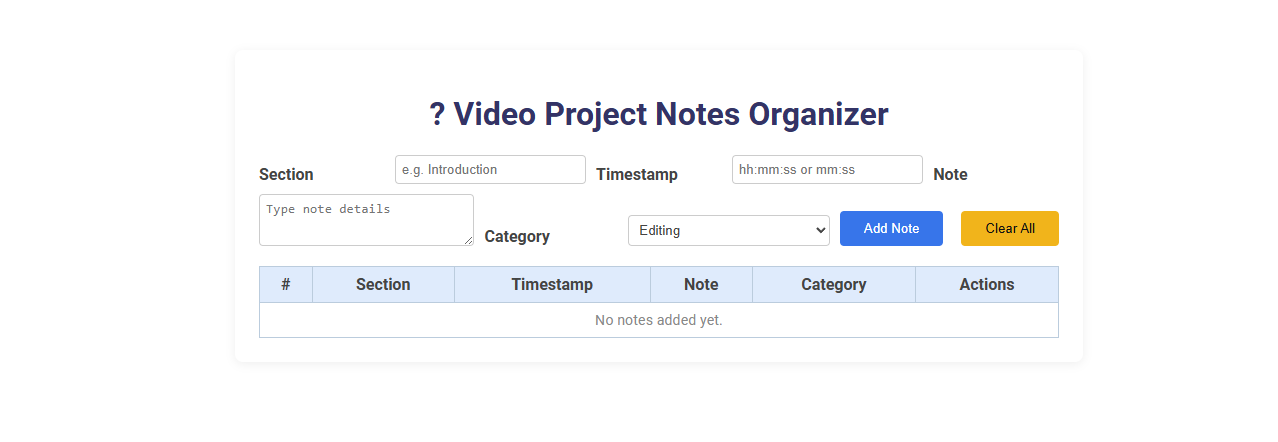
The Video Project Notes Organizer is a digital tool designed to systematically capture, categorize, and manage notes related to specific sections and timestamps within a video project. Its purpose is to streamline the video production workflow by allowing users to log detailed notes, assign them to sections, add precise timestamps, and classify them by category, ensuring easy reference and collaboration. Users input notes along with section titles, timestamps, and categories, then add or clear notes, creating an organized, searchable record for seamless project management.
How to use this tool?
Complete Guide: How to Use the Video Project Notes Organizer Tool
-
Open the Tool
Access the Video Project Notes Organizer Tool in your browser. -
Add a New Note
- In the Section field, type the name of the video section (e.g., Introduction, Scene 1).
- In the Timestamp box, input the relevant time from the video in the format hh:mm:ss or mm:ss.
- Note: Enter your detailed note or feedback about this part of the video.
- Select a Category from the dropdown (e.g., Editing, Content, Audio, Visuals, etc.).
- Click the Add Note button to save this note to your project list.
-
Organize Your Notes
- Each added note will appear in the table below the input fields.
- The table columns include an auto-number, Section, Timestamp, Note, Category, and Actions.
-
Edit or Delete Notes
- Use the Actions column to edit or remove any note as your project progresses (Button options may appear for each note).
-
Clear All Notes
- If you want to remove all notes and reset the organizer, click the Clear All button.
-
Best Practices
- Be specific in both Section and Timestamp to easily find points in the video later.
- Use Categories to sort notes by tasks or team members (e.g. pass all 'Editing' notes to the editor).
- Regularly update notes as project feedback evolves.
-
Export/Save (If available)
- Check for options to export or save your notes list for sharing or backup (Download/Export options may exist).
Tip:
- Keep the organizer open while reviewing your video for real-time notes entry.
- Frequent updates ensure that you don't lose important feedback or ideas.
This tool is ideal for personal video projects, team reviews, edits, and content planning. Use it to keep your workflow organized and efficient!
Introduction: The Need for Organized Video Project Notes
Introduction: The Need for Organized Video Project Notes Effective video project management demands clear, structured notes to track creative ideas, technical details, and progress milestones. Disorganized notes can lead to missed deadlines, inconsistent edits, and communication breakdowns within your team. Using a dedicated video project notes organizer ensures that every crucial element is recorded and easily accessible throughout the production cycle.
Key Features of the Free Online Video Project Notes Organizer
The Free Online Video Project Notes Organizer offers seamless integration with popular video platforms, enabling you to timestamp and annotate key moments efficiently. It features collaborative tools for real-time sharing and editing, ensuring your team stays synchronized. Advanced search and categorization options help quickly retrieve specific notes from extensive video projects.
Step-by-Step Guide: Getting Started with the Tool
The Video Project Notes Organizer streamlines content management by allowing users to capture and categorize video insights efficiently. Begin by creating a new project, then import your video files and set customizable tags for easier navigation. Utilize timestamped notes to enhance review processes and collaborate seamlessly with team members.
Adding and Structuring Notes for Different Video Sections
A video project notes organizer enables efficient addition and structuring of notes for various video sections, enhancing project clarity. Users can categorize notes by timestamps, scenes, or themes to streamline editing and collaboration. This structured approach improves workflow management and ensures precise communication among team members.
Managing Timestamps for Precise Note Placement
Managing timestamps in your video project notes organizer ensures precise note placement, enhancing workflow efficiency. Accurate timestamp alignment allows you to quickly reference specific moments, improving collaboration and editing speed. Integrating timestamp management features streamlines the review process and maintains organized project documentation.
Categorizing Notes for Efficient Collaboration
A Video Project Notes Organizer streamlines collaboration by categorizing notes into clear, accessible sections such as script ideas, shot lists, and feedback. Organized notes enhance team communication and reduce time spent searching for important information. You can efficiently track project progress and ensure all contributors stay aligned with project goals.
Editing, Deleting, and Updating Your Project Notes
Efficiently edit your video project notes by selecting specific entries to revise content, timestamps, or tags for better organization. Delete outdated or irrelevant notes to maintain a clutter-free workspace and streamline your editing process. Update your project notes regularly to reflect changes in the video timeline, ensuring accurate and up-to-date information for seamless project management.
Exporting and Saving Notes for Future Reference
Exporting and saving notes from your video project notes organizer ensures seamless access and review across devices. You can export notes in multiple formats such as PDF, TXT, or CSV for easy sharing and archival. Properly saved notes enhance project management by enabling quick retrieval and future reference.
Best Practices for Maximizing Organization and Productivity
Implement consistent naming conventions and use timestamps to streamline video project notes organization, enabling quick retrieval and reference. Integrate collaborative tools like Google Docs or Notion to facilitate real-time updates and team communication. Regularly review and categorize notes by scenes, edits, and feedback to enhance productivity and ensure no critical details are overlooked.
Video project notes organizer Tool Preview