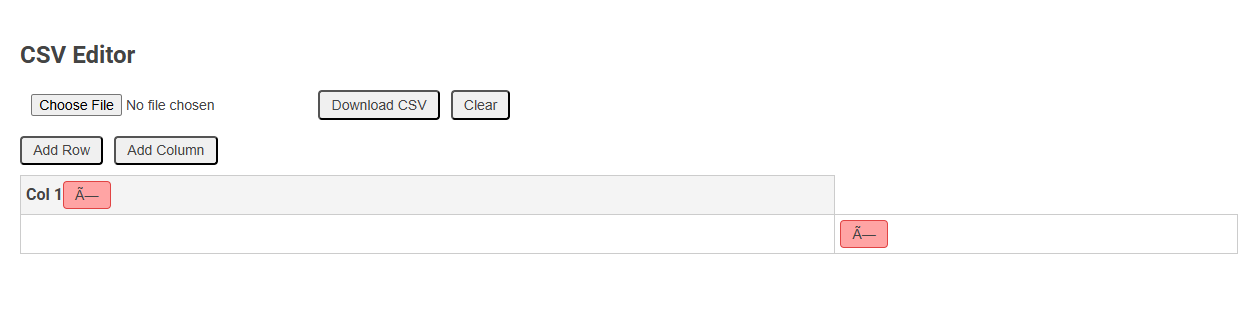
The CSV Editor tool enables users to create, modify, and manage CSV files directly in the browser, supporting easy data manipulation such as adding rows and columns or editing cell content. It is essential for handling tabular data efficiently without requiring advanced spreadsheet software. Users can upload existing CSV files, edit data, and download updated versions, streamlining workflow for data processing and analysis.
How to use this tool?
Complete Guide to Using the CSV Editor Tool
-
Uploading a CSV File
Click the Choose File button to select and upload a CSV file from your computer. The table will display the file contents for you to edit. -
Viewing and Editing Data
The table displays your CSV data. Each cell can be clicked and edited. Simply click inside a cell, update the value, and press Enter or click outside the cell to save the changes. -
Adding Rows
Use the Add Row button to insert a new blank row at the bottom of the table. You can then input new data directly into the cells of the new row. -
Adding Columns
Click the Add Column button to add an additional column to your table. A new column will appear at the end; enter values as needed. -
Clearing the Table
Press the Clear button to remove all data from the table and start from scratch. -
Downloading the Edited CSV
When you've finished editing, click Download CSV to download your edited table as a CSV file. -
Troubleshooting Character Issues
If you see strange characters (such as "A--"), your file might not be UTF-8 encoded. Ensure your CSV is UTF-8 when uploading, or try saving it as UTF-8 format in a text editor before re-uploading.
Tips
- You can freely combine editing, adding, and deleting cells before downloading your file.
- Use the Clear button carefully as it removes all data from the table without confirmation.
- If you want to start over, you can re-upload a file or clear the table at any time.
Introduction to Free Online CSV File Editor
Discover the convenience of a free online CSV file editor designed to simplify your data management tasks. This tool allows you to effortlessly view, edit, and organize CSV files without installing software, ensuring quick and efficient access to your data. Experience seamless CSV editing directly in your browser, optimizing productivity for both personal and professional use.
Key Features of the CSV Editing Tool
A CSV editor offers powerful features including easy row and column management, real-time data validation, and seamless import/export options to maintain data integrity. You can swiftly edit large datasets with advanced search, filtering, and bulk update capabilities designed for efficiency. The tool also supports customizable data formats and automation to simplify repetitive tasks and enhance your workflow.
How to Upload Your CSV File
To upload your CSV file in a CSV editor, start by selecting the upload or import option within the interface. Choose the CSV file from your device, ensuring it meets the editor's format requirements for seamless integration. The editor will then parse and display your data, allowing immediate editing and analysis.
Effortless Data Viewing and Cell Editing
A CSV editor enables effortless data viewing with a clear, organized grid layout that simplifies navigation and analysis. Your cell editing is streamlined through intuitive tools allowing quick modifications, data validation, and instant updates. This enhances productivity by reducing errors and speeding up data management tasks.
Adding New Rows to Enhance Your CSV
Adding new rows to your CSV file allows you to expand datasets effortlessly, improving data organization and analysis. Use a CSV editor to input records directly or import bulk data, ensuring consistency in formatting and structure. Efficient row addition streamlines updates, supporting dynamic and scalable data management.
Inserting Additional Columns Instantly
A CSV editor allows you to insert additional columns instantly, enhancing your data organization and analysis. This feature supports seamless expansion of datasets without disrupting existing content. Quickly add new columns to accommodate more information and improve data clarity.
Clearing and Resetting the Entire Table
A CSV editor streamlines data management by enabling quick clearing and resetting of the entire table, ensuring efficient starting points for new datasets. Users can remove all cell contents instantly without deleting the table structure, preserving headers and formatting. This feature enhances workflow by minimizing manual deletion and preventing structural errors during data refreshes.
Downloading and Exporting the Edited CSV
Download your edited CSV file quickly and securely with our intuitive CSV editor. Export options support multiple formats including Excel, JSON, and plain CSV to suit your data needs. You can easily customize export settings to ensure your data remains accurate and well-organized.
Solving Common Character Encoding Issues
A CSV editor helps you solve common character encoding issues by supporting multiple encoding formats such as UTF-8, ISO-8859-1, and ASCII. It allows seamless import and export of data without corrupting special characters or accents. This ensures your CSV files maintain data integrity across various platforms and applications.
CSV editor Tool Preview