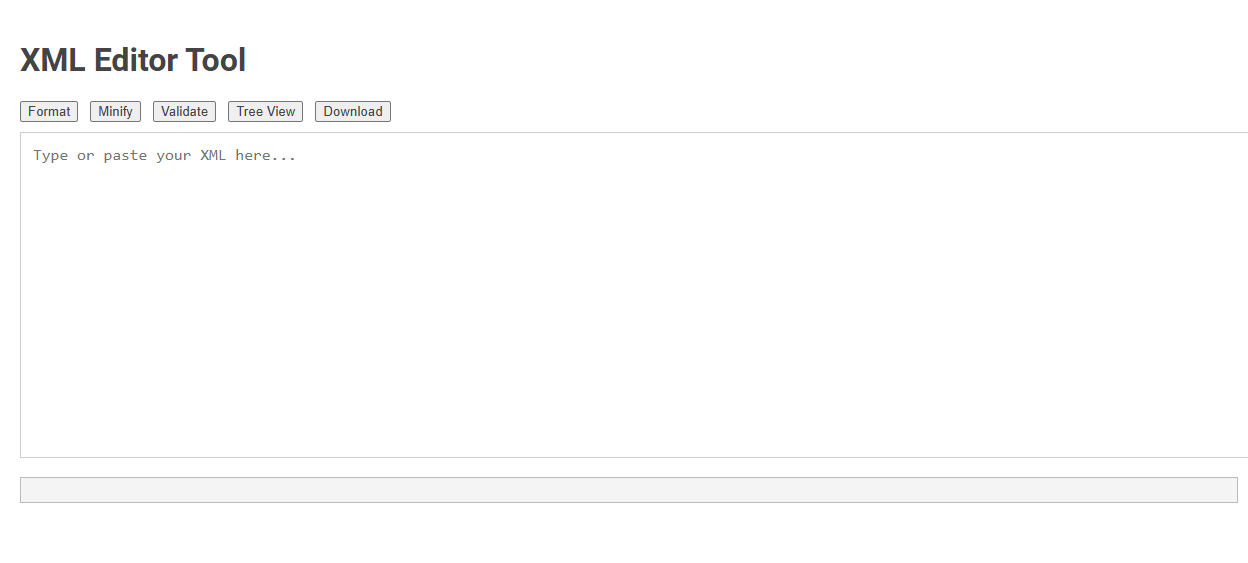
The XML Editor Tool is a web-based utility designed for creating, formatting, minifying, validating, and visualizing XML data. This tool simplifies XML editing by allowing users to easily check syntax, switch between text and tree view, and download their files, enhancing efficiency and reducing errors in XML management. Ideal for developers and data managers, its intuitive interface streamlines workflows involving XML document handling.
How to use this tool?
Complete Guide to Using the XML Editor Tool
-
Access the Tool:
Open the XML Editor Tool in your web browser. -
Input Your XML:
In the large text area labeled "Type or paste your XML here...", either type your XML code manually or paste it from another source. -
Format XML:
Click the Format button to automatically arrange your XML with proper indentation and readability. -
Minify XML:
Press the Minify button to compress your XML into a compact, single-line format, useful for reducing file size. -
Validate XML:
Hit the Validate button to check the syntax of your XML. Any errors or issues will be shown in the lower result area. -
Tree View:
Click the Tree View button to see your XML presented as an easy-to-read hierarchical structure, allowing you to visually inspect the data relationships. -
Download:
Once you are satisfied with your XML, click the Download button to save the final version of your XML file to your computer.
Tips:
- You can use the tool for both small and large XML files.
- If errors are shown during validation, double-check your tags and overall structure.
- Use "Format" before downloading to improve readability for future edits.
Introduction: Streamlining XML Workflow with an Online Editor
XML editors enhance productivity by providing intuitive interfaces to create, edit, and validate XML documents efficiently. Online XML editors streamline workflow by enabling real-time collaboration, instant syntax checking, and cloud-based access from any device. These tools reduce errors and save time, making XML management seamless for developers and content creators.
Key Features of the Free XML Editing Tool
The free XML editor offers syntax highlighting, schema validation, and real-time error detection to simplify your XML editing process. It supports multiple XML standards such as XPath, XSLT, and DTD, ensuring accurate data structuring. Your productivity is enhanced with features like auto-completion, drag-and-drop functionality, and customizable interface options.
Step-by-Step Guide: How to Access the XML Editor
Access the XML editor by opening your application and navigating to the "Tools" or "Developer" menu, where the XML editor option is typically located. Select the XML editor to launch the interface designed for editing and validating XML files efficiently. Your seamless access to the XML editor empowers precise data structuring and code management.
Efficient XML Input Methods for Fast Editing
Efficient XML input methods in XML editors streamline fast editing by incorporating syntax-aware autocomplete and tag suggestion features that reduce manual typing errors. Keyboard shortcuts and customizable templates accelerate the insertion of complex XML structures, enhancing productivity for developers. Real-time validation and error highlighting ensure accuracy throughout the editing process, minimizing the need for frequent corrections.
Formatting XML Instantly for Enhanced Readability
An XML editor enables instant formatting of XML files, transforming raw code into a clean, hierarchical structure for enhanced readability. Features like automatic indentation, color-coded syntax, and tag matching streamline the editing process and reduce errors. Optimized formatting tools improve data clarity, making XML easier to analyze and maintain across applications.
Minifying XML to Optimize File Size and Performance
Minifying XML reduces file size by removing unnecessary whitespace and comments, enhancing your website or application's load speed and performance. Efficient XML editors provide tools to automatically minify files while preserving data integrity. This optimization helps you streamline data transmission and improve overall system responsiveness.
Validating XML: Ensuring Syntax Accuracy Effortlessly
An XML editor with built-in validation features ensures syntax accuracy by automatically detecting errors and highlighting them in real-time. It supports well-formedness checks and schema validation against DTD or XSD, streamlining the editing process. These tools enable developers to maintain clean, error-free XML documents effortlessly, reducing debugging time and improving data integrity.
Exploring XML in Tree View for Better Data Visualization
Exploring XML in Tree View enhances data visualization by presenting hierarchical structures clearly and intuitively. XML editors with tree view capabilities enable users to navigate complex datasets efficiently, improving accuracy and understanding. This approach streamlines editing, validation, and management of XML files for developers and data professionals.
Downloading and Exporting Your Edited XML Files
Downloading and exporting your edited XML files is seamless with advanced XML editors, supporting formats like XML, JSON, and HTML for versatile use. These editors offer one-click export functions, ensuring your data maintains its structure and integrity during download. Compatibility with cloud storage services enables direct saving and sharing of your edited files, streamlining workflow efficiency.
XML editor Tool Preview