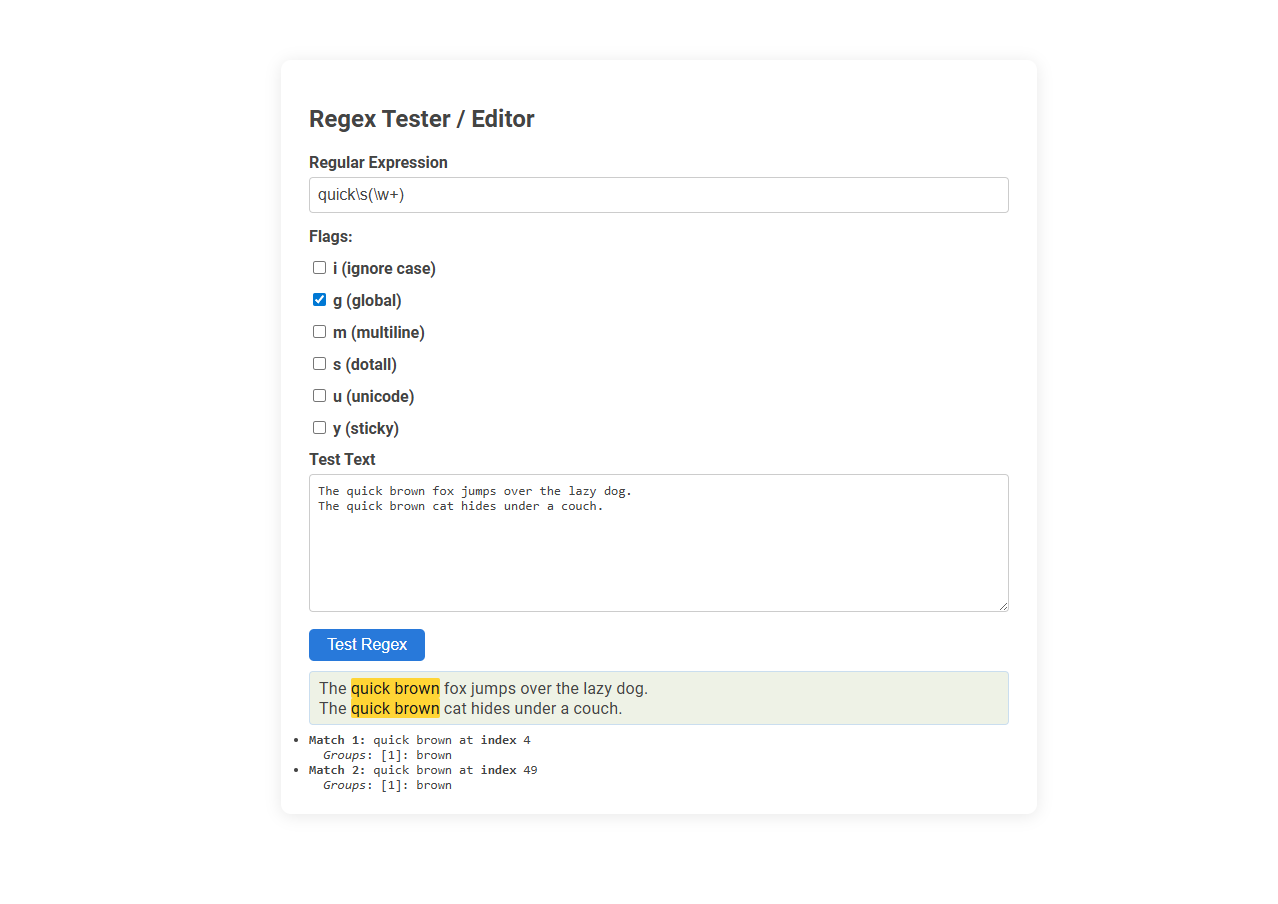
This Regex tester/editor tool allows users to create, validate, and debug regular expressions by providing instant feedback and match highlights on sample text. It is essential for developers and data professionals to efficiently test and refine complex pattern-matching logic before integrating regex into applications or scripts. The tool is used by inputting a regex pattern, setting desired flags, and entering test text to visualize matches and capture groups in real time.
How to use this tool?
Complete Guide to Using the Regex Tester/Editor Tool
-
Enter Regular Expression:
- In the "Regular Expression" input field, type or paste your regex pattern. Example:
quick\s(\w+)
- In the "Regular Expression" input field, type or paste your regex pattern. Example:
-
Select Flags:
- i (ignore case): Makes the regex case-insensitive.
- g (global): Finds all matches, not just the first.
- m (multiline): Changes the behavior of ^ and $ to match the start/end of each line.
- s (dotall): Allows the dot
.to match newlines. - u (unicode): Enables full Unicode matching.
- y (sticky): Matches only from the last index position.
- Check or uncheck these flags as needed for your regex test.
-
Input Test Text:
- In the "Test Text" area, type or paste the text you want to test your regular expression against.
- Example text is provided for reference:
The quick brown fox jumps over the lazy dog.
-
Test Regex:
- Click the Test Regex button.
- The tool will highlight matching patterns in the provided text.
-
View Results:
- Matches are shown highlighted within the test text.
- Below the test area, details of each match are listed:
- Match number and matched string with its index position.
- Any capturing groups (if used in regex) are shown under "Groups".
-
Adjust and Repeat:
- Edit the regular expression, flags, or test text as needed.
- Click Test Regex again to see updated results.
Tips
- Use capturing groups
()to extract specific parts. - Combine flags to tailor regex behavior to your needs.
- The results help debug and refine your expressions by showing matches and groups in context.
Introduction to Free Online Regex Tester/Editor
A Free Online Regex Tester/Editor allows you to create, test, and debug regular expressions efficiently without installing software. It supports various regex flavors and provides instant feedback on pattern matches within your input text. Your development process becomes faster and error-free by using this accessible, web-based tool.
Key Features of the Regex Testing Tool
A Regex tester/editor offers real-time pattern matching to quickly validate and debug regular expressions. It includes syntax highlighting, error detection, and detailed match information for efficient regex development. Advanced features often incorporate customizable flags, replacement testing, and support for multiple regex flavors to enhance versatility.
How to Enter and Edit Your Regular Expression
Entering and editing your regular expression in a Regex tester/editor starts by typing the desired pattern directly into the input field. Utilize syntax highlighting and real-time validation features to refine your expression and catch errors instantly. Save frequently to avoid data loss and test against sample text for accurate results.
Understanding and Setting Regex Flags
A Regex tester/editor allows users to experiment with patterns and immediately see matched results, enhancing the learning process. Understanding and setting regex flags such as 'i' for case-insensitive matching, 'g' for global searches, and 'm' for multiline mode is crucial for precise pattern control. These flags modify regex behavior, enabling tailored searches and efficient pattern testing across different text scenarios.
Adding and Modifying Test Text Samples
A Regex tester/editor streamlines adding and modifying test text samples by providing real-time input fields that instantly reflect pattern matches. Users can easily insert multiple sample texts, enabling comprehensive testing across diverse scenarios. Advanced editors support quick editing and management of these samples, enhancing regex accuracy and efficiency.
Interpreting Match Results and Output
A Regex tester/editor enables users to input patterns and test strings to interpret match results with precision. It highlights matched substrings, displays capturing groups, and provides detailed explanations of regex operations. Real-time output visualization simplifies debugging by clarifying which parts of the input conform to the regex pattern.
Extracting Data Using Capturing Groups
Regex testers/editors enable you to extract specific data by using capturing groups, which isolate and retrieve matched substrings from complex patterns. With tools like Regex101 or Sublime Text's regex engine, capturing groups simplify data parsing in logs, user inputs, or structured documents. Mastering capturing groups enhances your ability to efficiently extract and manipulate targeted information from large datasets.
Step-by-Step: Testing and Debugging Regex Patterns
A Regex tester/editor enables step-by-step testing and debugging of regex patterns by allowing users to input test strings and instantly view matching results. Interactive features highlight matched groups and pinpoint errors in real time, facilitating pattern refinement and accuracy. Tools like regex101 and RegexBuddy offer built-in explanations and match visualizations to streamline the debugging process.
Best Practices and Tips for Effective Regex Testing
A Regex tester/editor enables real-time pattern validation and debugging, enhancing accuracy in complex text searches. Best practices include crafting concise expressions, using test cases covering edge scenarios, and leveraging features like syntax highlighting and match visualization. Consistent testing minimizes errors and optimizes performance in applications relying on regular expressions.
Regex tester/editor Tool Preview