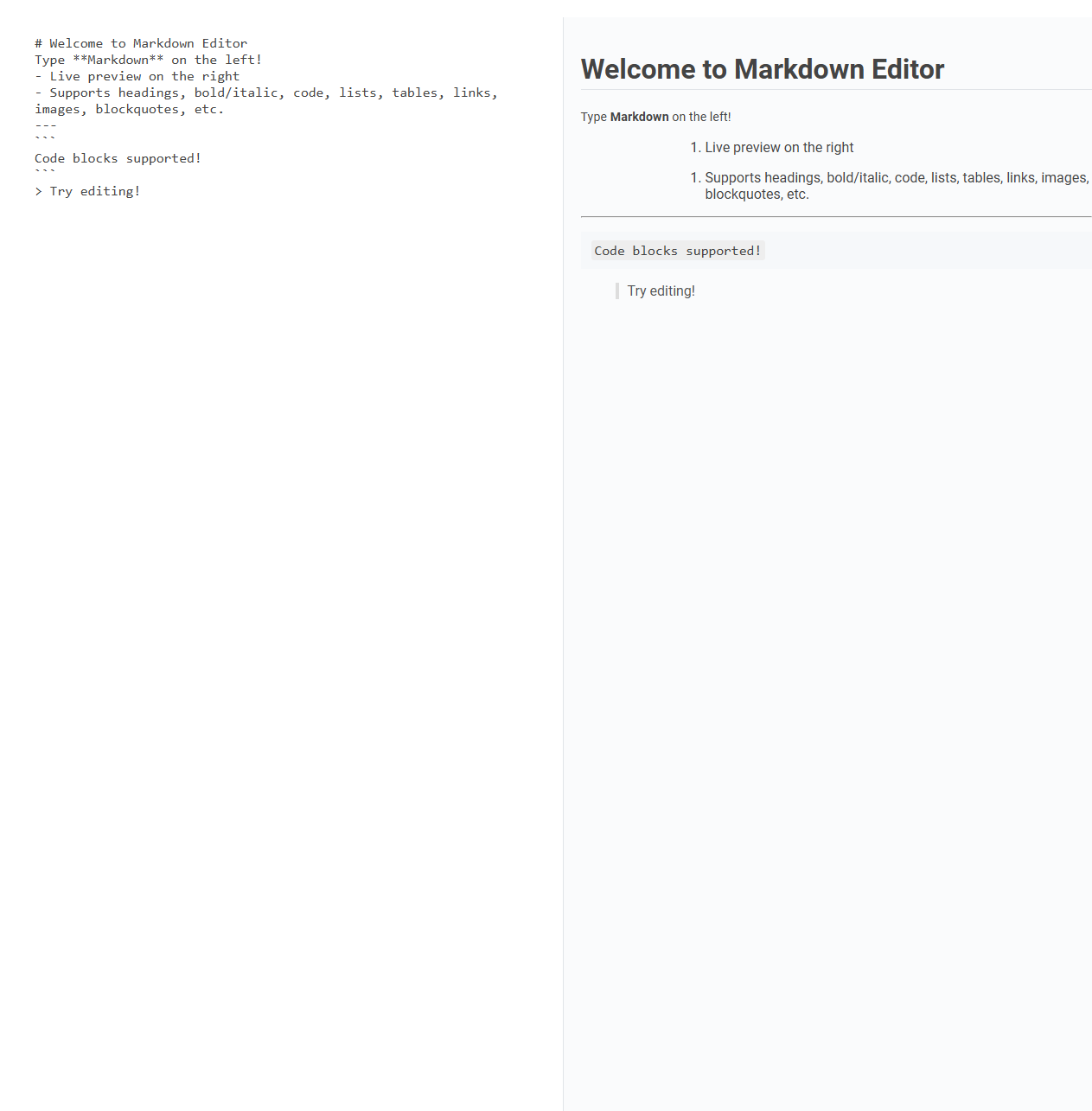
This Markdown editor tool enables users to write Markdown syntax on the left panel and view a live preview on the right, supporting headings, formatting, lists, links, images, tables, and code blocks. It is valuable for creating formatted documents efficiently without switching between writing and preview modes, streamlining content creation and editing workflows. Usage involves typing Markdown text in the editor and instantly seeing the rendered output, making formatting intuitive and immediate.
How to use this tool?
Complete Guide: How to Use the Markdown Editor Tool
-
Understand the Layout
- Left Panel: Write or paste your Markdown code here (supports headings, lists, bold, italic, links, tables, images, code blocks, etc.).
- Right Panel: See the real-time preview of your formatted content based on the Markdown you enter on the left.
-
Writing in Markdown
- Headings: Use
#for headings. Example:# Heading 1 - Bold:
bold text - Italic:
*italic text* - Lists:
- Unordered list:
- itemor* item - Ordered list:
1. item
- Unordered list:
- Code: Inline code with
`code`, code blocks with triple backticks``` - Links:
[link text](URL) - Images:
 - Blockquotes:
> quoted text - Tables:
| Header 1 | Header 2 |
|----------|----------|
| Row 1 | Data 1 |
| Row 2 | Data 2 |
- Headings: Use
-
Live Preview
- Everything you write or update on the left is instantly rendered on the right, letting you see your formatted output before you publish or export it.
-
Tips & Tricks
- Use the editor to experiment with Markdown syntax without worrying about formatting errors.
- Copy content from the preview panel or the Markdown code as needed.
- Click back into the left pane to keep editing and see changes live.
Example Workflow
- Start by typing
# Hello Worldin the left panel to see a big heading appear on the right. - Add a list like
- First itemand check the real-time preview. - Try formatting text, adding code blocks, and inserting links or images using their Markdown syntax.
Summary
This Markdown Editor tool is a simple, powerful way to write and preview Markdown-formatted content. Just type Markdown on the left and see your polished document on the right instantly!
Introduction to Effortless Markdown Editing
A Markdown editor simplifies text formatting by using plain text with easy-to-read symbols, enabling you to create well-structured documents quickly. This tool enhances productivity by converting your Markdown syntax into formatted HTML or PDF instantly. Effortless Markdown editing empowers your writing process, making content creation seamless and efficient.
Key Features of the Free Online Markdown Tool
The free online Markdown editor offers seamless real-time preview functionality, allowing you to see your formatting instantly. It supports a wide range of Markdown syntax, including headers, lists, links, and images, enhancing content creation flexibility. Your documents can be easily exported in multiple formats such as HTML and PDF for versatile sharing options.
Navigating the Markdown Editor Interface
Navigating the Markdown editor interface is intuitive and designed for efficiency, featuring a toolbar with essential formatting tools and a live preview pane to visualize your content in real time. You can easily switch between the editing and preview modes, allowing for seamless content creation and adjustment. The interface supports keyboard shortcuts to enhance productivity while maintaining a clean layout for focused writing.
Writing and Formatting Content in Markdown
A Markdown editor enables seamless writing and formatting of content using plain text syntax, enhancing readability and structure without complex code. Users can quickly apply headings, lists, links, and emphasis, streamlining the creation of well-organized documents. Support for live preview and export options boosts productivity for bloggers, developers, and content creators.
Real-Time Markdown Preview Experience
Experience seamless real-time Markdown preview with advanced editors like Typora and Mark Text, which render formatted text instantly as you type. These tools support synchronized scrolling and syntax highlighting, enhancing editing precision and efficiency. Boost your workflow by visualizing document structure immediately, eliminating the need to switch between editing and preview modes.
Essential Markdown Syntax Supported
A Markdown editor supports essential syntax like headings, bold and italic text, lists, links, and images to create structured and visually appealing documents. You can quickly format your content with simple symbols, making editing efficient and straightforward. This core functionality empowers your writing with clarity and ease across various platforms.
Tips for Productive Markdown Editing
Master productivity in Markdown editing by using keyboard shortcuts to format text swiftly and incorporating live preview features for real-time content visualization. Utilize templates and snippets to streamline repetitive tasks, enhancing your editing efficiency. Organizing content with headers and consistent syntax ensures clarity and ease of navigation in your documents.
Exporting and Copying Markdown Content
Markdown editors offer seamless exporting options, allowing users to save content in formats such as HTML, PDF, and plain text. Copying Markdown content preserves syntax integrity, enabling easy transfer to other platforms without loss of formatting. Robust export and copy features enhance workflow efficiency for developers, writers, and content creators.
Use Cases for the Markdown Editor Tool
Markdown editors streamline content creation for developers, bloggers, and technical writers by enabling quick formatting with plain text syntax. They enhance collaboration in project documentation and knowledge bases through easy-to-read and shareable markdown files. These tools also support seamless conversion to HTML, PDF, and other formats, improving publishing workflows across platforms.
Markdown editor Tool Preview