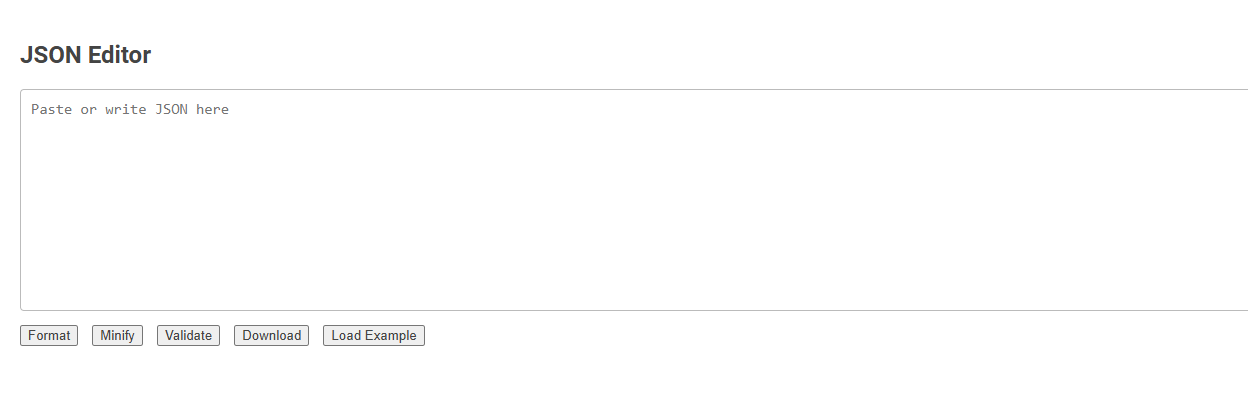
The JSON editor tool enables users to write, format, minify, validate, and download JSON data for efficient data management. It is essential for developers and data analysts who work with JSON-based APIs, ensuring error-free and properly structured data. Usage involves pasting or writing JSON, then utilizing buttons for formatting, minifying, validation, or downloading.
How to use this tool?
Complete Guide to Using the JSON Editor Tool
-
Overview
- This JSON editor tool allows you to write, paste, and manage JSON data efficiently. You can format, minify, validate, download, and load example JSON with just a click.
-
Starting with the Editor
- Paste or write your JSON code in the large text area labeled "Paste or write JSON here".
-
Understanding the Buttons
- Format: Beautifies your JSON, making it readable with proper indentation.
- Minify: Compresses your JSON into a single line, removing all unnecessary spaces for compact storage or transfer.
- Validate: Checks your JSON for errors and ensures the syntax is correct. You'll receive feedback if there are issues.
- Download: Allows you to save the JSON you've written to your computer as a .json file.
- Load Example: Inserts a sample JSON into the editor, which is helpful for practice or demonstration.
-
Step-by-Step Usage
- Input JSON: Enter your JSON directly or paste copied JSON into the editor area.
- Format: Click "Format" if you want to make your JSON easier to read.
- Minify: Click "Minify" if you need a compact version (useful for APIs, storage, or minimizing file size).
- Validate: Click "Validate" to check if the JSON syntax is correct. Read any error messages carefully and fix mistakes in the editor.
- Download: Click "Download" to save your work as a JSON file to your device.
- Load Example: Click this if you want to see a sample JSON structure for reference or testing.
-
Tips
- Always validate your JSON before downloading or using it in applications to avoid syntax errors.
- Use the "Format" button to quickly spot and fix structural issues in large or complex JSON documents.
- Pair this tool with an external JSON schema validator if you have specific schema requirements.
Introduction to Free Online JSON Editing Tools
Free online JSON editing tools provide a user-friendly interface for creating, editing, and validating JSON data without the need for software installation. These tools support syntax highlighting, error detection, and real-time formatting to enhance productivity for developers working with APIs, configuration files, and data interchange formats. Popular options include JSON Editor Online, JSON Formatter & Validator, and CodeBeautify JSON Editor, offering seamless cloud-based access for efficient JSON management.
Key Features of the Effortless JSON Editor
Effortless JSON Editor offers intuitive syntax highlighting and real-time validation to streamline JSON data management. It supports auto-completion, error detection, and easy formatting for enhanced efficiency. The editor also includes multi-platform compatibility and seamless integration with popular development environments.
Simple Steps to Start Editing JSON
JSON editors simplify data management by allowing users to load JSON files and immediately view structured content. Begin by opening your JSON editor, then import or paste your JSON code to see a formatted, editable layout. Use the editor's intuitive interface to modify keys and values efficiently, and save your changes seamlessly for application integration.
How to Format JSON for Readability
Formatting JSON for readability involves adding appropriate indentation and line breaks to structure the data clearly. You can use tools like online JSON editors or code editors with built-in formatting features to automatically organize your JSON. Properly formatted JSON enhances readability and makes debugging much easier.
JSON Minification: Compact Your Data Instantly
JSON editor tools enable seamless JSON minification, reducing file size by removing whitespace and unnecessary characters. This process optimizes data storage and accelerates transmission across networks. Efficient JSON minification ensures faster parsing and improved performance in web applications and APIs.
Real-Time JSON Validation and Error Checking
JSON editor with real-time JSON validation and error checking instantly detects syntax errors and invalid structures as you type. It highlights mistakes directly in the code, enabling quick corrections and ensuring data integrity. This feature reduces debugging time and improves productivity during JSON editing tasks.
Downloading and Saving Your JSON Files Online
Downloading and saving your JSON files online is streamlined with advanced JSON editors that support cloud integration. These editors enable real-time saving to platforms like Google Drive, Dropbox, or custom cloud storage, ensuring your data is securely backed up. Immediate download options in formats such as .json or .txt facilitate quick access and offline use.
Exploring Example JSON for Easy Learning
Exploring example JSON files in a JSON editor helps users understand complex data structures through hands-on practice. Interactive features like syntax highlighting and real-time validation make learning intuitive and error-free. Access to diverse sample JSON datasets accelerates skill development for developers, analysts, and students.
Best Practices for Accurate JSON Management
Using a reliable JSON editor ensures your data remains well-structured and error-free. Implement schema validation to maintain consistency and prevent syntax mistakes. You can improve accuracy by regularly testing and formatting your JSON to align with industry standards.
JSON editor Tool Preview