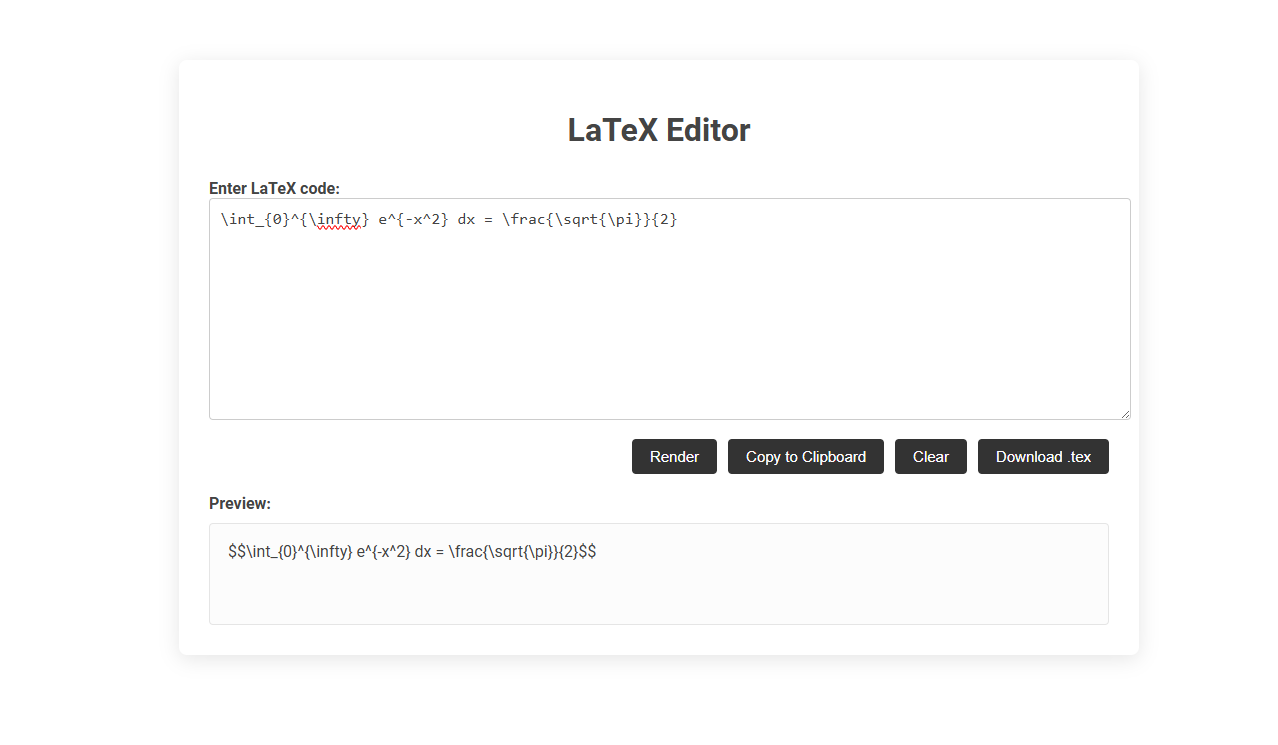
LaTeX Editor is a tool designed for writing, rendering, and previewing LaTeX code, which is widely used for creating mathematical expressions and scientific documents. It streamlines document preparation by allowing users to enter LaTeX code, render visual outputs instantly, copy to clipboard, or download the code as a .tex file. This tool is essential for students, researchers, and professionals who require precise mathematical formatting and document control.
How to use this tool?
Complete Guide: How to Use the LaTeX Editor Tool
-
Enter LaTeX Code:
Click inside the large text box labeled "Enter LaTeX code." Type or paste your LaTeX code (e.g.,\int_{0}^{\infty} e^{-x^2} dx = \frac{\sqrt{\pi}}{2}). Edit your math or scientific expressions here. -
Render Your LaTeX:
After entering your code, click the Render button. This will process your LaTeX and display a formatted preview of your expression below in the "Preview" section. -
Preview Section:
View your rendered LaTeX code in the preview panel. This area shows what your code will look like once formatted. -
Copy to Clipboard:
If you're satisfied with your code, click the Copy to Clipboard button. This copies your current LaTeX code so you can paste it wherever you need. -
Clear:
Click the Clear button to erase all LaTeX code from the editor, allowing you to start fresh. -
Download as .tex:
To save your work as a LaTeX file, click the Download .tex button. This will download your input as a .tex file for use in LaTeX editors or sharing.
Tips
- Use proper LaTeX syntax for best results.
- The preview helps you spot errors before saving or copying your code.
- Common LaTeX commands:
\frac{}{}, \sqrt{}, \sum, \int, ^, _etc.
Top Free Online LaTeX Editors for Effortless Collaboration
Top free online LaTeX editors like Overleaf, ShareLaTeX, and Papeeria enable seamless real-time collaboration with integrated version control and cloud storage. These platforms support multi-user editing, customizable templates, and direct publishing to academic journals or repositories. Choose a LaTeX editor that combines ease of use with powerful collaboration tools to streamline your research and document creation process.
Key Features to Expect from Free LaTeX Editing Tools
Free LaTeX editors offer essential features such as syntax highlighting, real-time preview, and error checking to enhance document preparation efficiency. Many tools include integrated PDF viewers, customizable templates, and collaboration support enabling seamless teamwork. Users can also benefit from auto-completion, code folding, and cross-referencing capabilities that streamline academic and scientific writing.
Seamless Real-Time Collaboration: Why It Matters in LaTeX
Seamless real-time collaboration in a LaTeX editor enhances productivity by allowing multiple users to edit complex documents simultaneously without conflicts. This feature ensures your academic papers, technical reports, or research projects stay consistent and error-free throughout the writing process. Effective collaboration tools reduce version control issues and streamline feedback, crucial for timely project completion.
How to Get Started with an Online LaTeX Editor
Getting started with an online LaTeX editor involves selecting a platform such as Overleaf or ShareLaTeX, which offer user-friendly interfaces and collaborative features. Create a free account, choose a template or start a blank project, and begin typing your LaTeX code with real-time preview and error checking. You can easily share your document with others and access your work from any device connected to the internet.
Step-by-Step: Creating and Sharing Your LaTeX Documents Online
Creating and sharing LaTeX documents online begins with selecting a web-based LaTeX editor such as Overleaf, which offers collaborative editing and real-time preview features. Start by setting up your project, inputting your LaTeX code, and using templates to streamline document formatting. Once your document is complete, share it via a unique URL or export it as PDF for easy distribution and collaboration.
Comparing Popular Free LaTeX Editors: Pros & Cons
Popular free LaTeX editors include TeXstudio, Overleaf, and TeXworks, each offering unique advantages. TeXstudio provides comprehensive features and offline access but has a steeper learning curve, while Overleaf excels in collaborative online editing without installation requirements but depends on internet connectivity. TeXworks is lightweight and user-friendly for beginners but lacks some advanced functionalities found in other editors.
Tips for Smooth Collaborative Editing in Online LaTeX Tools
Efficient collaborative editing in online LaTeX tools requires real-time synchronization and conflict resolution features to ensure seamless teamwork. Utilizing version control systems like Git integrated within platforms such as Overleaf enhances document tracking and rollback capabilities. Clear communication through built-in commenting and chat functions minimizes editing overlaps and maintains project coherence.
Exporting, Downloading, and Backing Up Your LaTeX Files
Exporting your LaTeX files to PDF or other formats ensures compatibility with various platforms and ease of sharing. Downloading the source files allows offline access and further editing in different LaTeX editors. Regularly backing up your LaTeX projects protects your work from data loss and supports version control.
Best Practices for Writing and Formatting in Online LaTeX Editors
Online LaTeX editors like Overleaf streamline collaborative writing by enabling real-time edits and version control. Best practices include organizing code with clear comments, consistent indentation, and modular file structures for maintainability. Utilize built-in templates and compilation tools to ensure accurate formatting and reduce syntax errors.
LaTeX editor Tool Preview